Wiz
Port's Wiz integration allows you to model Wiz resources in your software catalog and ingest data into them.
Overview
This integration allows you to:
- Map and organize your desired Wiz resources and their metadata in Port (see supported resources below).
- Watch for Wiz object changes (create/update/delete) in real-time, and automatically apply the changes to your entities in Port.
Supported resources
The resources that can be ingested from Wiz into Port are listed below.
It is possible to reference any field that appears in the API responses of the GET requests for these resources in the mapping configuration.
Note that Wiz's API documentation is restricted to the authenticated Wiz Documentation Portal, which requires a Wiz account to access.
ProjectIssueControlService ticketVulnerabilityRepositoryTechnologyHosted technology
Prerequisites
Port Credentials
To get your Port credentials, go to your Port application, click on the ... button in the top right corner, and select Credentials. Here you can view and copy your CLIENT_ID and CLIENT_SECRET:

Wiz Credentials
You need the following connection details to configure Wiz:
- Wiz API URL (API Endpoint URL)
- Wiz Token URL
- Client ID and Client Secret
There are two possible endpoints depending on your service account's identity provider:
- Amazon Cognito: https://auth.app.wiz.io/oauth/token
- Auth0: https://auth.wiz.io/oauth/token
Learn more here.
- Finding Your Wiz API URL:
- Login to Wiz account.
- Click the User Profile icon available at the top right of the screen and click the User Settings option.
- Click the Tenant option from the left options menu.
- The system displays the API Endpoint URL.
- Copy and save the API URL to use while configuring the Wiz integration.
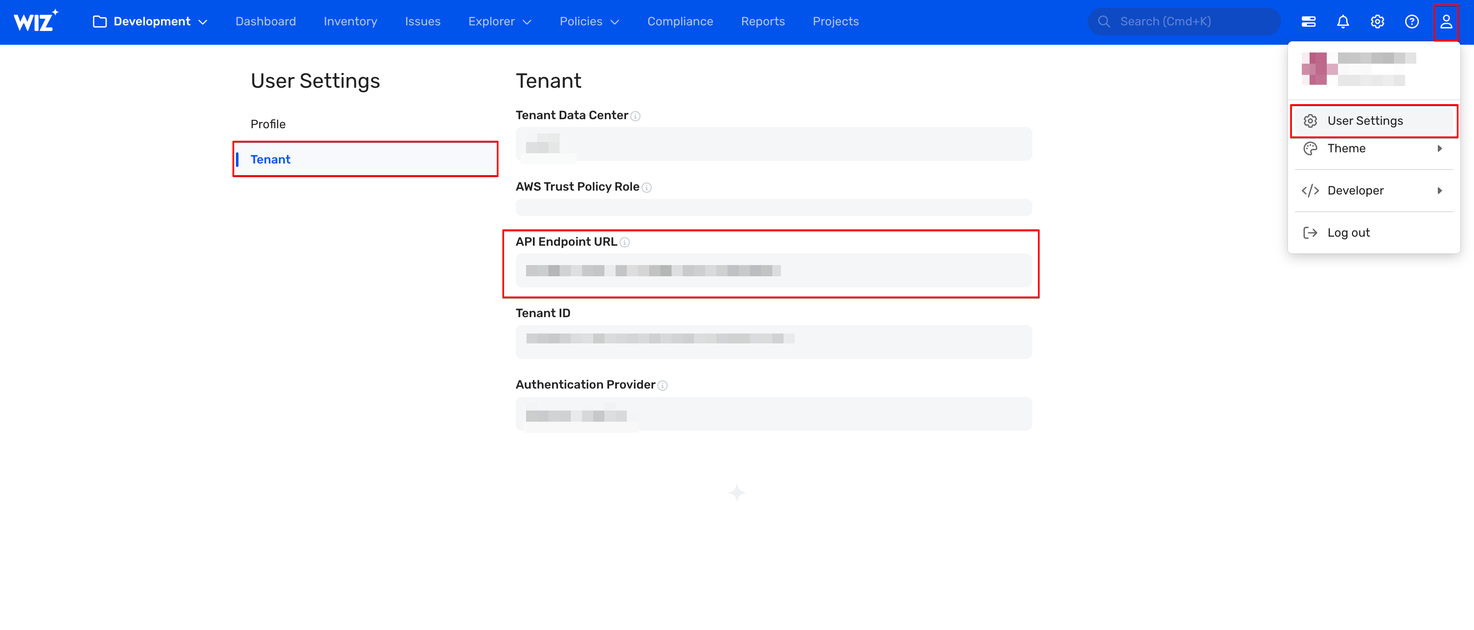
For more details, refer to the documentation
- Getting the Client ID and Client Secret
You must create a service account in Wiz to generate the Client ID and Client Secret. Follow the below steps to get the Client ID and Client Secret:
- Login to Wiz with the Project Admin role.
- Click the Settings icon available at the top-right of the page.
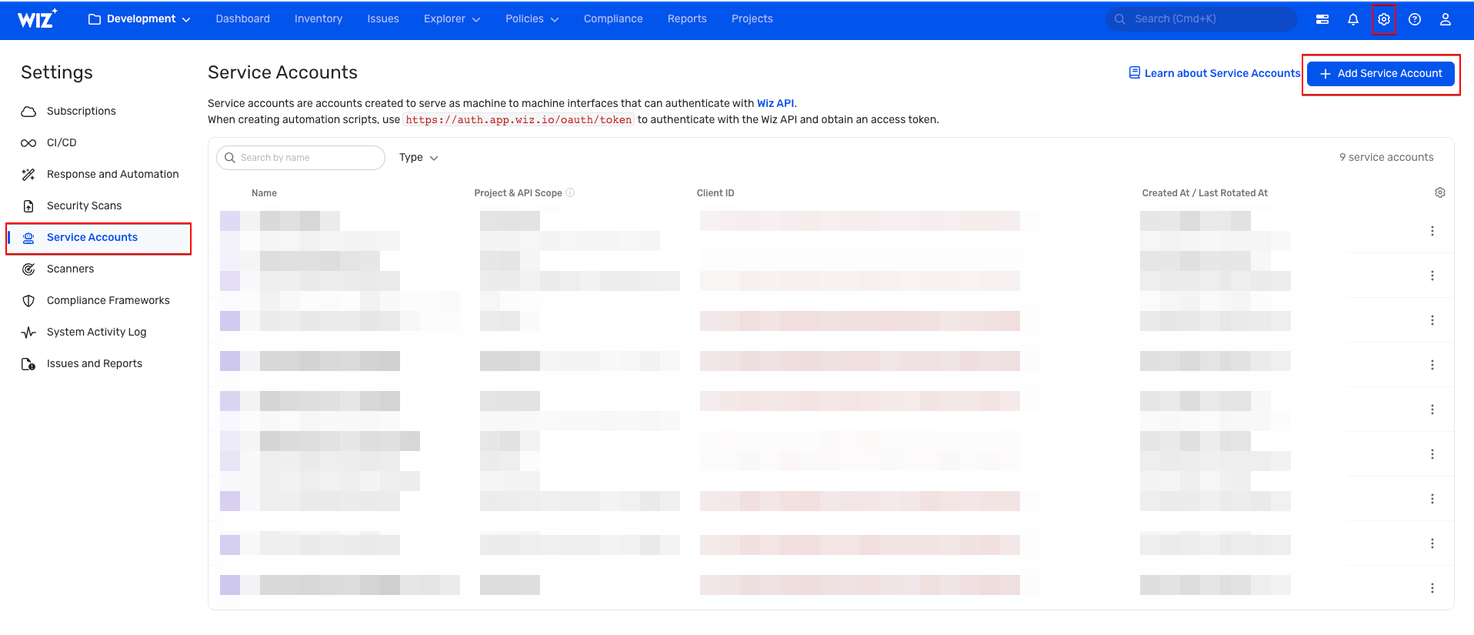
- On the Settings page, Click Service Accounts from the left menu.
- Create a Service Account:
- Click Add Service Account.
- Provide a descriptive Service Account Name.
- Type: Select Custom Integration (GraphQL API).
- Project: Choose the relevant project(s).
- API Scopes: Select only the
read:projects,read:issues,read:vulnerabilitiesandread:inventorypermissions. - Click Add Service Account at the bottom of the page to save.
- Retrieve Credentials: Wiz will display your Client ID and Client Secret.
- Save Credentials: Copy and store them securely for use in Port.
Setup
Choose one of the following installation methods:
Not sure which method is right for your use case? Check the available installation methods.
- Hosted by Port
- Self-hosted
- CI
-
Go to the data source page in your portal.
-
Under
Select your installation method, chooseHosted by Port. -
Configure the
Installation parametersandAdvanced configurationas you wish (see below for details).
Installation parameters
Each integration requires specific parameters (such as an API token, a URL, etc.), as seen in Port's UI when installing it. Hover over the ⓘ icon next to each parameter to see more details about it.
Advanced configuration
-
During the installation process each integration may have additional settings under the
Advanced configurationsection in Port's UI.
Additionally, each integration has one or more settings that can be configured after installation. To do so, click on the integration's name in the Data sources page and navigate to theSettingtab.
Hover over the ⓘ icon next to each setting to see more details about it. -
If the integration supports live events, the option to enable/disable them will be available in this section.
Currently, live events are not supported for this integration.
Resyncs will be performed periodically (with a configurable interval), or manually triggered by you via Port's UI.Therefore, real-time events (including GitOps) will not be ingested into Port immediately.
Live events support for this integration is WIP and will be supported in the near future.
Port secrets
Some integration settings require sensitive pieces of data, such as tokens. For these settings, Port secrets will be used, ensuring that your sensitive data is encrypted and secure.
When filling in such a setting, its value will be obscured (shown as ••••••••).
For each such setting, Port will automatically create a secret in your organization.
To see all secrets in your organization, follow these steps.
Port source IP addresses
When using this installation method, Port will make outbound calls to your 3rd-party applications from static IP addresses. You may need to add these addresses to your allowlist, in order to allow Port to interact with the integrated service:
- Europe (EU):
54.73.167.226,63.33.143.237,54.76.185.219 - United States (US):
3.234.37.33,54.225.172.136,3.225.234.99
Using this installation option means that the integration will be able to update Port in real time using webhooks.
Prerequisites
-
A Kubernetes cluster - the integration's container chart will be deployed to this cluster.
-
kubectlandhelmmust be installed on your machine. YourkubectlCLI must be connected to the Kubernetes cluster where you plan to install the integration.
For details about the available parameters for the installation, see the table below.
- Helm
- ArgoCD
-
Go to the Wiz data source page in your portal.
-
Select the
Self-hostedmethod. -
A
helmcommand will be displayed, with default values already filled out (e.g. your Port client ID, client secret, etc). Copy the command, replace the placeholders with your values, then run it in your terminal to install the integration.
BaseUrl & webhook configuration
To enable real-time updates of the data in your software catalog, you need to define the liveEvents.baseUrl parameter.
This parameter should be set to the URL of your Wiz integration instance, which needs to have the option to setup webhooks via HTTP requests/receive HTTP requests, so ensure the network is configured accordingly.
- If Wiz and the integration are in the same cluster/network: Use an internal URL (e.g., a Kubernetes service DNS name).
For Kubernetes deployments, create a service to expose the integration pod and use the service URL asliveEvents.baseUrl. If both the source system and integration are in the same cluster, an internal ClusterIP service is sufficient. - If Wiz is external to the integration's network: The integration must be exposed via an ingress, load balancer, or public URL that Wiz can reach.
If liveEvents.baseUrl is not provided, the integration will continue to function correctly. In such a configuration, to retrieve the latest information from the target system, the scheduledResyncInterval parameter has to be set, or a manual resync will need to be triggered through Port's UI.
To test webhooks or live event delivery to your local environment, expose your local pod or service to the internet using ngrok (e.g. ngrok http http://localhost:8000)
Scalable mode for large integrations
If you are deploying the integration at scale and want to decouple the resync process from the live events process (recommended for large or high-throughput environments), you can enable scalable mode by adding the following flags to your Helm install command:
--set workload.kind="CronJob" \
--set workload.cron.resyncTimeoutMinutes=60 \
--set scheduledResyncInterval="'*/60 * * * *'" \
--set liveEvents.worker.enabled=true
The port_region, port.baseUrl, portBaseUrl, port_base_url and OCEAN__PORT__BASE_URL parameters select which Port API instance to use:
- EU (app.port.io) →
https://api.port.io - US (app.us.port.io) →
https://api.us.port.io
To install the integration using ArgoCD:
- Create a
values.yamlfile inargocd/my-ocean-wiz-integrationin your git repository with the content:
Remember to replace the placeholders for WIZ_CLIENT_ID, WIZ_CLIENT_SECRET, WIZ_API_URL and WIZ_TOKEN_URL.
initializePortResources: true
scheduledResyncInterval: 120
integration:
identifier: my-ocean-wiz-integration
type: wiz
eventListener:
type: POLLING
config:
wizApiUrl: WIZ_API_URL
wizTokenUrl: WIZ_TOKEN_URL
secrets:
wizClientId: WIZ_CLIENT_ID
wizClientSecret: WIZ_CLIENT_SECRET
- Install the
my-ocean-wiz-integrationArgoCD Application by creating the followingmy-ocean-wiz-integration.yamlmanifest:
Remember to replace the placeholders for YOUR_PORT_CLIENT_ID YOUR_PORT_CLIENT_SECRET and YOUR_GIT_REPO_URL.
Multiple sources ArgoCD documentation can be found here.
ArgoCD Application
apiVersion: argoproj.io/v1alpha1
kind: Application
metadata:
name: my-ocean-wiz-integration
namespace: argocd
spec:
destination:
namespace: my-ocean-wiz-integration
server: https://kubernetes.default.svc
project: default
sources:
- repoURL: 'https://port-labs.github.io/helm-charts/'
chart: port-ocean
targetRevision: 0.9.5
helm:
valueFiles:
- $values/argocd/my-ocean-wiz-integration/values.yaml
parameters:
- name: port.clientId
value: YOUR_PORT_CLIENT_ID
- name: port.clientSecret
value: YOUR_PORT_CLIENT_SECRET
- name: port.baseUrl
value: https://api.port.io
- repoURL: YOUR_GIT_REPO_URL
targetRevision: main
ref: values
syncPolicy:
automated:
prune: true
selfHeal: true
syncOptions:
- CreateNamespace=true
- Apply your application manifest with
kubectl:
kubectl apply -f my-ocean-wiz-integration.yaml
This table summarizes the available parameters for the installation. Note the parameters specific to this integration, they are last in the table.
| Parameter | Description | Required |
|---|---|---|
port.clientId | Your port client id (Get the credentials) | ✅ |
port.clientSecret | Your port client secret (Get the credentials) | ✅ |
port.baseUrl | Your Port API URL - https://api.port.io for EU, https://api.us.port.io for US | ✅ |
integration.identifier | Change the identifier to describe your integration | ✅ |
integration.type | The integration type | ✅ |
integration.config.appHost | The host of the Port Ocean app. Used to set up the integration endpoint as the target for Webhooks created in Wiz | ✅ |
integration.eventListener.type | The event listener type | ✅ |
scheduledResyncInterval | The number of minutes between each resync | ❌ |
initializePortResources | Default true, When set to true the integration will create default blueprints and the port App config Mapping | ❌ |
sendRawDataExamples | Enable sending raw data examples from the third party API to port for testing and managing the integration mapping. Default is true | ❌ |
integration.secrets.wizClientId | The Wiz Client ID | ✅ |
integration.secrets.wizClientSecret | The Wiz Client Secret | ✅ |
integration.config.wizApiUrl | The Wiz API URL. | ✅ |
integration.config.wizTokenUrl | The Wiz Token Authentication URL | ✅ |
integration.secret.wizWebhookVerificationToken | This is a password you create, that is used to verify webhook events to Port | ❌ |
For advanced configuration such as proxies or self-signed certificates, click here.
Recommended resource sizes
To ensure optimal performance and avoid out-of-memory (OOM) errors, we recommend the following resources for this integration:
- CPU Limit:
800m - CPU Request:
100m - Memory Limit:
1Gi - Memory Request:
1Gi
Set resource values
helm install my-integration port-labs/port-ocean \
# ... other parameters
--set ocean.resources.limits.cpu=800m \
--set ocean.resources.limits.memory=1Gi \
--set ocean.resources.requests.cpu=100m \
--set ocean.resources.requests.memory=1Gi
This workflow/pipeline will run the Wiz integration once and then exit, this is useful for scheduled ingestion of data.
- GitHub
- Jenkins
- Azure Devops
- GitLab
Make sure to configure the following Github Secrets:
| Parameter | Description | Required |
|---|---|---|
OCEAN__INTEGRATION__CONFIG__WIZ_CLIENT_ID | The Wiz Client ID token | ✅ |
OCEAN__INTEGRATION__CONFIG__WIZ_CLIENT_SECRET | The Wiz Client Secret | ✅ |
OCEAN__INTEGRATION__CONFIG__WIZ_API_URL | The Wiz API URL e.g. https://api.us17.app.wiz.io/graphql | ✅ |
OCEAN__INTEGRATION__CONFIG__WIZ_TOKEN_URL | The Wiz Token URL e.g. https://auth.app.wiz.io/oauth/token | ✅ |
OCEAN__INTEGRATION__CONFIG__WIZ_WEBHOOK_VERIFICATION_TOKEN | The token used to verify webhook requests into Port. | ❌ |
OCEAN__INITIALIZE_PORT_RESOURCES | Default true, When set to false the integration will not create default blueprints and the port App config Mapping | ❌ |
OCEAN__SEND_RAW_DATA_EXAMPLES | Enable sending raw data examples from the third party API to port for testing and managing the integration mapping. Default is true | ❌ |
OCEAN__INTEGRATION__IDENTIFIER | Provide a unique identifier for your integration. If not provided, the default identifier will be used. | ❌ |
OCEAN__PORT__CLIENT_ID | Your port client id (Get the credentials) | ✅ |
OCEAN__PORT__CLIENT_SECRET | Your port client secret (Get the credentials) | ✅ |
OCEAN__PORT__BASE_URL | Your Port API URL - https://api.port.io for EU, https://api.us.port.io for US | ✅ |
Here is an example for wiz-integration.yml workflow file:
name: Wiz Exporter Workflow
on:
workflow_dispatch:
schedule:
- cron: '0 */1 * * *' # Determines the scheduled interval for this workflow. This example runs every hour.
jobs:
run-integration:
runs-on: ubuntu-latest
timeout-minutes: 30 # Set a time limit for the job
steps:
- uses: port-labs/ocean-sail@v1
with:
type: 'wiz'
port_client_id: ${{ secrets.OCEAN__PORT__CLIENT_ID }}
port_client_secret: ${{ secrets.OCEAN__PORT__CLIENT_SECRET }}
port_base_url: https://api.port.io
config: |
wiz_client_id: ${{ secrets.OCEAN__INTEGRATION__CONFIG__WIZ_CLIENT_ID }}
wiz_client_secret: ${{ secrets.OCEAN__INTEGRATION__CONFIG__WIZ_CLIENT_SECRET }}
wiz_api_url: ${{ secrets.OCEAN__INTEGRATION__CONFIG__WIZ_API_URL }}
wiz_token_url: ${{ secrets.OCEAN__INTEGRATION__CONFIG__WIZ_TOKEN_URL }}
Your Jenkins agent should be able to run docker commands.
Make sure to configure the following Jenkins Credentials
of Secret Text type:
| Parameter | Description | Required |
|---|---|---|
OCEAN__INTEGRATION__CONFIG__WIZ_CLIENT_ID | The Wiz Client ID token | ✅ |
OCEAN__INTEGRATION__CONFIG__WIZ_CLIENT_SECRET | The Wiz Client Secret | ✅ |
OCEAN__INTEGRATION__CONFIG__WIZ_API_URL | The Wiz API URL e.g. https://api.us17.app.wiz.io/graphql | ✅ |
OCEAN__INTEGRATION__CONFIG__WIZ_TOKEN_URL | The Wiz Token URL e.g. https://auth.app.wiz.io/oauth/token | ✅ |
OCEAN__INTEGRATION__CONFIG__WIZ_WEBHOOK_VERIFICATION_TOKEN | The token used to verify webhook requests into Port. | ❌ |
OCEAN__INITIALIZE_PORT_RESOURCES | Default true, When set to false the integration will not create default blueprints and the port App config Mapping | ❌ |
OCEAN__SEND_RAW_DATA_EXAMPLES | Enable sending raw data examples from the third party API to port for testing and managing the integration mapping. Default is true | ❌ |
OCEAN__INTEGRATION__IDENTIFIER | Provide a unique identifier for your integration. If not provided, the default identifier will be used. | ❌ |
OCEAN__PORT__CLIENT_ID | Your port client id (Get the credentials) | ✅ |
OCEAN__PORT__CLIENT_SECRET | Your port client secret (Get the credentials) | ✅ |
OCEAN__PORT__BASE_URL | Your Port API URL - https://api.port.io for EU, https://api.us.port.io for US | ✅ |
Here is an example for Jenkinsfile groovy pipeline file:
pipeline {
agent any
stages {
stage('Run Wiz Integration') {
steps {
script {
withCredentials([
string(credentialsId: 'OCEAN__INTEGRATION__CONFIG__WIZ_CLIENT_ID', variable: 'OCEAN__INTEGRATION__CONFIG__WIZ_CLIENT_ID'),
string(credentialsId: 'OCEAN__INTEGRATION__CONFIG__WIZ_CLIENT_SECRET', variable: 'OCEAN__INTEGRATION__CONFIG__WIZ_CLIENT_SECRET'),
string(credentialsId: 'OCEAN__INTEGRATION__CONFIG__WIZ_API_URL', variable: 'OCEAN__INTEGRATION__CONFIG__WIZ_API_URL'),
string(credentialsId: 'OCEAN__INTEGRATION__CONFIG__WIZ_TOKEN_URL', variable: 'OCEAN__INTEGRATION__CONFIG__WIZ_TOKEN_URL'),
string(credentialsId: 'OCEAN__PORT__CLIENT_ID', variable: 'OCEAN__PORT__CLIENT_ID'),
string(credentialsId: 'OCEAN__PORT__CLIENT_SECRET', variable: 'OCEAN__PORT__CLIENT_SECRET'),
]) {
sh('''
#Set Docker image and run the container
integration_type="wiz"
version="latest"
image_name="ghcr.io/port-labs/port-ocean-${integration_type}:${version}"
docker run -i --rm --platform=linux/amd64 \
-e OCEAN__EVENT_LISTENER='{"type":"ONCE"}' \
-e OCEAN__INITIALIZE_PORT_RESOURCES=true \
-e OCEAN__SEND_RAW_DATA_EXAMPLES=true \
-e OCEAN__INTEGRATION__CONFIG__WIZ_CLIENT_ID=$OCEAN__INTEGRATION__CONFIG__WIZ_CLIENT_ID \
-e OCEAN__INTEGRATION__CONFIG__WIZ_CLIENT_SECRET=$OCEAN__INTEGRATION__CONFIG__WIZ_CLIENT_SECRET \
-e OCEAN__INTEGRATION__CONFIG__WIZ_API_URL=$OCEAN__INTEGRATION__CONFIG__WIZ_API_URL \
-e OCEAN__INTEGRATION__CONFIG__WIZ_TOKEN_URL=$OCEAN__INTEGRATION__CONFIG__WIZ_TOKEN_URL \
-e OCEAN__PORT__CLIENT_ID=$OCEAN__PORT__CLIENT_ID \
-e OCEAN__PORT__CLIENT_SECRET=$OCEAN__PORT__CLIENT_SECRET \
-e OCEAN__PORT__BASE_URL='https://api.port.io' \
$image_name
exit $?
''')
}
}
}
}
}
}
Prerequisites
- Your Azure Devops agent should be able to run docker commands. Learn more about agents here.
- You must have permissions to create and manage Azure DevOps variable groups for storing credentials.
Set up your credentials
- Create a Variable Group: Name it port-ocean-credentials.
- Store the required variables (see the table below).
- Authorize Your Pipeline:
-
Go to "Library" -> "Variable groups."
-
Find port-ocean-credentials and click on it.
-
Select "Pipeline Permissions" and add your pipeline to the authorized list.
-
| Parameter | Description | Required |
|---|---|---|
OCEAN__INTEGRATION__CONFIG__WIZ_CLIENT_ID | The Wiz Client ID token | ✅ |
OCEAN__INTEGRATION__CONFIG__WIZ_CLIENT_SECRET | The Wiz Client Secret | ✅ |
OCEAN__INTEGRATION__CONFIG__WIZ_API_URL | The Wiz API URL e.g. https://api.us17.app.wiz.io/graphql | ✅ |
OCEAN__INTEGRATION__CONFIG__WIZ_TOKEN_URL | The Wiz Token URL e.g. https://auth.app.wiz.io/oauth/token | ✅ |
OCEAN__INTEGRATION__CONFIG__WIZ_WEBHOOK_VERIFICATION_TOKEN | The token used to verify webhook requests into Port. | ❌ |
OCEAN__INITIALIZE_PORT_RESOURCES | Default true, When set to false the integration will not create default blueprints and the port App config Mapping | ❌ |
OCEAN__SEND_RAW_DATA_EXAMPLES | Enable sending raw data examples from the third party API to port for testing and managing the integration mapping. Default is true | ❌ |
OCEAN__INTEGRATION__IDENTIFIER | Provide a unique identifier for your integration. If not provided, the default identifier will be used. | ❌ |
OCEAN__PORT__CLIENT_ID | Your port client id (Get the credentials) | ✅ |
OCEAN__PORT__CLIENT_SECRET | Your port client secret (Get the credentials) | ✅ |
OCEAN__PORT__BASE_URL | Your Port API URL - https://api.port.io for EU, https://api.us.port.io for US | ✅ |
Here is an example for wiz-integration.yml pipeline file:
trigger:
- main
pool:
vmImage: "ubuntu-latest"
variables:
- group: port-ocean-credentials
steps:
- script: |
# Set Docker image and run the container
integration_type="wiz"
version="latest"
image_name="ghcr.io/port-labs/port-ocean-$integration_type:$version"
docker run -i --rm \
-e OCEAN__EVENT_LISTENER='{"type":"ONCE"}' \
-e OCEAN__INITIALIZE_PORT_RESOURCES=true \
-e OCEAN__SEND_RAW_DATA_EXAMPLES=true \
-e OCEAN__INTEGRATION__CONFIG__WIZ_CLIENT_ID=$(OCEAN__INTEGRATION__CONFIG__WIZ_CLIENT_ID) \
-e OCEAN__INTEGRATION__CONFIG__WIZ_CLIENT_SECRET=$(OCEAN__INTEGRATION__CONFIG__WIZ_CLIENT_SECRET) \
-e OCEAN__INTEGRATION__CONFIG__WIZ_API_URL=$(OCEAN__INTEGRATION__CONFIG__WIZ_API_URL) \
-e OCEAN__INTEGRATION__CONFIG__WIZ_TOKEN_URL=$(OCEAN__INTEGRATION__CONFIG__WIZ_TOKEN_URL) \
-e OCEAN__PORT__CLIENT_ID=$(OCEAN__PORT__CLIENT_ID) \
-e OCEAN__PORT__CLIENT_SECRET=$(OCEAN__PORT__CLIENT_SECRET) \
-e OCEAN__PORT__BASE_URL='https://api.port.io' \
$image_name
exit $?
displayName: 'Ingest Data into Port'
Make sure to configure the following GitLab variables:
| Parameter | Description | Required |
|---|---|---|
OCEAN__INTEGRATION__CONFIG__WIZ_CLIENT_ID | The Wiz Client ID token | ✅ |
OCEAN__INTEGRATION__CONFIG__WIZ_CLIENT_SECRET | The Wiz Client Secret | ✅ |
OCEAN__INTEGRATION__CONFIG__WIZ_API_URL | The Wiz API URL e.g. https://api.us17.app.wiz.io/graphql | ✅ |
OCEAN__INTEGRATION__CONFIG__WIZ_TOKEN_URL | The Wiz Token URL e.g. https://auth.app.wiz.io/oauth/token | ✅ |
OCEAN__INTEGRATION__CONFIG__WIZ_WEBHOOK_VERIFICATION_TOKEN | The token used to verify webhook requests into Port. | ❌ |
OCEAN__INITIALIZE_PORT_RESOURCES | Default true, When set to false the integration will not create default blueprints and the port App config Mapping | ❌ |
OCEAN__SEND_RAW_DATA_EXAMPLES | Enable sending raw data examples from the third party API to port for testing and managing the integration mapping. Default is true | ❌ |
OCEAN__INTEGRATION__IDENTIFIER | Provide a unique identifier for your integration. If not provided, the default identifier will be used. | ❌ |
OCEAN__PORT__CLIENT_ID | Your port client id (Get the credentials) | ✅ |
OCEAN__PORT__CLIENT_SECRET | Your port client secret (Get the credentials) | ✅ |
OCEAN__PORT__BASE_URL | Your Port API URL - https://api.port.io for EU, https://api.us.port.io for US | ✅ |
Here is an example for .gitlab-ci.yml pipeline file:
default:
image: docker:24.0.5
services:
- docker:24.0.5-dind
before_script:
- docker info
variables:
INTEGRATION_TYPE: wiz
VERSION: latest
stages:
- ingest
ingest_data:
stage: ingest
variables:
IMAGE_NAME: ghcr.io/port-labs/port-ocean-$INTEGRATION_TYPE:$VERSION
script:
- |
docker run -i --rm --platform=linux/amd64 \
-e OCEAN__EVENT_LISTENER='{"type":"ONCE"}' \
-e OCEAN__INITIALIZE_PORT_RESOURCES=true \
-e OCEAN__SEND_RAW_DATA_EXAMPLES=true \
-e OCEAN__INTEGRATION__CONFIG__WIZ_CLIENT_ID=$OCEAN__INTEGRATION__CONFIG__WIZ_CLIENT_ID \
-e OCEAN__INTEGRATION__CONFIG__WIZ_CLIENT_SECRET=$OCEAN__INTEGRATION__CONFIG__WIZ_CLIENT_SECRET \
-e OCEAN__INTEGRATION__CONFIG__WIZ_API_URL=$OCEAN__INTEGRATION__CONFIG__WIZ_API_URL \
-e OCEAN__INTEGRATION__CONFIG__WIZ_TOKEN_URL=$OCEAN__INTEGRATION__CONFIG__WIZ_TOKEN_URL \
-e OCEAN__PORT__CLIENT_ID=$OCEAN__PORT__CLIENT_ID \
-e OCEAN__PORT__CLIENT_SECRET=$OCEAN__PORT__CLIENT_SECRET \
-e OCEAN__PORT__BASE_URL='https://api.port.io' \
$IMAGE_NAME
rules: # Run only when changes are made to the main branch
- if: '$CI_COMMIT_BRANCH == "main"'
The port_region, port.baseUrl, portBaseUrl, port_base_url and OCEAN__PORT__BASE_URL parameters select which Port API instance to use:
- EU (app.port.io) →
https://api.port.io - US (app.us.port.io) →
https://api.us.port.io
For advanced configuration such as proxies or self-signed certificates, click here.
Configuration
Port integrations use a YAML mapping block to ingest data from the third-party api into Port.
The mapping makes use of the JQ JSON processor to select, modify, concatenate, transform and perform other operations on existing fields and values from the integration API.
Default mapping configuration
This is the default mapping configuration for this integration:
Default mapping configuration (Click to expand)
createMissingRelatedEntities: true
deleteDependentEntities: true
resources:
- kind: project
selector:
query: 'true'
port:
entity:
mappings:
blueprint: '"wizProject"'
identifier: .id
title: .name
properties:
archived: .archived
businessUnit: .businessUnit
description: .description
- kind: issue
selector:
query: 'true'
port:
entity:
mappings:
blueprint: '"wizIssue"'
identifier: .id
title: .entitySnapshot.name + " | " + .entitySnapshot.type
properties:
url: .id as $id | "https://app.wiz.io/issues#~(issue~'" + $id + ")"
status: .status
severity: .severity
vulnerabilityType: .type
notes: .notes
wizIssueID: .entitySnapshot.id
cloudResourceType: .entitySnapshot.type
resourceName: .entitySnapshot.name
cloudPlatform: .entitySnapshot.cloudPlatform
linkToResource: if .entitySnapshot.cloudProviderURL == "" then null else .entitySnapshot.cloudProviderURL end
cloudResourceID: .entitySnapshot.providerId
cloudRegion: .entitySnapshot.region
resourceGroupExternalId: .entitySnapshot.resourceGroupExternalId
subscriptionExternalId: .entitySnapshot.subscriptionExternalId
subscriptionName: .entitySnapshot.subscriptionName
subscriptionTags: .entitySnapshot.subscriptionTags
resourceTags: .entitySnapshot.tags
vulnerability: .entitySnapshot
createdAt: .createdAt
updatedAt: .updatedAt
statusChangedAt: .statusChangedAt
resolvedAt: .resolvedAt
relations:
projects: .projects | map(.id)
serviceTickets: .serviceTickets[].externalId
control: .sourceRule.id
- kind: control
selector:
query: 'true'
port:
entity:
mappings:
blueprint: '"wizControl"'
identifier: .id
title: .name
properties:
controlDescription: .controlDescription
resolutionRecommendation: .resolutionRecommendation
- kind: serviceTicket
selector:
query: 'true'
port:
entity:
mappings:
blueprint: '"wizServiceTicket"'
identifier: .externalId
title: .name
properties:
url: .url
- kind: vulnerability-finding
selector:
query: 'true'
port:
entity:
mappings:
blueprint: '"wizVulnerabilityFinding"'
identifier: .id
title: .name
properties:
status: .status
severity: .severity
categories: .categories
version: .version
score: .score
description: .description
detailedName: .detailedName
artifactMetadata: .artifactType
remediation: .remediation
detectionMethod: .detectionMethod
environments: .environments
link: .link
portalUrl: .portalUrl
origin: .origin
vulnerabilityExternalId: .vulnerabilityExternalId
CVEDescription: .CVEDescription
hasFix: .hasFix
hasExploit: .hasExploit
isHighProfileThreat: .isHighProfileThreat
updatedAt: .updatedAt
resolvedAt: .resolvedAt
firstDetectedAt: .firstDetectedAt
publishedDate: .publishedDate
rootComponent: .rootComponent
applicationServices: .applicationServices
relations:
projects: .projects | map(.id)
- kind: vulnerability-finding
selector:
query: '.detailedName != null and .version != null'
port:
entity:
mappings:
identifier: .detailedName + "-" + .version | gsub("[^\\p{L}0-9@_.+:\\/=-]"; "")
title: .detailedName + "-" + .version | gsub("[^\\p{L}0-9@_.+:\\/=-]"; "")
blueprint: '"sbomPackage"'
properties:
version: .version
package: .detailedName
manager: .artifactType.osPackageManager // .artifactType.codeLibraryLanguage
- kind: repository
selector:
query: 'true'
port:
entity:
mappings:
blueprint: '"wizRepository"'
identifier: .id
title: .name
properties:
url: .url
platform: .platform
public: .public
archived: .archived
visibility: .visibility
organization: .organization.id
branches: .branches | map(.id)
relations:
projects: .projects | map(.id)
- kind: technology
selector:
query: 'true'
port:
entity:
mappings:
blueprint: '"wizTechnology"'
identifier: .id
title: .name
properties:
description: .description
categories: .categories | map(.name)
usage: .usage
status: .status
risk: .risk
note: .note
ownerName: .ownerName
businessModel: .businessModel
popularity: .popularity
projectCount: .projectCount
codeRepoCount: .codeRepoCount
isCloudService: .isCloudService
supportedOperatingSystems: .supportedOperatingSystems
- kind: hosted-technology
selector:
query: 'true'
port:
entity:
mappings:
blueprint: '"wizHostedTechnology"'
identifier: .id
title: .name
properties:
detectionMethods: .detectionMethods
installedPackages: .installedPackages
firstSeen: .firstSeen
updatedAt: .updatedAt
cpe: .cpe
relations:
technology: .technology.id
Monitoring and sync status
To learn more about how to monitor and check the sync status of your integration, see the relevant documentation.
Examples
To view and test the integration's mapping against examples of the third-party API responses, use the jq playground in your data sources page. Find the integration in the list of data sources and click on it to open the playground.
Examples of blueprints and the relevant integration configurations can be found on the Wiz examples page.
Let's Test It
This section includes a sample response data from Wiz. In addition, it includes the entity created from the resync event based on the Ocean configuration provided in the previous section.
Payload
Here is an example of the payload structure from Wiz:
Project response data
{
"id": "d6ac50bb-aec0-52fc-80ab-bacd7b02f178",
"name": "Project1",
"isFolder": false,
"archived": false,
"businessUnit": "Dev",
"description": "Test project"
}
Control response data
{
"__typename": "Control",
"id": "9d7ef6e4-baed-47ba-99ec-a78a801f1e19",
"name": "Publicly Exposed Assets with DataFindings ",
"controlDescription": "",
"resolutionRecommendation": "",
"securitySubCategories": [
{
"title": "Data Security",
"category": {
"name": "8 Data Security",
"framework": {
"name": "Wiz"
}
}
}
]
}
Issue response data
{
"id": "fffedba9-587f-4251-8c96-d966c183f10c",
"sourceRule": {
"__typename": "Control",
"id": "9d7ef6e4-baed-47ba-99ec-a78a801f1e19",
"name": "Publicly Exposed Assets with DataFindings ",
"controlDescription": "",
"resolutionRecommendation": "",
"securitySubCategories": [
{
"title": "Data Security",
"category": {
"name": "8 Data Security",
"framework": {
"name": "Wiz"
}
}
}
]
},
"createdAt": "2023-08-23T07:56:09.903743Z",
"updatedAt": "2023-09-12T08:33:16.327851Z",
"dueAt": null,
"type": "TOXIC_COMBINATION",
"resolvedAt": "2023-08-30T08:17:54.613564Z",
"statusChangedAt": "2023-08-30T08:17:54.613564Z",
"projects": [
{
"id": "d6ac50bb-aec0-52fc-80ab-bacd7b02f178",
"name": "Project1",
"slug": "project1",
"businessUnit": "Dev",
"riskProfile": {
"businessImpact": "MBI"
}
}
],
"status": "RESOLVED",
"severity": "HIGH",
"entitySnapshot": {
"id": "3d7dafdc-0087-55e0-81fd-a9e2b152fb47",
"type": "DATA_FINDING",
"nativeType": "",
"name": "GDPR 2415",
"status": null,
"cloudPlatform": null,
"cloudProviderURL": "",
"providerId": "data##wizt-recEIECHXqlRPMZRw##wfke-jpb8-twwk-l7mm",
"region": "",
"resourceGroupExternalId": "",
"subscriptionExternalId": "",
"subscriptionName": "",
"subscriptionTags": null,
"tags": {},
"externalId": "data##wizt-recEIECHXqlRPMZRw##wfke-jpb8-twwk-l7mm"
},
"serviceTickets": [],
"notes": [
{
"createdAt": "2023-09-12T08:33:16.29091Z",
"updatedAt": "2023-09-12T08:33:16.366971Z",
"text": "test",
"user": null,
"serviceAccount": {
"name": "bot-ise"
}
},
{
"createdAt": "2023-09-12T08:22:20.13926Z",
"updatedAt": "2023-09-12T08:33:16.369728Z",
"text": "test",
"user": null,
"serviceAccount": {
"name": "bot-ise"
}
},
{
"createdAt": "2023-09-12T08:21:49.663314Z",
"updatedAt": "2023-09-12T08:33:16.371541Z",
"text": "test",
"user": null,
"serviceAccount": {
"name": "bot-ise"
}
}
]
}
Service Ticket response data
{
"externalId": "data##wizt-customID##ja63-kx0z-f27x-mpvl",
"name": "Security Vulnerability in AWS S3 Bucket",
"url": "https://api.wiz.com/wiz/service-tickets/data##wizt-customID##ja63-kx0z-f27x-mpvl"
}
Vulnerability response data
{
"id": "0ac9b058-fe02-5e5c-990f-5d181343d09d",
"severity": "LOW",
"categories": "DOS",
"version": "2.2.4",
"detectionMethod": "PACKAGE",
"score": 3.7,
"status": "OPEN",
"detailedName": "apt",
"artifactType": {
"group": "OS_PACKAGE",
"ciComponent": null,
"custom": null,
"plugin": null,
"osPackageManager": "DPKG",
"codeLibraryLanguage": null
},
"description": "The package `apt` version `2.2.4` was detected in `APT package manager` on a machine running `Debian 11.11` is vulnerable to `CVE-2011-3374`, which exists in `all current versions`.\n\nThe vulnerability was found in the [Official Debian Security Advisories](https://security-tracker.debian.org/tracker/CVE-2011-3374) with vendor severity: `Low` ([NVD](https://nvd.nist.gov/vuln/detail/CVE-2011-3374) severity: `Low`).\n\nThis vulnerability has a known exploit available. Source: [VulnCheck](https://seclists.org/fulldisclosure/2011/Sep/221).\n\nThis vulnerability cannot be remediated because a fix has not been released.",
"resolvedAt": null,
"updatedAt": "2025-12-02T12:41:24.069936Z",
"firstDetectedAt": "2022-11-06T14:05:28.414309Z",
"publishedDate": "2019-11-26T00:15:00Z",
"remediation": null,
"environments": [
"PRODUCTION"
],
"link": "https://security-tracker.debian.org/tracker/CVE-2011-3374",
"vulnerabilityExternalId": "CVE-2011-3374",
"portalUrl": "https://app.wiz.io/explorer/vulnerability-findings#~(entity~(~'0ac9b058-fe02-5e5c-990f-5d181343d09d*2cSECURITY_TOOL_FINDING))",
"origin": "WIZ",
"CVEDescription": "It was found that apt-key in apt, all versions, do not correctly validate gpg keys with the master keyring, leading to a potential man-in-the-middle attack.",
"name": "CVE-2011-3374",
"hasFix": false,
"hasExploit": true,
"isHighProfileThreat": false,
"projects": [
{
"id": "0f19bcc4-c17b-57d0-a187-db3a6b1a5100",
"name": "Project 3"
}
],
"rootComponent": null,
"applicationServices": null
}
Repository response data
{
"id": "78342",
"name": "payment-service",
"url": "https://github.com/org/payment-service",
"platform": "GITHUB",
"public": false,
"archived": false,
"visibility": "PRIVATE",
"organization": {
"id": "org-4821",
"name": "acme-engineering"
},
"projects":[
{
"name": "Project1",
"id": "d6ac50bb-aec0-52fc-80ab-bacd7b02f178"
}
],
"branches": [
{
"id": "branch-a1",
"name": "main",
"url": "https://github.com/org/payment-service/tree/main"
},
{
"id": "branch-a2",
"name": "develop",
"url": "https://github.com/org/payment-service/tree/develop"
}
]
}
Technology response data
{
"id": "10071",
"name": ".NET Core SDK",
"description": ".NET Core SDK is a set of libraries and tools that allow developers to create .NET Core applications and libraries. It includes the .NET Core runtime for running applications, but also provides additional capabilities for building, testing, and debugging .NET Core applications. The SDK also includes a command line interface (CLI) for performing various tasks such as project creation, code compilation, and package management.",
"categories": [
{
"name": "Frameworks & Libraries"
}
],
"usage": "COMMON",
"status": "UNREVIEWED",
"risk": "MEDIUM",
"note": null,
"ownerName": "Microsoft Corporation",
"businessModel": "COMMERCIAL_OPEN_SOURCE",
"popularity": "VERY_COMMON",
"projectCount": 0,
"codeRepoCount": 0,
"isCloudService": false,
"supportedOperatingSystems": [
"WINDOWS",
"LINUX"
]
}
Hosted technology response data
{
"id": "08be2ce6-e850-5bac-b116-bb63f991d2bd",
"name": "Linux Debian (docker.io/httpd@96b1e8f6)",
"technology": {
"id": "4370",
"name": "Linux Debian"
},
"resource": {
"id": "b8ca4430-1676-54cd-a342-b9f6110cdfa9",
"name": "docker.io/httpd@96b1e8f6"
},
"detectionMethods": [
"OS"
],
"installedPackages": [
"adduser (3.152)",
"apt (3.0.3)",
"base-files (13.8+deb13u3)",
"base-passwd (3.6.7)",
"bash (5.2.37-2+b7)",
"bsdutils (1:2.41-5)",
"ca-certificates (20250419)",
"coreutils (9.7-3)",
"dash (0.5.12-12)",
"debconf (1.5.91)",
"debian-archive-keyring (2025.1)",
"debianutils (5.23.2)",
"diffutils (1:3.10-4)",
"dpkg (1.22.21)",
"findutils (4.10.0-3)",
"gcc-14-base (14.2.0-19)",
"grep (3.11-4)",
"gzip (1.13-1)",
"hostname (3.25)",
"init-system-helpers (1.69~deb13u1)",
"libacl1 (2.3.2-2+b1)",
"libapr1t64 (1.7.5-1)",
"libaprutil1-ldap (1.6.3-3+b1)",
"libaprutil1t64 (1.6.3-3+b1)",
"libapt-pkg7.0 (3.0.3)",
"libattr1 (1:2.5.2-3)",
"libaudit-common (1:4.0.2-2)",
"libaudit1 (1:4.0.2-2+b2)",
"libblkid1 (2.41-5)",
"libbrotli1 (1.1.0-2+b7)",
"libbsd0 (0.12.2-2)",
"libbz2-1.0 (1.0.8-6)",
"libc-bin (2.41-12+deb13u1)",
"libc6 (2.41-12+deb13u1)",
"libcap-ng0 (0.8.5-4+b1)",
"libcap2 (1:2.75-10+b3)",
"libcom-err2 (1.47.2-3+b7)",
"libcrypt1 (1:4.4.38-1)",
"libcurl4t64 (8.14.1-2+deb13u2)",
"libdb5.3t64 (5.3.28+dfsg2-9)",
"libdebconfclient0 (0.280)",
"libexpat1 (2.7.1-2)",
"libffi8 (3.4.8-2)",
"libgcc-s1 (14.2.0-19)",
"libgdbm6t64 (1.24-2)",
"libgmp10 (2:6.3.0+dfsg-3)",
"libgnutls30t64 (3.8.9-3+deb13u2)",
"libgssapi-krb5-2 (1.21.3-5)",
"libhogweed6t64 (3.10.1-1)",
"libidn2-0 (2.3.8-2)",
"libjansson4 (2.14-2+b3)",
"libk5crypto3 (1.21.3-5)",
"libkeyutils1 (1.6.3-6)",
"libkrb5-3 (1.21.3-5)",
"libkrb5support0 (1.21.3-5)",
"liblastlog2-2 (2.41-5)",
"libldap-common (2.6.10+dfsg-1)",
"libldap2 (2.6.10+dfsg-1)",
"liblua5.2-0 (5.2.4-3+b3)",
"liblz4-1 (1.10.0-4)",
"liblzma5 (5.8.1-1)",
"libmd0 (1.1.0-2+b1)",
"libmount1 (2.41-5)",
"libnettle8t64 (3.10.1-1)",
"libnghttp2-14 (1.64.0-1.1)",
"libnghttp3-9 (1.8.0-1)",
"libp11-kit0 (0.25.5-3)",
"libpam-modules (1.7.0-5)",
"libpam-modules-bin (1.7.0-5)",
"libpam-runtime (1.7.0-5)",
"libpam0g (1.7.0-5)",
"libpcre2-8-0 (10.46-1~deb13u1)",
"libpsl5t64 (0.21.2-1.1+b1)",
"librtmp1 (2.4+20151223.gitfa8646d.1-2+b5)",
"libsasl2-2 (2.1.28+dfsg1-9)",
"libsasl2-modules-db (2.1.28+dfsg1-9)",
"libseccomp2 (2.6.0-2)",
"libselinux1 (3.8.1-1)",
"libsemanage-common (3.8.1-1)",
"libsemanage2 (3.8.1-1)",
"libsepol2 (3.8.1-1)",
"libsmartcols1 (2.41-5)",
"libsqlite3-0 (3.46.1-7)",
"libssh2-1t64 (1.11.1-1)",
"libssl3t64 (3.5.4-1~deb13u2)",
"libstdc++6 (14.2.0-19)",
"libsystemd0 (257.9-1~deb13u1)",
"libtasn1-6 (4.20.0-2)",
"libtinfo6 (6.5+20250216-2)",
"libudev1 (257.9-1~deb13u1)",
"libunistring5 (1.3-2)",
"libuuid1 (2.41-5)",
"libxml2 (2.12.7+dfsg+really2.9.14-2.1+deb13u2)",
"libxxhash0 (0.8.3-2)",
"libzstd1 (1.5.7+dfsg-1)",
"login (1:4.16.0-2+really2.41-5)",
"login.defs (1:4.17.4-2)",
"mawk (1.3.4.20250131-1)",
"mount (2.41-5)",
"ncurses-base (6.5+20250216-2)",
"ncurses-bin (6.5+20250216-2)",
"openssl (3.5.4-1~deb13u2)",
"openssl-provider-legacy (3.5.4-1~deb13u2)",
"passwd (1:4.17.4-2)",
"perl-base (5.40.1-6)",
"sed (4.9-2)",
"sqv (1.3.0-3+b2)",
"sysvinit-utils (3.14-4)",
"tar (1.35+dfsg-3.1)",
"tzdata (2025b-4+deb13u1)",
"util-linux (2.41-5)",
"zlib1g (1:1.3.dfsg+really1.3.1-1+b1)"
],
"firstSeen": "2026-03-04T12:25:53.351929Z",
"updatedAt": "2026-03-04T12:25:53.351929Z",
"cpe": "cpe:/o:debian:debian_linux:13.3"
}
Mapping Result
The combination of the sample payload and the Ocean configuration generates the following Port entity:
Project entity in Port(Click to expand)
{
"identifier": "d6ac50bb-aec0-52fc-80ab-bacd7b02f178",
"title": "Project1",
"blueprint": "wizProject",
"team": [],
"icon": "NewRelic",
"properties": {
"archived": false,
"businessUnit": "Dev",
"description": "Test project"
},
"createdAt": "2024-2-6T09:30:57.924Z",
"createdBy": "hBx3VFZjqgLPEoQLp7POx5XaoB0cgsxW",
"updatedAt": "2024-2-6T11:49:20.881Z",
"updatedBy": "hBx3VFZjqgLPEoQLp7POx5XaoB0cgsxW"
}
Control entity in Port(Click to expand)
{
"identifier": "9d7ef6e4-baed-47ba-99ec-a78a801f1e19",
"title": "Publicly Exposed Assets with DataFindings",
"blueprint": "wizControl",
"icon": "Flag",
"properties": {
"controlDescription": "",
"resolutionRecommendation": ""
},
"createdAt": "2024-2-6T09:30:57.924Z",
"createdBy": "hBx3VFZjqgLPEoQLp7POx5XaoB0cgsxW",
"updatedAt": "2024-2-6T11:49:20.881Z",
"updatedBy": "hBx3VFZjqgLPEoQLp7POx5XaoB0cgsxW"
}
Issue entity in Port(Click to expand)
{
"identifier": "fffedba9-587f-4251-8c96-d966c183f10c",
"title": "GDPR 2415 | DATA_FINDING",
"blueprint": "wizIssue",
"icon": "Alert",
"properties": {
"url": "https://app.wiz.io/issues#~(issue~'fffedba9-587f-4251-8c96-d966c183f10c)",
"status": "RESOLVED",
"severity": "HIGH",
"type": "TOXIC_COMBINATION",
"notes": [],
"vulnerability": {
"id": "3d7dafdc-0087-55e0-81fd-a9e2b152fb47",
"type": "DATA_FINDING",
"nativeType": "",
"name": "GDPR 2415",
"status": null,
"cloudPlatform": null,
"cloudProviderURL": "",
"providerId": "data##wizt-recEIECHXqlRPMZRw##wfke-jpb8-twwk-l7mm",
"region": "",
"resourceGroupExternalId": "",
"subscriptionExternalId": "",
"subscriptionName": "",
"subscriptionTags": null,
"tags": {},
"externalId": "data##wizt-recEIECHXqlRPMZRw##wfke-jpb8-twwk-l7mm"
},
"createdAt": "2023-08-23T07:56:09.903743Z",
"updatedAt": "2023-09-12T08:33:16.327851Z",
"resolvedAt": "2023-08-30T08:17:54.613564Z",
"statusChangedAt": "2023-08-30T08:17:54.613564Z",
},
"relations": {
"projects": ["d6ac50bb-aec0-52fc-80ab-bacd7b02f178"],
"serviceTickets": [],
"control": "9d7ef6e4-baed-47ba-99ec-a78a801f1e19"
},
"createdAt": "2023-08-23T07:56:09.903743Z",
"createdBy": "hBx3VFZjqgLPEoQLp7POx5XaoB0cgsxW",
"updatedAt": "2023-09-12T08:33:16.327851Z",
"updatedBy": "hBx3VFZjqgLPEoQLp7POx5XaoB0cgsxW"
}
Service Ticket entity in Port(Click to expand)
{
"identifier": "data##wizt-customID##ja63-kx0z-f27x-mpvl",
"title": "Security Vulnerability in AWS S3 Bucket",
"blueprint": "serviceTicket",
"icon": "Book",
"properties": {
"url": "https://api.wiz.com/wiz/service-tickets/data##wizt-customID##ja63-kx0z-f27x-mpvl"
},
"relations": {},
"createdAt": "2023-08-23T07:56:09.903743Z",
"createdBy": "hBx3VFZjqgLPEoQLp7POx5XaoB0cgsxW",
"updatedAt": "2023-09-12T08:33:16.327851Z",
"updatedBy": "hBx3VFZjqgLPEoQLp7POx5XaoB0cgsxW"
}
Vulnerability entity in Port(Click to expand)
{
"identifier": "0ac9b058-fe02-5e5c-990f-5d181343d09d",
"title": "CVE-2011-3374",
"properties": {
"status": "OPEN",
"severity": "LOW",
"categories": [
"DOS"
],
"version": "2.2.4",
"detectionMethod": "PACKAGE",
"score": 3.7,
"detailedName": "apt",
"artifactMetadata": {
"group": "OS_PACKAGE",
"osPackageManager": "DPKG"
},
"description": "The package `apt` version `2.2.4` was detected in `APT package manager` on a machine running `Debian 11.11` is vulnerable to `CVE-2011-3374`, which exists in `all current versions`.\n\nThe vulnerability was found in the [Official Debian Security Advisories](https://security-tracker.debian.org/tracker/CVE-2011-3374) with vendor severity: `Low` ([NVD](https://nvd.nist.gov/vuln/detail/CVE-2011-3374) severity: `Low`).\n\nThis vulnerability has a known exploit available. Source: [VulnCheck](https://seclists.org/fulldisclosure/2011/Sep/221).\n\nThis vulnerability cannot be remediated because a fix has not been released.",
"firstDetectedAt": "2022-11-06T14:05:28.414309Z",
"publishedDate": "2019-11-26T00:15:00Z",
"environments": [
"PRODUCTION"
],
"link": "https://security-tracker.debian.org/tracker/CVE-2011-3374",
"vulnerabilityExternalId": "CVE-2011-3374",
"portalUrl": "https://app.wiz.io/explorer/vulnerability-findings#~(entity~(~'0ac9b058-fe02-5e5c-990f-5d181343d09d*2cSECURITY_TOOL_FINDING))",
"origin": "WIZ",
"CVEDescription": "It was found that apt-key in apt, all versions, do not correctly validate gpg keys with the master keyring, leading to a potential man-in-the-middle attack.",
"hasFix": false,
"hasExploit": true,
"isHighProfileThreat": false,
"updatedAt": "2025-12-02T12:41:24.069936Z"
},
"relations": {
"projects": [
"0f19bcc4-c17b-57d0-a187-db3a6b1a5100"
]
},
"icon": "Wiz"
}
Repository entity in Port(Click to expand)
{
"identifier": "78342",
"title": "payment-service",
"icon": "Wiz",
"properties": {
"url": "https://github.com/org/payment-service",
"platform": "GITHUB",
"public": false,
"archived": false,
"visibility": "PRIVATE",
"organization": "acme-engineering",
"branches": [
"main",
"develop"
]
},
"relations": {
"projects": ["d6ac50bb-aec0-52fc-80ab-bacd7b02f178"]
}
}
Technology entity in Port(Click to expand)
{
"identifier": "12306",
"title": "AWS App Mesh",
"properties": {
"description": "AWS App Mesh is a service mesh that provides application-level networking to make it easy for your services to communicate with each other across multiple types of compute infrastructure. It standardizes how your services communicate, giving you end-to-end visibility and helping to ensure high availability for your applications.",
"categories": [
"Cloud Networking Services"
],
"usage": "COMMON",
"status": "UNREVIEWED",
"risk": "HIGH",
"ownerName": "Amazon Web Services, Inc.",
"businessModel": "COMMERCIAL_PROPRIETARY",
"projectCount": 0,
"codeRepoCount": 0,
"isCloudService": true
},
"relations": {},
"icon": "Wiz"
}
Hosted Technology entity in Port(Click to expand)
{
"identifier": "08be2ce6-e850-5bac-b116-bb63f991d2bd",
"title": "Linux Debian (docker.io/httpd@96b1e8f6)",
"properties": {
"detectionMethods": [
"OS"
],
"installedPackages": [
"adduser (3.152)",
"apt (3.0.3)",
"base-files (13.8+deb13u3)",
"base-passwd (3.6.7)",
"bash (5.2.37-2+b7)",
"bsdutils (1:2.41-5)",
"ca-certificates (20250419)",
"coreutils (9.7-3)",
"dash (0.5.12-12)",
"debconf (1.5.91)",
"debian-archive-keyring (2025.1)",
"debianutils (5.23.2)",
"diffutils (1:3.10-4)",
"dpkg (1.22.21)",
"findutils (4.10.0-3)",
"gcc-14-base (14.2.0-19)",
"grep (3.11-4)",
"gzip (1.13-1)",
"hostname (3.25)",
"init-system-helpers (1.69~deb13u1)",
"libacl1 (2.3.2-2+b1)",
"libapr1t64 (1.7.5-1)",
"libaprutil1-ldap (1.6.3-3+b1)",
"libaprutil1t64 (1.6.3-3+b1)",
"libapt-pkg7.0 (3.0.3)",
"libattr1 (1:2.5.2-3)",
"libaudit-common (1:4.0.2-2)",
"libaudit1 (1:4.0.2-2+b2)",
"libblkid1 (2.41-5)",
"libbrotli1 (1.1.0-2+b7)",
"libbsd0 (0.12.2-2)",
"libbz2-1.0 (1.0.8-6)",
"libc-bin (2.41-12+deb13u1)",
"libc6 (2.41-12+deb13u1)",
"libcap-ng0 (0.8.5-4+b1)",
"libcap2 (1:2.75-10+b3)",
"libcom-err2 (1.47.2-3+b7)",
"libcrypt1 (1:4.4.38-1)",
"libcurl4t64 (8.14.1-2+deb13u2)",
"libdb5.3t64 (5.3.28+dfsg2-9)",
"libdebconfclient0 (0.280)",
"libexpat1 (2.7.1-2)",
"libffi8 (3.4.8-2)",
"libgcc-s1 (14.2.0-19)",
"libgdbm6t64 (1.24-2)",
"libgmp10 (2:6.3.0+dfsg-3)",
"libgnutls30t64 (3.8.9-3+deb13u2)",
"libgssapi-krb5-2 (1.21.3-5)",
"libhogweed6t64 (3.10.1-1)",
"libidn2-0 (2.3.8-2)",
"libjansson4 (2.14-2+b3)",
"libk5crypto3 (1.21.3-5)",
"libkeyutils1 (1.6.3-6)",
"libkrb5-3 (1.21.3-5)",
"libkrb5support0 (1.21.3-5)",
"liblastlog2-2 (2.41-5)",
"libldap-common (2.6.10+dfsg-1)",
"libldap2 (2.6.10+dfsg-1)",
"liblua5.2-0 (5.2.4-3+b3)",
"liblz4-1 (1.10.0-4)",
"liblzma5 (5.8.1-1)",
"libmd0 (1.1.0-2+b1)",
"libmount1 (2.41-5)",
"libnettle8t64 (3.10.1-1)",
"libnghttp2-14 (1.64.0-1.1)",
"libnghttp3-9 (1.8.0-1)",
"libp11-kit0 (0.25.5-3)",
"libpam-modules (1.7.0-5)",
"libpam-modules-bin (1.7.0-5)",
"libpam-runtime (1.7.0-5)",
"libpam0g (1.7.0-5)",
"libpcre2-8-0 (10.46-1~deb13u1)",
"libpsl5t64 (0.21.2-1.1+b1)",
"librtmp1 (2.4+20151223.gitfa8646d.1-2+b5)",
"libsasl2-2 (2.1.28+dfsg1-9)",
"libsasl2-modules-db (2.1.28+dfsg1-9)",
"libseccomp2 (2.6.0-2)",
"libselinux1 (3.8.1-1)",
"libsemanage-common (3.8.1-1)",
"libsemanage2 (3.8.1-1)",
"libsepol2 (3.8.1-1)",
"libsmartcols1 (2.41-5)",
"libsqlite3-0 (3.46.1-7)",
"libssh2-1t64 (1.11.1-1)",
"libssl3t64 (3.5.4-1~deb13u2)",
"libstdc++6 (14.2.0-19)",
"libsystemd0 (257.9-1~deb13u1)",
"libtasn1-6 (4.20.0-2)",
"libtinfo6 (6.5+20250216-2)",
"libudev1 (257.9-1~deb13u1)",
"libunistring5 (1.3-2)",
"libuuid1 (2.41-5)",
"libxml2 (2.12.7+dfsg+really2.9.14-2.1+deb13u2)",
"libxxhash0 (0.8.3-2)",
"libzstd1 (1.5.7+dfsg-1)",
"login (1:4.16.0-2+really2.41-5)",
"login.defs (1:4.17.4-2)",
"mawk (1.3.4.20250131-1)",
"mount (2.41-5)",
"ncurses-base (6.5+20250216-2)",
"ncurses-bin (6.5+20250216-2)",
"openssl (3.5.4-1~deb13u2)",
"openssl-provider-legacy (3.5.4-1~deb13u2)",
"passwd (1:4.17.4-2)",
"perl-base (5.40.1-6)",
"sed (4.9-2)",
"sqv (1.3.0-3+b2)",
"sysvinit-utils (3.14-4)",
"tar (1.35+dfsg-3.1)",
"tzdata (2025b-4+deb13u1)",
"util-linux (2.41-5)",
"zlib1g (1:1.3.dfsg+really1.3.1-1+b1)"
],
"firstSeen": "2026-03-04T12:25:53.351929Z",
"updatedAt": "2026-03-04T12:25:53.351929Z",
"cpe": "cpe:/o:debian:debian_linux:13.3"
},
"relations": {
"technology": "4370"
},
"icon": "Wiz"
}
Alternative installation via webhook
While the Ocean integration described above is the recommended installation method, you may prefer to use a webhook to ingest data from Wiz. If so, use the following instructions:
Note that when using the webhook installation method, data will be ingested into Port only when the webhook is triggered.
Webhook installation (click to expand)
In this example you are going to create a webhook integration between Wiz and Port, which will ingest Wiz issue entities into Port.
Port configuration
Create the following blueprint definition:Wiz issue blueprint
{
"identifier": "wizIssue",
"description": "This blueprint represents a wiz issue",
"title": "Wiz Issue",
"icon": "Alert",
"schema": {
"properties": {
"status": {
"title": "Status",
"type": "string",
"enum": [
"OPEN",
"IN_PROGRESS",
"RESOLVED",
"REJECTED"
],
"enumColors": {
"OPEN": "blue",
"IN_PROGRESS": "orange",
"RESOLVED": "green",
"REJECTED": "darkGray"
}
},
"severity": {
"title": "Severity",
"type": "string",
"enum": [
"INFORMATIONAL",
"LOW",
"MEDIUM",
"HIGH",
"CRITICAL"
],
"enumColors": {
"INFORMATIONAL": "blue",
"LOW": "yellow",
"MEDIUM": "orange",
"HIGH": "red",
"CRITICAL": "red"
}
},
"control": {
"title": "Control",
"type": "string",
"description": "A security graph query defining a risk"
},
"vulnerability": {
"title": "Vulnerability",
"type": "object",
"description": "The identified security risk"
},
"createdAt": {
"title": "Created At",
"type": "string",
"format": "date-time"
}
},
"required": []
},
"mirrorProperties": {},
"calculationProperties": {},
"relations": {}
}
Create the following webhook configuration using Port's UI Basic details tab - fill the following details: Integration configuration tab - fill the following JQ mapping:Wiz issue webhook configuration
Wiz Mapper;wiz_mapper;A webhook configuration to map Wiz issues to Port;Box;[
{
"blueprint": "wizIssue",
"entity": {
"identifier": ".body.issue.id",
"title": ".body.resource.name",
"properties": {
"status": ".body.issue.status",
"severity": ".body.issue.severity",
"control": ".body.control.name",
"vulnerability": ".body.resource",
"createdAt": ".body.issue.created"
}
}
}
]
Create a webhook in Wiz
- Send an email to win@wiz.io requesting for access to the developer documentation or reach out to your Wiz account manager.
- Follow this guide in the documentation to create a webhook.
Done! Any issue created in Wiz will trigger a webhook event to the webhook URL provided by Port. Port will parse the events according to the mapping and update the catalog entities accordingly.