IAM role architecture
This page describes the IAM setup for self-hosted AWS integration deployments. With self-hosted deployments you manage IAM resources directly; the hosted version manages them for you.
Role structure
In every deployment, the integration uses one read-only role, PortOceanReadRole, with the AWS ReadOnlyAccess policy. Who can assume that role depends on where you run the integration: an ECS task, an EC2 instance, or a pod using your EKS cluster's OIDC identity. Select a tab below to see the trust policy for that method.
Overview — In all cases, the integration process gets an identity (task role, instance role, or OIDC-backed service account). That identity is allowed to assume PortOceanReadRole. The read-only role has ReadOnlyAccess and is used to call AWS APIs.
- IAM Role (ECS)
- IAM Role (EC2)
- IRSA (EKS)
The integration runs in an ECS task and assumes the read-only role PortOceanReadRole to call AWS APIs. Two roles apply:
- Task role (PortOceanTaskRole) — Attached to the task; its only permission is
sts:AssumeRoleon PortOceanReadRole. - Read-only role (PortOceanReadRole) — Has the ReadOnlyAccess managed policy. Only the task role can assume it.
Flow — ECS injects the task role credentials into the container. The integration uses them to assume PortOceanReadRole, then calls AWS APIs with that role.

Read-only role trust policy. Only the task role can assume this role. Replace TASK_ROLE_ARN with your task role ARN:
{
  "Version": "2012-10-17",
  "Statement": [{
    "Effect": "Allow",
    "Principal": {
      "AWS": "TASK_ROLE_ARN"
    },
    "Action": "sts:AssumeRole"
  }]
}
Key security features: AWS provides temporary credentials to ECS tasks automatically. The task role has only assume-role permission; the read-only role holds ReadOnlyAccess. AWS STS automatically rotates credentials. ECS tasks can assume roles in other AWS accounts when you configure cross-account access.
The integration runs on an EC2 instance and assumes the read-only role PortOceanReadRole to call AWS APIs. Two roles apply:
- Instance role (PortOceanInstanceRole) — Attached to the instance; its only permission is
sts:AssumeRoleon PortOceanReadRole. - Read-only role (PortOceanReadRole) — Has the ReadOnlyAccess managed policy. Only the instance role can assume it.
Flow — EC2 delivers the instance role credentials to the instance via the instance profile. The integration assumes PortOceanReadRole, then calls AWS APIs with that role.

Read-only role trust policy. Only the instance role can assume this role. Replace INSTANCE_ROLE_ARN with your instance role ARN:
{
  "Version": "2012-10-17",
  "Statement": [{
    "Effect": "Allow",
    "Principal": {
      "AWS": "INSTANCE_ROLE_ARN"
    },
    "Action": "sts:AssumeRole"
  }]
}
Key security features: EC2 delivers temporary credentials to the instance via the instance profile. The instance role has only assume-role permission; the read-only role holds ReadOnlyAccess. AWS STS automatically rotates credentials.
With IRSA, the read-only role (PortOceanReadRole) trusts your EKS cluster's OIDC identity provider. There is no separate "task" or "instance" role; the pod receives a web identity token from the service account, and PortOceanReadRole trusts that token.
Flow — The pod uses a Kubernetes service account annotated with the IAM role ARN. EKS and the OIDC provider issue a short-lived token. The integration exchanges it for PortOceanReadRole credentials via AssumeRoleWithWebIdentity, then calls AWS APIs.

{
  "Version": "2012-10-17",
  "Statement": [{
    "Effect": "Allow",
    "Principal": {
      "Federated": "arn:aws:iam::MEMBER_ACCOUNT_ID:oidc-provider/oidc.eks.YOUR_REGION.amazonaws.com/id/YOUR_OIDC_ID"
    },
    "Action": "sts:AssumeRoleWithWebIdentity",
    "Condition": {
      "StringEquals": {
        "oidc.eks.YOUR_REGION.amazonaws.com/id/YOUR_OIDC_ID:aud": "sts.amazonaws.com",
        "oidc.eks.YOUR_REGION.amazonaws.com/id/YOUR_OIDC_ID:sub": "system:serviceaccount:YOUR_NAMESPACE:YOUR_SERVICE_ACCOUNT"
      }
    }
  }]
}
Key security features: OIDC federation provides secure identity federation without shared secrets. Roles are tied to specific Kubernetes service accounts, and pods receive short-lived tokens for the role.
Permissions setup
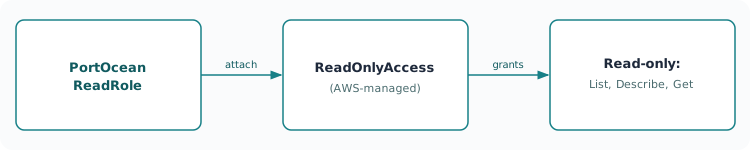
In every deployment method, the integration calls AWS APIs using PortOceanReadRole. That role has the AWS managed ReadOnlyAccess policy attached, which gives read-only access to AWS services:
ManagedPolicyArns:
  - arn:aws:iam::aws:policy/ReadOnlyAccess
Benefits: The policy automatically includes new AWS services so you do not need to redeploy when AWS adds services. AWS maintains and updates it. Access is read-only; create, modify, and delete actions are not allowed.
Security considerations
Self-hosted integrations use read-only access with carefully configured trust relationships. You can list and describe resources and read metadata and tags; you cannot create, modify, delete, or change any resource.
Troubleshooting
Common IAM issues include access denied errors, cross-account failures, and authentication problems. Verify permissions, trust relationships, and configurations.
For detailed setup instructions, see the single account installation page.