Installation
This page guides you through installing the AWS integration. Choose how you want to run it and the integration syncs your AWS resources into your Port catalog, keeping the catalog up-to-date through periodic resyncs.
The integration supports two deployment options:
- Hosted by Port: Fully managed by Port with zero infrastructure to maintain. You create IAM roles via CloudFormation, and Port runs the integration on its servers, connecting to your AWS accounts using OIDC authentication.
- Self-hosted: Runs in your own AWS environment (ECS, EC2, EKS, or a one-off Docker run). You manage the deployment and the IAM roles that grant the integration read-only access.
Setup
Use the wizard below to select your deployment option and follow the steps. For self-hosted installations, you will first choose whether to sync a single account or multiple accounts across your AWS Organization.
You can control which AWS regions the integration queries using regionPolicy. See Querying resources from specific regions.
Account discovery
This section explains how the integration discovers accounts when you choose the multi-account self-hosted setup. It does not apply to single-account or Hosted by Port installations.
Account discovery is driven by AWS Organizations. The integration assumes a role in your management account to call the Organizations API, then assumes PortOceanReadRole in each discovered account to read and sync resources into your Port catalog. The account list is refreshed on every resync cycle and new accounts are picked up automatically, and removed accounts stop being synced.
How accounts are discovered depends on whether you provide a Target OU ID during installation:
Sync all accounts (default)
Leave the Target OU ID field empty to sync every active member account in your organization.
When to use: You want full organization-wide visibility with no account filtering.
How it works:
- The integration assumes a role in your management account.
- It calls the AWS Organizations
ListAccountsAPI to enumerate all active accounts in your organization. - It assumes
PortOceanReadRolein each account and syncs resources into your Port catalog.
Sync accounts in a specific OU
Set a Target OU ID (ou-xxxx-xxxxxxxx) during installation to scope discovery to a specific branch of your organization hierarchy. The integration will discover accounts in that OU and any nested sub-OUs.
When to use: You want to limit syncing to a subset of accounts. For example, only accounts in your production OU, or a single business unit's accounts.
How it works:
- The integration assumes a role in your management account.
- It calls
ListAccountsForParentwith your OU ID and recursively walks all nested sub-OUs to build the account list. - It assumes
PortOceanReadRolein each discovered account and syncs resources into your Port catalog.
Find your OU ID in the AWS Organizations console under Organizational structure (format: ou-xxxx-xxxxxxxx).
IAM role architecture
The integration uses read-only IAM roles to access your AWS resources. How those roles are created and trusted depends on your deployment option. Select a tab below to see the role architecture for your setup.
- Hosted by Port
- Self-hosted
AWS Hosted by Port uses a strategically designed IAM role that provides comprehensive read-only access to all AWS services. The role is created automatically by the CloudFormation template and uses the AWS managed ReadOnlyAccess policy for future-proofing and operational simplicity.
We recommend keeping the IAM role and its permissions unchanged after deployment. The integration is designed to work with the full ReadOnlyAccess policy, which ensures:
- Complete resource discovery across all AWS services.
- Future compatibility when Port adds support for new AWS services.
- Reliable operation without permission-related issues.
If you prefer to create the IAM role manually rather than using the CloudFormation template, the following sections describe the setup we implement. This will help you understand the reasoning behind our design choices and adapt them if you decide to configure the role differently.
Role structure
For multi-account setups, the role structure is replicated across all target accounts.
OIDC identity provider
The CloudFormation template creates an OIDC identity provider that connects to Port's EKS cluster:
PortIntegrationOIDCProvider:
  Type: AWS::IAM::OIDCProvider
  Properties:
    Url: 'https://oidc.eks.eu-west-1.amazonaws.com/id/56E5F51C07138118A9183ECEAA68FAF4'
    ClientIdList:
      - sts.amazonaws.com
    Tags:
      - Key: port:integration
        Value: !Ref IntegrationIdentifier
Key details:
- EKS OIDC URL: Points to Port's production EKS cluster in EU-West-1.
- Client ID: Uses
sts.amazonaws.comfor IRSA authentication. - Reusable: Can be shared across multiple integrations in the same account.
- Optional: Can be disabled if you already have a Port OIDC provider.
Trust policy
The IAM role uses an OIDC (OpenID Connect) trust policy with IRSA (IAM Roles for Service Accounts) that allows Port's EKS cluster to assume the role:
{
  "Version": "2012-10-17",
  "Statement": [{
    "Effect": "Allow",
    "Principal": {
      "Federated": "arn:aws:iam::YOUR_ACCOUNT_ID:oidc-provider/oidc.eks.eu-west-1.amazonaws.com/id/56E5F51C07138118A9183ECEAA68FAF4"
    },
    "Action": "sts:AssumeRoleWithWebIdentity",
    "Condition": {
      "StringEquals": {
        "oidc.eks.eu-west-1.amazonaws.com/id/56E5F51C07138118A9183ECEAA68FAF4:aud": "sts.amazonaws.com",
        "oidc.eks.eu-west-1.amazonaws.com/id/56E5F51C07138118A9183ECEAA68FAF4:sub": "system:serviceaccount:org-YOUR_ORG_ID-port-oidc-sa"
      }
    }
  }]
}
Key security features:
- OIDC authentication: Role is tied to Port's specific EKS service account.
- Temporary credentials: All access uses short-lived tokens (typically 1 hour).
Permissions policy
The role uses the AWS managed ReadOnlyAccess policy, which provides comprehensive read-only access to all AWS services:
ManagedPolicyArns:
  - arn:aws:iam::aws:policy/ReadOnlyAccess
Strategic benefits:
- Future-proof: Automatically includes new AWS services without CloudFormation updates.
- Operational simplicity: No need to redeploy when adding support for new services.
- Comprehensive coverage: Access to all AWS services with read-only permissions.
- AWS maintained: AWS manages and updates the policy as needed.
- Read-only security: Only read permissions, no write/delete/create access.
Security considerations
From a security view point the integration uses a read-only role. It can list/describe and read metadata/tags, but cannot create, modify, delete, or change any resource.
With self-hosted deployments you manage IAM resources directly; the hosted version manages them for you.
Role structure
In every deployment, the integration uses one read-only role, PortOceanReadRole, with the AWS ReadOnlyAccess policy. Who can assume that role depends on where you run the integration: an ECS task, an EC2 instance, or a pod using your EKS cluster's OIDC identity. Select a tab below to see the trust policy for that method.
In all cases, the integration process gets an identity (task role, instance role, or OIDC-backed service account). That identity is allowed to assume PortOceanReadRole. The read-only role has ReadOnlyAccess and is used to call AWS APIs.
- IAM Role (ECS)
- IAM Role (EC2)
- IRSA (EKS)
The integration runs in an ECS task and assumes the read-only role PortOceanReadRole to call AWS APIs. Two roles apply:
- Task role (PortOceanTaskRole) — Attached to the task; its only permission is
sts:AssumeRoleon PortOceanReadRole. - Read-only role (PortOceanReadRole) — Has the ReadOnlyAccess managed policy. Only the task role can assume it.
Flow — ECS injects the task role credentials into the container. The integration uses them to assume PortOceanReadRole, then calls AWS APIs with that role.

Read-only role trust policy. Only the task role can assume this role. Replace TASK_ROLE_ARN with your task role ARN:
{
  "Version": "2012-10-17",
  "Statement": [{
    "Effect": "Allow",
    "Principal": {
      "AWS": "TASK_ROLE_ARN"
    },
    "Action": "sts:AssumeRole"
  }]
}
Key security features: AWS provides temporary credentials to ECS tasks automatically. The task role has only assume-role permission; the read-only role holds ReadOnlyAccess. AWS STS automatically rotates credentials. ECS tasks can assume roles in other AWS accounts when you configure cross-account access.
The integration runs on an EC2 instance and assumes the read-only role PortOceanReadRole to call AWS APIs. Two roles apply:
- Instance role (PortOceanInstanceRole) — Attached to the instance; its only permission is
sts:AssumeRoleon PortOceanReadRole. - Read-only role (PortOceanReadRole) — Has the ReadOnlyAccess managed policy. Only the instance role can assume it.
Flow — EC2 delivers the instance role credentials to the instance via the instance profile. The integration assumes PortOceanReadRole, then calls AWS APIs with that role.

Read-only role trust policy. Only the instance role can assume this role. Replace INSTANCE_ROLE_ARN with your instance role ARN:
{
  "Version": "2012-10-17",
  "Statement": [{
    "Effect": "Allow",
    "Principal": {
      "AWS": "INSTANCE_ROLE_ARN"
    },
    "Action": "sts:AssumeRole"
  }]
}
Key security features: EC2 delivers temporary credentials to the instance via the instance profile. The instance role has only assume-role permission; the read-only role holds ReadOnlyAccess. AWS STS automatically rotates credentials.
With IRSA, the read-only role (PortOceanReadRole) trusts your EKS cluster's OIDC identity provider. There is no separate "task" or "instance" role; the pod receives a web identity token from the service account, and PortOceanReadRole trusts that token.
Flow — The pod uses a Kubernetes service account annotated with the IAM role ARN. EKS and the OIDC provider issue a short-lived token. The integration exchanges it for PortOceanReadRole credentials via AssumeRoleWithWebIdentity, then calls AWS APIs.

{
  "Version": "2012-10-17",
  "Statement": [{
    "Effect": "Allow",
    "Principal": {
      "Federated": "arn:aws:iam::MEMBER_ACCOUNT_ID:oidc-provider/oidc.eks.YOUR_REGION.amazonaws.com/id/YOUR_OIDC_ID"
    },
    "Action": "sts:AssumeRoleWithWebIdentity",
    "Condition": {
      "StringEquals": {
        "oidc.eks.YOUR_REGION.amazonaws.com/id/YOUR_OIDC_ID:aud": "sts.amazonaws.com",
        "oidc.eks.YOUR_REGION.amazonaws.com/id/YOUR_OIDC_ID:sub": "system:serviceaccount:YOUR_NAMESPACE:YOUR_SERVICE_ACCOUNT"
      }
    }
  }]
}
Key security features: OIDC federation provides secure identity federation without shared secrets. Roles are tied to specific Kubernetes service accounts, and pods receive short-lived tokens for the role.
Permissions setup
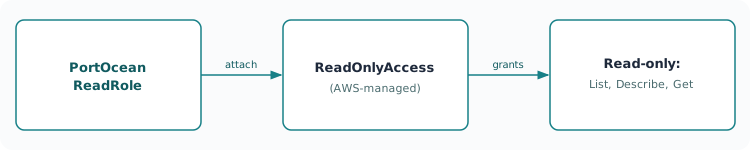
In every deployment method, the integration calls AWS APIs using PortOceanReadRole. That role has the AWS managed ReadOnlyAccess policy attached, which gives read-only access to AWS services:
ManagedPolicyArns:
  - arn:aws:iam::aws:policy/ReadOnlyAccess
Benefits: The policy automatically includes new AWS services so you do not need to redeploy when AWS adds services. AWS maintains and updates it. Access is read-only; create, modify, and delete actions are not allowed.
Security considerations
Self-hosted integrations use read-only access with carefully configured trust relationships. You can list and describe resources and read metadata and tags; you cannot create, modify, delete, or change any resource.
Troubleshooting
Select your deployment option to troubleshoot installation and sync issues. Use Interactive mode to be guided through diagnostic checks, or Quick reference to scan the full list of issues and fixes.
- Hosted by Port
- Self-hosted
What are you experiencing?
Select the issue that best matches your situation. We'll guide you through diagnosing and fixing it step by step.
- Single account
- Multi-account
What are you experiencing?
Select the issue that best matches your situation. We'll guide you through diagnosing and fixing it step by step.
What are you experiencing?
Select the issue that best matches your situation. We'll guide you through diagnosing and fixing it step by step.