Kubecost

Port's Kubecost integration allows you to model Kubecost resources in your software catalog and ingest data into them.

Setup
Choose one of the following installation methods: Not sure which method is right for your use case? Check the available installation methods.
The prerequisites required for installation are listed below.
-
Go to the Kubecost Connectors page in Port.
-
Under
Select your installation method, chooseHosted by Port. -
Configure the
Installation parametersandAdvanced configurationas you wish (see below for details).
Installation parameters
Each integration requires specific parameters (such as an API token, a URL, etc.), as seen in Port's UI when installing it. Hover over the ⓘ icon next to each parameter to see more details about it.
Advanced configuration
- During the installation process each integration may have additional settings under the
Advanced configurationsection in Port's UI. Additionally, each integration has one or more settings that can be configured after installation. To do so, click on the integration's name in the Connectors page and navigate to theSettingtab. Hover over the ⓘ icon next to each setting to see more details about it.
Port secrets
Some integration settings require sensitive pieces of data, such as tokens. For these settings, Port secrets will be used, ensuring that your sensitive data is encrypted and secure.
When filling in such a setting, its value will be obscured (shown as ••••••••).
For each such setting, Port will automatically create a secret in your organization.
To see all secrets in your organization, follow these steps.
Port source IP addresses
When using this installation method, Port will make outbound calls to your 3rd-party applications from static IP addresses. You may need to add these addresses to your allowlist, in order to allow Port to interact with the integrated service:
- Europe (EU):
54.73.167.226,63.33.143.237,54.76.185.219 - United States (US):
3.234.37.33,54.225.172.136,3.225.234.99
-
Go to the Kubecost Connectors page in your portal.
-
Select the
Self-hostedmethod. -
A
helmcommand will be displayed, with default values already filled out (e.g. your Port client ID, client secret, etc). Copy the command, replace the placeholders with your values, then run it in your terminal to install the integration.
Live event support
Currently, live events are not supported for this integration.
Resyncs will be performed periodically (with a configurable interval), or manually triggered by you via Port's UI.
Therefore, real-time events (including GitOps) will not be ingested into Port immediately.
Live events support for this integration is WIP and will be supported in the near future.
The resync interval can be configured using the scheduledResyncInterval parameter. See the optional parameters section below for more details.
Required parameters:
port.clientId- Your port client id.port.clientSecret- Your port client secret.port.baseUrl- Your Port API URL (https://api.port.iofor EU,https://api.us.port.iofor US).integration.identifier- Change the identifier to describe your integration.integration.type- The integration type.integration.eventListener.type- The event listener type.integration.config.kubecostHost- The Kubecost server URL.
Optional parameters (click to expand)
integration.config.kubecostApiVersion- The API version of the Kubecost instance. Possible values arev1,v2andv3. The default value isv2.scheduledResyncInterval- The number of minutes between each resync.initializePortResources- Defaulttrue, when set totruethe integration will create default blueprints and the port App config mapping.sendRawDataExamples- Enable sending raw data examples from the third party API to port for testing and managing the integration mapping. Default istrue.
- GitHub
- Jenkins
- Azure DevOps
- GitLab
- Go to the Kubecost Connectors page in your portal.
- Under Select your installation method, choose your desired CI/CD platform.
- Copy the workflow and replace the placeholders with your values.
Below are the available parameters and their descriptions.
| Parameter | Description | Required? | Secret?Store this value as a GitHub Actions secret |
|---|---|---|---|
port_client_id | Your Port client ID (How to get the credentials). | ✓ | ✓ |
port_client_secret | Your Port client secret (How to get the credentials). | ✓ | ✓ |
port_base_url | Your Port API URL (https://api.port.io for EU, https://api.us.port.io for US). | ✓ | ✗ |
kubecost_host | The Kubecost server URL. | ✓ | ✓ |
kubecost_api_version | The API version of the Kubecost instance. Possible values are v1 and v2. The default value is v2. | ✗ | ✗ |
initialize_port_resources | Default true. When set to true, the integration will create default blueprints and the Port app config mapping. | ✗ | ✗ |
integration_identifier | The identifier of the integration that will be installed. | ✗ | ✗ |
send_raw_data_examples | Enable sending raw data examples from the third-party API to Port for testing and managing the integration mapping. Default is true. | ✗ | ✗ |
Your Jenkins agent must be able to run Docker commands.
Below are the available parameters and their descriptions.
| Parameter | Description | Required? | Secret?Store this value as a Jenkins credential (Secret Text) |
|---|---|---|---|
OCEAN__ | Your Port client ID (How to get the credentials). | ✓ | ✓ |
OCEAN__ | Your Port client secret (How to get the credentials). | ✓ | ✓ |
OCEAN__ | Your Port API URL (https://api.port.io for EU, https://api.us.port.io for US). | ✓ | ✗ |
OCEAN__ | The Kubecost server URL. | ✓ | ✓ |
OCEAN__ | The API version of the Kubecost instance. Possible values are v1 and v2. The default value is v2. | ✗ | ✗ |
OCEAN__ | Default true. When set to true, the integration will create default blueprints and the Port app config mapping. | ✗ | ✗ |
OCEAN__ | The identifier of the integration that will be installed. | ✗ | ✗ |
OCEAN__ | Enable sending raw data examples from the third-party API to Port for testing and managing the integration mapping. Default is true. | ✗ | ✗ |
Here is an example for a Jenkinsfile pipeline file:Jenkins pipeline (click to expand)
Prerequisites
- Your Azure Devops agent should be able to run docker commands. Learn more about agents here.
- You must have permissions to create and manage Azure DevOps variable groups for storing credentials.
Set up your credentials
- Create a Variable Group: Name it port-ocean-credentials.
- Store the required variables (see the table below).
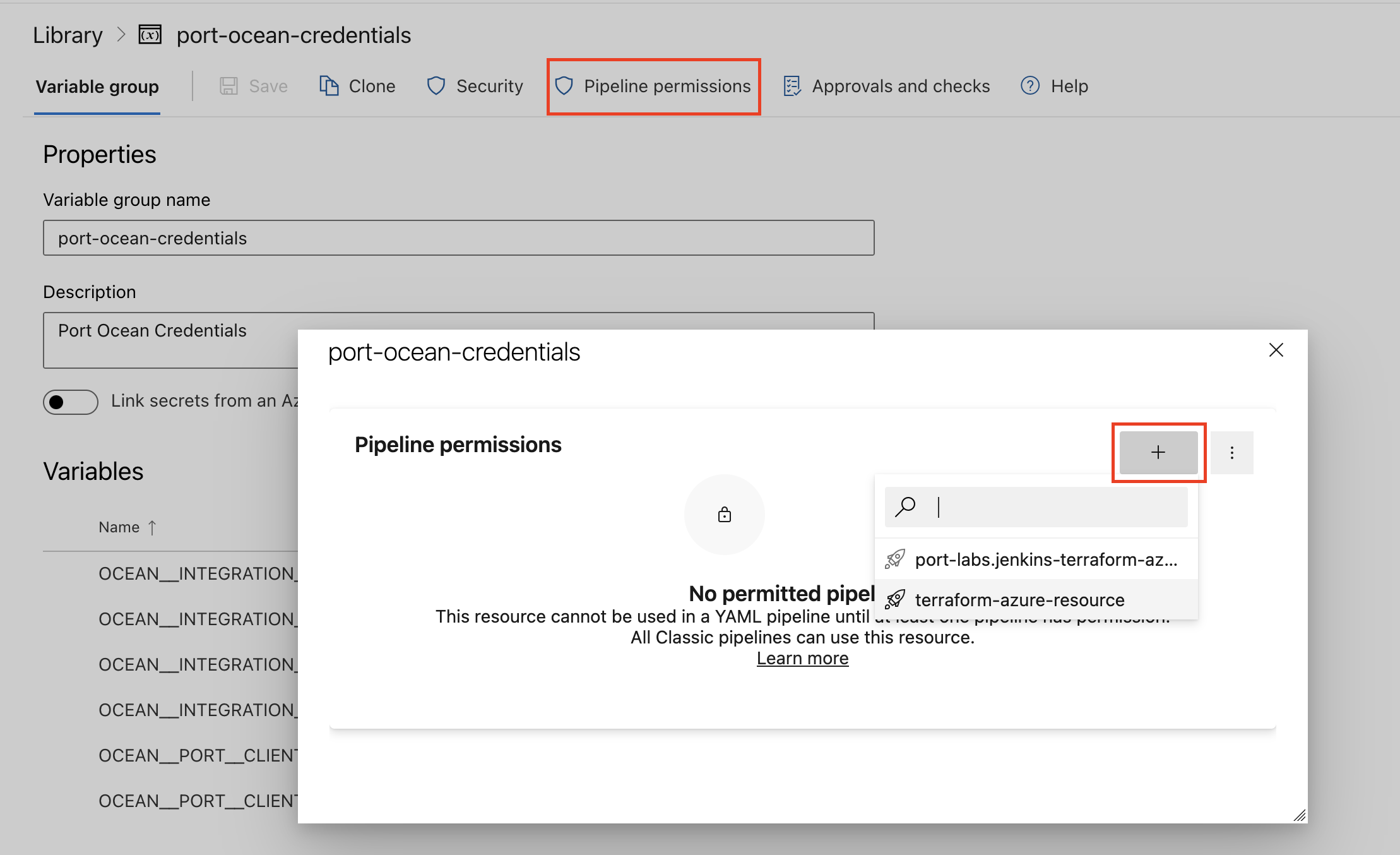
- Authorize Your Pipeline:
-
Go to "Library" -> "Variable groups."
-
Find port-ocean-credentials and click on it.
-
Select "Pipeline Permissions" and add your pipeline to the authorized list.
-
Below are the available parameters and their descriptions.
| Parameter | Description | Required? | Secret?Store this value as an Azure DevOps pipeline variable |
|---|---|---|---|
OCEAN__ | Your Port client ID (How to get the credentials). | ✓ | ✓ |
OCEAN__ | Your Port client secret (How to get the credentials). | ✓ | ✓ |
OCEAN__ | Your Port API URL (https://api.port.io for EU, https://api.us.port.io for US). | ✓ | ✗ |
OCEAN__ | The Kubecost server URL. | ✓ | ✓ |
OCEAN__ | The API version of the Kubecost instance. Possible values are v1 and v2. The default value is v2. | ✗ | ✗ |
OCEAN__ | Default true. When set to true, the integration will create default blueprints and the Port app config mapping. | ✗ | ✗ |
OCEAN__ | The identifier of the integration that will be installed. | ✗ | ✗ |
OCEAN__ | Enable sending raw data examples from the third-party API to Port for testing and managing the integration mapping. Default is true. | ✗ | ✗ |
Here is an example for a azure-pipeline.yml pipeline file:Azure pipeline (click to expand)
- Go to the Kubecost Connectors page in your portal.
- Under Select your installation method, choose your desired CI/CD platform.
- Copy the workflow and replace the placeholders with your values.
Below are the available parameters and their descriptions.
| Parameter | Description | Required? | Secret?Store this value as a GitLab CI/CD variable |
|---|---|---|---|
OCEAN__ | Your Port client ID (How to get the credentials). | ✓ | ✓ |
OCEAN__ | Your Port client secret (How to get the credentials). | ✓ | ✓ |
OCEAN__ | Your Port API URL (https://api.port.io for EU, https://api.us.port.io for US). | ✓ | ✗ |
OCEAN__ | The Kubecost server URL. | ✓ | ✓ |
OCEAN__ | The API version of the Kubecost instance. Possible values are v1 and v2. The default value is v2. | ✗ | ✗ |
OCEAN__ | Default true. When set to true, the integration will create default blueprints and the Port app config mapping. | ✗ | ✗ |
OCEAN__ | The identifier of the integration that will be installed. | ✗ | ✗ |
OCEAN__ | Enable sending raw data examples from the third-party API to Port for testing and managing the integration mapping. Default is true. | ✗ | ✗ |
Configuration
Port integrations use a YAML mapping block to ingest data from the third-party api into Port.
The mapping makes use of the JQ JSON processor to select, modify, concatenate, transform and perform other operations on existing fields and values from the integration API.
Default mapping configuration
This is the default mapping configuration for this integration:
Default mapping configuration (click to expand)
createMissingRelatedEntities: true
deleteDependentEntities: true
resources:
- kind: kubesystem
  selector:
    query: 'true'
  port:
    entity:
      mappings:
        blueprint: '"kubecostResourceAllocation"'
        identifier: .name
        title: .name
        properties:
          cluster: .properties.cluster
          namespace: .properties.namespace
          startDate: .start
          endDate: .end
          cpuCoreHours: .cpuCoreHours
          cpuCost: .cpuCost
          cpuEfficiency: .cpuEfficiency
          gpuHours: .gpuHours
          gpuCost: .gpuCost
          networkCost: .networkCost
          loadBalancerCost: .loadBalancerCost
          pvCost: .pvCost
          pvBytes: .pvBytes
          ramBytes: .ramBytes
          ramCost: .ramCost
          ramEfficiency: .ramEfficiency
          sharedCost: .sharedCost
          externalCost: .externalCost
          totalCost: .totalCost
          totalEfficiency: .totalEfficiency
- kind: cloud
  selector:
    query: 'true'
  port:
    entity:
      mappings:
        blueprint: '"kubecostCloudAllocation"'
        identifier: .properties.provider + "/" + .properties.providerID + "/" + .properties.category + "/" + .properties.service | gsub("[^A-Za-z0-9@_.:\\\\/=-]"; "-")
        title: .properties.provider + "/" + .properties.service
        properties:
          provider: .properties.provider
          accountID: .properties.accountID
          invoiceEntityID: .properties.invoiceEntityID
          startDate: .window.start
          endDate: .window.end
          listCost: .listCost.cost
          listCostPercent: .listCost.kubernetesPercent
          netCost: .netCost.cost
          netCostPercent: .netCost.kubernetesPercent
          amortizedNetCost: .amortizedNetCost.cost
          amortizedNetCostPercent: .amortizedNetCost.kubernetesPercent
          invoicedCost: .invoicedCost.cost
          invoicedCostPercent: .invoicedCost.kubernetesPercent
Monitoring and sync status
To learn more about how to monitor and check the sync status of your integration, see the relevant documentation.
Mapping & selectors per resource
- kind: kubesystem
  selector:
    query: 'true'
  port:
    entity:
      mappings:
        blueprint: '"kubecostResourceAllocation"'
        identifier: .name
        title: .name
        properties:
          cluster: .properties.cluster
          namespace: .properties.namespace
          startDate: .start
          endDate: .end
          cpuCoreHours: .cpuCoreHours
          cpuCost: .cpuCost
          cpuEfficiency: .cpuEfficiency
          gpuHours: .gpuHours
          gpuCost: .gpuCost
          networkCost: .networkCost
          loadBalancerCost: .loadBalancerCost
          pvCost: .pvCost
          pvBytes: .pvBytes
          ramBytes: .ramBytes
          ramCost: .ramCost
          ramEfficiency: .ramEfficiency
          sharedCost: .sharedCost
          externalCost: .externalCost
          totalCost: .totalCost
          totalEfficiency: .totalEfficiency
{
  "name": "argocd",
  "properties": {
    "cluster": "cluster-one",
    "node": "gke-my-regional-cluster-default-pool-e8093bfa-0bjg",
    "namespace": "argocd",
    "providerID": "gke-my-regional-cluster-default-pool-e8093bfa-0bjg",
    "namespaceLabels": {
      "kubernetes_io_metadata_name": "argocd"
    }
  },
  "window": {
    "start": "2023-10-30T00:00:00Z",
    "end": "2023-10-30T01:00:00Z"
  },
  "start": "2023-10-30T00:00:00Z",
  "end": "2023-10-30T01:00:00Z",
  "minutes": 60,
  "cpuCores": 0.00515,
  "cpuCoreRequestAverage": 0,
  "cpuCoreUsageAverage": 0.00514,
  "cpuCoreHours": 0.00515,
  "cpuCost": 0.00012,
  "cpuCostAdjustment": 0,
  "cpuEfficiency": 1,
  "gpuCount": 0,
  "gpuHours": 0,
  "gpuCost": 0,
  "gpuCostAdjustment": 0,
  "networkTransferBytes": 2100541.53,
  "networkReceiveBytes": 2077024.88318,
  "networkCost": 0,
  "networkCrossZoneCost": 0,
  "networkCrossRegionCost": 0,
  "networkInternetCost": 0,
  "networkCostAdjustment": 0,
  "loadBalancerCost": 0.02708,
  "loadBalancerCostAdjustment": 0,
  "pvBytes": 0,
  "pvByteHours": 0,
  "pvCost": 0,
  "pvs": "None",
  "pvCostAdjustment": 0,
  "ramBytes": 135396181.33333,
  "ramByteRequestAverage": 0,
  "ramByteUsageAverage": 135394433.70477,
  "ramByteHours": 135396181.33333,
  "ramCost": 0.00041,
  "ramCostAdjustment": 0,
  "ramEfficiency": 1,
  "externalCost": 0,
  "sharedCost": 0,
  "totalCost": 0.02761,
  "totalEfficiency": 1,
  "proportionalAssetResourceCosts": {},
  "lbAllocations": {
    "cluster-one/argocd/argocd-server": {
      "service": "argocd/argocd-server",
      "cost": 0.027083333333333334,
      "private": false,
      "ip": ""
    }
  },
  "sharedCostBreakdown": {}
}
{
  "identifier": "argocd",
  "title": "argocd",
  "icon": "Cluster",
  "blueprint": "kubecostResourceAllocation",
  "team": [],
  "properties": {
    "cluster": "cluster-one",
    "namespace": "argocd",
    "startDate": "2023-10-30T04:00:00.000Z",
    "endDate": "2023-10-30T05:00:00.000Z",
    "cpuCoreHours": 0.0051,
    "cpuCost": 0.00012,
    "cpuEfficiency": 1,
    "gpuHours": 0,
    "gpuCost": 0,
    "networkCost": 0,
    "loadBalancerCost": 0.02708,
    "pvCost": 0,
    "pvBytes": 0,
    "ramBytes": 135396181.33333,
    "ramCost": 0.00041,
    "ramEfficiency": 1,
    "sharedCost": 0,
    "externalCost": 0,
    "totalCost": 0.02761,
    "totalEfficiency": 1
  },
  "relations": {},
  "createdAt": "2023-10-30T13:25:42.717Z",
  "createdBy": "hBx3VFZjqgLPEoQLp7POx5XaoB0cgsxW",
  "updatedAt": "2023-10-30T13:28:37.379Z",
  "updatedBy": "hBx3VFZjqgLPEoQLp7POx5XaoB0cgsxW"
}
Below are the supported selectors for this resource. Use them under the selector key in your integration mapping configuration to control which resources are returned from the API.
| Selector | Type | Description |
|---|---|---|
exportEnvVariables | array | Environment variable names whose values should be included in lakehouse ingest payloads for DSP processing. |
window | string | The time window for the query. Supported values: preset windows ('today', 'week', 'month', 'yesterday', 'lastweek', 'lastmonth', '30m', '12h', '7d'), an ISO8601 UTC date-time pair ('2026-03-30T00:00:00Z,2026-03-31T00:00:00Z'), or a Unix timestamp pair ('1711756800,1711843200'). Default: "today". |
aggregate | string | Field by which to aggregate the results. E.g. 'namespace', 'service', or 'label:app'. |
step | string | Granularity of each time bucket in the results. For example, '1d' breaks a week-long window into daily buckets. Accepts seconds (s), minutes (m), hours (h), or days (d), e.g. '30m', '2h', '1d'. Defaults to the full window as a single bucket. |
accumulate | boolean | If true, sum the entire range of sets into a single set. Default: false. |
idle | boolean | If true, include idle cost (i.e. the cost of the un-allocated assets) as its own allocation Default: true. |
external | boolean | If true, include external, or out-of-cluster costs in each allocation. Default is false. Default: false. |
filterClusters | string | Comma-separated list of clusters to match; e.g. cluster-one,cluster-two will return results from only those two clusters. |
filterNodes | string | Comma-separated list of nodes to match; e.g. node-one,node-two will return results from only those two nodes. |
filterNamespaces | string | Comma-separated list of namespaces to match; e.g. namespace-one,namespace-two will return results from only those two namespaces. |
filterControllerKinds | string | Comma-separated list of controller kinds to match; e.g. deployment, job will return results with only those two controller kinds. |
filterControllers | string | Comma-separated list of controllers to match; e.g. deployment-one,statefulset-two will return results from only those two controllers. |
filterPods | string | Comma-separated list of pods to match; e.g. pod-one,pod-two will return results from only those two pods. |
filterAnnotations | string | Comma-separated list of annotations to match; e.g. name:annotation-one,name:annotation-two will return results with either of those two annotation key-value-pairs. |
filterLabels | string | Comma-separated list of annotations to match; e.g. app:cost-analyzer, app:prometheus will return results with either of those two label key-value-pairs. |
filterServices | string | Comma-separated list of services to match; e.g. frontend-one,frontend-two will return results with either of those two services |
shareIdle | boolean | If true, idle cost is allocated proportionally across all non-idle allocations, per-resource. That is, idle CPU cost is shared with each non-idle allocation's CPU cost, according to the percentage of the total CPU cost represented. Default is false Default: false. |
splitIdle | boolean | If true, and shareIdle == false, Idle Allocations are created on a per cluster or per node basis rather than being aggregated into a single idle allocation. Default is false Default: false. |
idleByNode | boolean | f true, idle allocations are created on a per node basis. Which will result in different values when shared and more idle allocations when split. Default is false. Default: false. |
shareNamespaces | string | Comma-separated list of namespaces to share; e.g. kube-system, kubecost will share the costs of those two namespaces with the remaining non-idle, unshared allocations. |
shareLabels | string | Comma-separated list of labels to share; e.g. env:staging, app:test will share the costs of those two label values with the remaining non-idle, unshared allocations. |
shareCost | number | Floating-point value representing a monthly cost to share with the remaining non-idle, unshared allocations; e.g. 30.42 ($1.00/day == $30.42/month) for the query yesterday (1 day) will split and distribute exactly $1.00 across the allocations. Default is 0.0. Default: 0. |
offset | integer | Number of items to skip before starting to collect the result set. |
limit | integer | Maximum number of items to return in the result set. |
filter | string | Filter results by any category which that can be aggregated by, can support multiple filterable items in the same category in a comma-separated list. E.g. 'namespace:kube-system,kubecost'. |
format | string | Format of the output. Default is JSON. |
costMetric | string | Cost metric format. Default: "cummulative". |
includeSharedCostBreakdown | boolean | If true, the cost breakdown for shared costs is included in the response. Default is false. Default: true. |
reconcile | boolean | If true, pulls data from the Assets cache and corrects prices of Allocations according to their related Assets Default: true. |
shareTenancyCosts | boolean | If true, share the cost of cluster overhead assets such as cluster management costs and node attached volumes across tenants of those resources. Default: true. |
shareSplit | string | Determines how to split shared costs among non-idle, unshared allocations. Default: "weighted". |
Advanced
For advanced configuration including customizing how Kubecost kinds are ingested, read the advanced section of Kubecost guide.