Sentry
Port's Sentry integration allows you to model Sentry resources in your software catalog and ingest data into them.
Overview
This integration allows you to:
- Map and organize your desired Sentry resources and their metadata in Port (see supported resources below).
- Watch for Sentry object changes (create/update/delete) in real-time, and automatically apply the changes to your entities in Port.
Supported resources
The resources that can be ingested from Sentry into Port are listed below. It is possible to reference any field that appears in the API responses linked below in the mapping configuration.
UserTeam- when enabled, the integration enrich the team resource with members using the team member APIProjectIssueProject TagIssue Tag
Setup
Choose one of the following installation methods:
Not sure which method is right for your use case? Check the available installation methods.
- Hosted by Port (Recommended)
- Self-hosted
- CI
-
Go to the Sentry data source page in your portal.
-
Under
Select your installation method, chooseHosted by Port. -
configure the
custom settingsandadvanced configurationas you wish (see below for details).
Custom settings
Each integration has its own tool-specific configuration that you provide during setup:
Advanced configuration
In Port, you can configure the following settings for the integration:
-
Live event support:This integration supports live events, allowing real-time updates to your software catalog without waiting for the next scheduled sync.
Supported live event triggers (click to expand)
Issue & Issue Tag:
- created
- resolved
- ignored
- unresolved
- assigned
-
Actions processing enabled:
When enabled, Port will automatically process actions for this integration. -
Create default resources:
When enabled, Port will automatically create default blueprints and mapping configurations for this integration.
Port secrets
Some integration settings require sensitive pieces of data, such as tokens. For these settings, Port secrets will be used, ensuring that your sensitive data is encrypted and secure.
When filling in such a setting, its value will be obscured (shown as ••••••••).
For each such setting, Port will automatically create a secret in your organization.
To see all secrets in your organization, follow these steps.
Port source IP addresses
When using this installation method, Port will make outbound calls to your 3rd-party applications from static IP addresses. You may need to add these addresses to your allowlist, in order to allow Port to interact with the integrated service:
- Europe (EU):
54.73.167.226,63.33.143.237,54.76.185.219 - United States (US):
3.234.37.33,54.225.172.136,3.225.234.99
Using this installation option means that the integration will be able to update Port in real time using webhooks.
For more information on how to configure live events, see the Live events section.
Prerequisites
-
A Kubernetes cluster - the integration's container chart will be deployed to this cluster.
-
kubectlandhelmmust be installed on your machine. YourkubectlCLI must be connected to the Kubernetes cluster where you plan to install the integration.
For details about the available parameters for the installation, see the table below.
- Helm
- ArgoCD
-
Go to the Sentry data source page in your portal.
-
Select the
Real-time and always onmethod. -
A
helmcommand will be displayed, with default values already filled out (e.g. your Port client ID, client secret, etc). Copy the command, replace the placeholders with your values, then run it in your terminal to install the integration.
BaseUrl & webhook configuration
To enable real-time updates of the data in your software catalog, you need to define the liveEvents.baseUrl parameter.
This parameter should be set to the URL of your Sentry integration instance, which needs to have the option to setup webhooks via HTTP requests/receive HTTP requests, so ensure the network is configured accordingly.
- If Sentry and the integration are in the same cluster/network: Use an internal URL (e.g., a Kubernetes service DNS name).
For Kubernetes deployments, create a service to expose the integration pod and use the service URL asliveEvents.baseUrl. If both the source system and integration are in the same cluster, an internal ClusterIP service is sufficient. - If Sentry is external to the integration's network: The integration must be exposed via an ingress, load balancer, or public URL that Sentry can reach.
If liveEvents.baseUrl is not provided, the integration will continue to function correctly. In such a configuration, to retrieve the latest information from the target system, the scheduledResyncInterval parameter has to be set, or a manual resync will need to be triggered through Port's UI.
To test webhooks or live event delivery to your local environment, expose your local pod or service to the internet using ngrok (e.g. ngrok http http://localhost:8000)
Scalable mode for large integrations
If you are deploying the integration at scale and want to decouple the resync process from the live events process (recommended for large or high-throughput environments), you can enable scalable mode by adding the following flags to your Helm install command:
--set workload.kind="CronJob" \
--set workload.cron.resyncTimeoutMinutes=60 \
--set scheduledResyncInterval="'*/60 * * * *'" \
--set liveEvents.worker.enabled=true
All Ocean integrations expose a health check endpoint at /docs.
For example, if your integration is accessible at https://your-integration-host:8000, you can access the health check at https://your-integration-host:8000/docs.
The port_region, port.baseUrl, portBaseUrl, port_base_url and OCEAN__PORT__BASE_URL parameters select which Port API instance to use:
- EU (app.port.io) →
https://api.getport.io - US (app.us.port.io) →
https://api.us.getport.io
To install the integration using ArgoCD:
- Create a
values.yamlfile inargocd/my-ocean-sentry-integrationin your git repository with the content:
Remember to replace the placeholders for SENTRY_HOST SENTRY_ORGANIZATION and SENTRY_TOKEN.
SENTRY_WEBHOOK_SECRET is only required if you plan to use webhooks.
initializePortResources: true
scheduledResyncInterval: 120
integration:
identifier: my-ocean-sentry-integration
type: sentry
eventListener:
type: POLLING
config:
sentryHost: SENTRY_HOST
sentryOrganization: SENTRY_ORGANIZATION
secrets:
sentryToken: SENTRY_TOKEN
sentryWebhookSecret: SENTRY_WEBHOOK_SECRET
- Install the
my-ocean-sentry-integrationArgoCD Application by creating the followingmy-ocean-sentry-integration.yamlmanifest:
Remember to replace the placeholders for YOUR_PORT_CLIENT_ID YOUR_PORT_CLIENT_SECRET and YOUR_GIT_REPO_URL.
Multiple sources ArgoCD documentation can be found here.
ArgoCD Application
apiVersion: argoproj.io/v1alpha1
kind: Application
metadata:
name: my-ocean-sentry-integration
namespace: argocd
spec:
destination:
namespace: my-ocean-sentry-integration
server: https://kubernetes.default.svc
project: default
sources:
- repoURL: 'https://port-labs.github.io/helm-charts/'
chart: port-ocean
targetRevision: 0.9.5
helm:
valueFiles:
- $values/argocd/my-ocean-sentry-integration/values.yaml
parameters:
- name: port.clientId
value: YOUR_PORT_CLIENT_ID
- name: port.clientSecret
value: YOUR_PORT_CLIENT_SECRET
- name: port.baseUrl
value: https://api.getport.io
- repoURL: YOUR_GIT_REPO_URL
targetRevision: main
ref: values
syncPolicy:
automated:
prune: true
selfHeal: true
syncOptions:
- CreateNamespace=true
The port_region, port.baseUrl, portBaseUrl, port_base_url and OCEAN__PORT__BASE_URL parameters select which Port API instance to use:
- EU (app.port.io) →
https://api.getport.io - US (app.us.port.io) →
https://api.us.getport.io
- Apply your application manifest with
kubectl:
kubectl apply -f my-ocean-sentry-integration.yaml
This table summarizes the available parameters for the installation. Note the parameters specific to this integration, they are last in the table.
| Parameter | Description | Required |
|---|---|---|
port.clientId | Your port client id | ✅ |
port.clientSecret | Your port client secret | ✅ |
port.baseUrl | Your Port API URL - https://api.getport.io for EU, https://api.us.getport.io for US | ✅ |
integration.identifier | Change the identifier to describe your integration | ✅ |
integration.type | The integration type | ✅ |
integration.eventListener.type | The event listener type | ✅ |
scheduledResyncInterval | The number of minutes between each resync | ❌ |
initializePortResources | Default true, When set to true the integration will create default blueprints and the port App config Mapping | ❌ |
integration.secrets.sentryToken | The Sentry API token. The token requires read permissions for Member, Team, Organization, Project and Issue & Event | ✅ |
integration.secrets.sentryWebhookSecret | The custom internal integration client secret. This requires read permissions for Issue & Event | ❌ |
integration.config.sentryHost | The Sentry host. For example https://sentry.io | ✅ |
integration.config.sentryOrganization | The Sentry organization slug. For example acme from https://acme.sentry.io | ✅ |
For advanced configuration such as proxies or self-signed certificates, click here.
Recommended resource sizes
To ensure optimal performance and avoid out-of-memory (OOM) errors, we recommend the following resources for this integration:
- CPU Limit:
800m - CPU Request:
100m - Memory Limit:
1Gi - Memory Request:
1Gi
Set resource values
helm install my-integration port-labs/port-ocean \
# ... other parameters
--set ocean.resources.limits.cpu=800m \
--set ocean.resources.limits.memory=1Gi \
--set ocean.resources.requests.cpu=100m \
--set ocean.resources.requests.memory=1Gi
Event listener
The integration uses polling to pull the configuration from Port every minute and check it for changes. If there is a change, a resync will occur.
This workflow/pipeline will run the Sentry integration once and then exit, this is useful for scheduled ingestion of data.
- GitHub
- Jenkins
- Azure Devops
- GitLab
Make sure to configure the following Github Secrets:
| Parameter | Description | Required |
|---|---|---|
OCEAN__INTEGRATION__CONFIG__SENTRY_TOKEN | The Sentry API token. The token requires read permissions for Member, Team, Organization, Project and Issue & Event | ✅ |
OCEAN__INTEGRATION__CONFIG__SENTRY_WEBHOOK_SECRET | The custom internal integration client secret. This requires read permissions for Issue & Event | ❌ |
OCEAN__INTEGRATION__CONFIG__SENTRY_HOST | The Sentry host. For example https://sentry.io | ✅ |
OCEAN__INTEGRATION__CONFIG__SENTRY_ORGANIZATION | The Sentry organization slug. For example acme from https://acme.sentry.io | ✅ |
OCEAN__INITIALIZE_PORT_RESOURCES | Default true, When set to false the integration will not create default blueprints and the port App config Mapping | ❌ |
OCEAN__INTEGRATION__IDENTIFIER | Change the identifier to describe your integration, if not set will use the default one | ❌ |
OCEAN__PORT__CLIENT_ID | Your port client id | ✅ |
OCEAN__PORT__CLIENT_SECRET | Your port client secret | ✅ |
OCEAN__PORT__BASE_URL | Your Port API URL - https://api.getport.io for EU, https://api.us.getport.io for US | ✅ |
Here is an example for sentry-integration.yml workflow file:
name: Sentry Exporter Workflow
on:
workflow_dispatch:
schedule:
- cron: '0 */1 * * *' # Determines the scheduled interval for this workflow. This example runs every hour.
jobs:
run-integration:
runs-on: ubuntu-latest
timeout-minutes: 30 # Set a time limit for the job
steps:
- uses: port-labs/ocean-sail@v1
with:
type: 'sentry'
port_client_id: ${{ secrets.OCEAN__PORT__CLIENT_ID }}
port_client_secret: ${{ secrets.OCEAN__PORT__CLIENT_SECRET }}
port_base_url: https://api.getport.io
config: |
sentry_token: ${{ secrets.OCEAN__INTEGRATION__CONFIG__SENTRY_TOKEN }}
sentry_webhook_secret: ${{ secrets.OCEAN__INTEGRATION__CONFIG__SENTRY_WEBHOOK_SECRET }}
sentry_host: ${{ secrets.OCEAN__INTEGRATION__CONFIG__SENTRY_HOST }}
sentry_organization: ${{ secrets.OCEAN__INTEGRATION__CONFIG__SENTRY_ORGANIZATION }}
Your Jenkins agent should be able to run docker commands.
Make sure to configure the following Jenkins Credentials of Secret Text type:
| Parameter | Description | Required |
|---|---|---|
OCEAN__INTEGRATION__CONFIG__SENTRY_TOKEN | The Sentry API token. The token requires read permissions for Member, Team, Organization, Project and Issue & Event | ✅ |
OCEAN__INTEGRATION__CONFIG__SENTRY_WEBHOOK_SECRET | The custom internal integration client secret. This requires read permissions for Issue & Event | ❌ |
OCEAN__INTEGRATION__CONFIG__SENTRY_HOST | The Sentry host. For example https://sentry.io | ✅ |
OCEAN__INTEGRATION__CONFIG__SENTRY_ORGANIZATION | The Sentry organization slug. For example acme from https://acme.sentry.io | ✅ |
OCEAN__INITIALIZE_PORT_RESOURCES | Default true, When set to false the integration will not create default blueprints and the port App config Mapping | ❌ |
OCEAN__INTEGRATION__IDENTIFIER | Change the identifier to describe your integration, if not set will use the default one | ❌ |
OCEAN__PORT__CLIENT_ID | Your port client id | ✅ |
OCEAN__PORT__CLIENT_SECRET | Your port client secret | ✅ |
OCEAN__PORT__BASE_URL | Your Port API URL - https://api.getport.io for EU, https://api.us.getport.io for US | ✅ |
Here is an example for Jenkinsfile groovy pipeline file:
pipeline {
agent any
stages {
stage('Run Sentry Integration') {
steps {
script {
withCredentials([
string(credentialsId: 'OCEAN__INTEGRATION__CONFIG__SENTRY_TOKEN', variable: 'OCEAN__INTEGRATION__CONFIG__SENTRY_TOKEN'),
string(credentialsId: 'OCEAN__INTEGRATION__CONFIG__SENTRY_WEBHOOK_SECRET', variable: 'OCEAN__INTEGRATION__CONFIG__SENTRY_WEBHOOK_SECRET'),
string(credentialsId: 'OCEAN__INTEGRATION__CONFIG__SENTRY_HOST', variable: 'OCEAN__INTEGRATION__CONFIG__SENTRY_HOST'),
string(credentialsId: 'OCEAN__INTEGRATION__CONFIG__SENTRY_ORGANIZATION', variable: 'OCEAN__INTEGRATION__CONFIG__SENTRY_ORGANIZATION'),
string(credentialsId: 'OCEAN__PORT__CLIENT_ID', variable: 'OCEAN__PORT__CLIENT_ID'),
string(credentialsId: 'OCEAN__PORT__CLIENT_SECRET', variable: 'OCEAN__PORT__CLIENT_SECRET'),
]) {
sh('''
#Set Docker image and run the container
integration_type="sentry"
version="latest"
image_name="ghcr.io/port-labs/port-ocean-${integration_type}:${version}"
docker run -i --rm --platform=linux/amd64 \
-e OCEAN__EVENT_LISTENER='{"type":"ONCE"}' \
-e OCEAN__INITIALIZE_PORT_RESOURCES=true \
-e OCEAN__INTEGRATION__CONFIG__SENTRY_TOKEN=$OCEAN__INTEGRATION__CONFIG__SENTRY_TOKEN \
-e OCEAN__INTEGRATION__CONFIG__SENTRY_WEBHOOK_SECRET=$OCEAN__INTEGRATION__CONFIG__SENTRY_WEBHOOK_SECRET \
-e OCEAN__INTEGRATION__CONFIG__SENTRY_HOST=$OCEAN__INTEGRATION__CONFIG__SENTRY_HOST \
-e OCEAN__INTEGRATION__CONFIG__SENTRY_ORGANIZATION=$OCEAN__INTEGRATION__CONFIG__SENTRY_ORGANIZATION \
-e OCEAN__PORT__CLIENT_ID=$OCEAN__PORT__CLIENT_ID \
-e OCEAN__PORT__CLIENT_SECRET=$OCEAN__PORT__CLIENT_SECRET \
-e OCEAN__PORT__BASE_URL='https://api.getport.io' \
$image_name
exit $?
''')
}
}
}
}
}
}
Prerequisites
- Your Azure Devops agent should be able to run docker commands. Learn more about agents here.
- You must have permissions to create and manage Azure DevOps variable groups for storing credentials.
Set up your credentials
- Create a Variable Group: Name it port-ocean-credentials.
- Store the required variables (see the table below).
- Authorize Your Pipeline:
-
Go to "Library" -> "Variable groups."
-
Find port-ocean-credentials and click on it.
-
Select "Pipeline Permissions" and add your pipeline to the authorized list.
-
| Parameter | Description | Required |
|---|---|---|
OCEAN__INTEGRATION__CONFIG__SENTRY_TOKEN | The Sentry API token. The token requires read permissions for Member, Team, Organization, Project and Issue & Event | ✅ |
OCEAN__INTEGRATION__CONFIG__SENTRY_WEBHOOK_SECRET | The custom internal integration client secret. This requires read permissions for Issue & Event | ❌ |
OCEAN__INTEGRATION__CONFIG__SENTRY_HOST | The Sentry host. For example https://sentry.io | ✅ |
OCEAN__INTEGRATION__CONFIG__SENTRY_ORGANIZATION | The Sentry organization slug. For example acme from https://acme.sentry.io | ✅ |
OCEAN__INITIALIZE_PORT_RESOURCES | Default true, When set to false the integration will not create default blueprints and the port App config Mapping | ❌ |
OCEAN__INTEGRATION__IDENTIFIER | Change the identifier to describe your integration, if not set will use the default one | ❌ |
OCEAN__PORT__CLIENT_ID | Your port client id | ✅ |
OCEAN__PORT__CLIENT_SECRET | Your port client secret | ✅ |
OCEAN__PORT__BASE_URL | Your Port API URL - https://api.getport.io for EU, https://api.us.getport.io for US | ✅ |
Here is an example for sentry-integration.yml pipeline file:
trigger:
- main
pool:
vmImage: "ubuntu-latest"
variables:
- group: port-ocean-credentials
steps:
- script: |
# Set Docker image and run the container
integration_type="sentry"
version="latest"
image_name="ghcr.io/port-labs/port-ocean-$integration_type:$version"
docker run -i --rm \
-e OCEAN__EVENT_LISTENER='{"type":"ONCE"}' \
-e OCEAN__INITIALIZE_PORT_RESOURCES=true \
-e OCEAN__INTEGRATION__CONFIG__SENTRY_TOKEN=$(OCEAN__INTEGRATION__CONFIG__SENTRY_TOKEN) \
-e OCEAN__INTEGRATION__CONFIG__SENTRY_WEBHOOK_SECRET=$(OCEAN__INTEGRATION__CONFIG__SENTRY_WEBHOOK_SECRET) \
-e OCEAN__INTEGRATION__CONFIG__SENTRY_HOST=$(OCEAN__INTEGRATION__CONFIG__SENTRY_HOST) \
-e OCEAN__INTEGRATION__CONFIG__SENTRY_ORGANIZATION=$(OCEAN__INTEGRATION__CONFIG__SENTRY_ORGANIZATION) \
-e OCEAN__PORT__CLIENT_ID=$(OCEAN__PORT__CLIENT_ID) \
-e OCEAN__PORT__CLIENT_SECRET=$(OCEAN__PORT__CLIENT_SECRET) \
-e OCEAN__PORT__BASE_URL='https://api.getport.io' \
$image_name
exit $?
displayName: 'Ingest Data into Port'
Make sure to configure the following GitLab variables:
| Parameter | Description | Required |
|---|---|---|
OCEAN__INTEGRATION__CONFIG__SENTRY_TOKEN | The Sentry API token. The token requires read permissions for Member, Team, Organization, Project and Issue & Event | ✅ |
OCEAN__INTEGRATION__CONFIG__SENTRY_WEBHOOK_SECRET | The custom internal integration client secret. This requires read permissions for Issue & Event | ❌ |
OCEAN__INTEGRATION__CONFIG__SENTRY_HOST | The Sentry host. For example https://sentry.io | ✅ |
OCEAN__INTEGRATION__CONFIG__SENTRY_ORGANIZATION | The Sentry organization slug. For example acme from https://acme.sentry.io | ✅ |
OCEAN__INITIALIZE_PORT_RESOURCES | Default true, When set to false the integration will not create default blueprints and the port App config Mapping | ❌ |
OCEAN__INTEGRATION__IDENTIFIER | Change the identifier to describe your integration, if not set will use the default one | ❌ |
OCEAN__PORT__CLIENT_ID | Your port client id | ✅ |
OCEAN__PORT__CLIENT_SECRET | Your port client secret | ✅ |
OCEAN__PORT__BASE_URL | Your Port API URL - https://api.getport.io for EU, https://api.us.getport.io for US | ✅ |
Here is an example for .gitlab-ci.yml pipeline file:
default:
image: docker:24.0.5
services:
- docker:24.0.5-dind
before_script:
- docker info
variables:
INTEGRATION_TYPE: sentry
VERSION: latest
stages:
- ingest
ingest_data:
stage: ingest
variables:
IMAGE_NAME: ghcr.io/port-labs/port-ocean-$INTEGRATION_TYPE:$VERSION
script:
- |
docker run -i --rm --platform=linux/amd64 \
-e OCEAN__EVENT_LISTENER='{"type":"ONCE"}' \
-e OCEAN__INITIALIZE_PORT_RESOURCES=true \
-e OCEAN__INTEGRATION__CONFIG__SENTRY_TOKEN=$OCEAN__INTEGRATION__CONFIG__SENTRY_TOKEN \
-e OCEAN__INTEGRATION__CONFIG__SENTRY_WEBHOOK_SECRET=$OCEAN__INTEGRATION__CONFIG__SENTRY_WEBHOOK_SECRET \
-e OCEAN__INTEGRATION__CONFIG__SENTRY_HOST=$OCEAN__INTEGRATION__CONFIG__SENTRY_HOST \
-e OCEAN__INTEGRATION__CONFIG__SENTRY_ORGANIZATION=$OCEAN__INTEGRATION__CONFIG__SENTRY_ORGANIZATION \
-e OCEAN__PORT__CLIENT_ID=$OCEAN__PORT__CLIENT_ID \
-e OCEAN__PORT__CLIENT_SECRET=$OCEAN__PORT__CLIENT_SECRET \
-e OCEAN__PORT__BASE_URL='https://api.getport.io' \
$IMAGE_NAME
rules: # Run only when changes are made to the main branch
- if: '$CI_COMMIT_BRANCH == "main"'
The port_region, port.baseUrl, portBaseUrl, port_base_url and OCEAN__PORT__BASE_URL parameters select which Port API instance to use:
- EU (app.port.io) →
https://api.getport.io - US (app.us.port.io) →
https://api.us.getport.io
For advanced configuration such as proxies or self-signed certificates, click here.
Live events
In order for the Sentry integration to update the data in Port on real-time changes in Sentry, you need to create a webhook in Sentry.
Create a webhook in Sentry
- Log in to Sentry with your organization's credentials.
- Click the gear icon (Setting) at the left sidebar of the page.
- Choose Developer Settings.
- At the upper corner of this page, click on Create New Integration.
- Sentry provides two types of integrations: Internal and Public. For the purpose of this guide, choose Internal Integration and click on the Next button.
- Input the following details:
Name- use a meaningful name such as "Port Webhook".Webhook URL- enter the appropriate URL.Overview- enter a description for the webhook. -Permissions- Grant your webhook Read permissions for the Issue & Event category.
Webhooks- Under this section, enable the issues checkbox to allow Sentry to report issue events to Port.
- Click Save Changes at the bottom of the page.
Now that the webhook is created, you can take the secret value generated by Sentry and use it to update the sentryWebhookSecret in your integration configuration. For more details on setting up internal integrations in Sentry, see the Sentry documentation.
Webhook URL configuration
Depending on your installation method, the webhook URL will be different:
- Hosted by Port: The webhook URL is provided in the Port UI after you created the integration.
- Self-hosted: The webhook URL is the address where your integration instance is reachable, followed by
/ingress. For example:https://sentry-integration.yourdomain.com/ingress. - Alternative installation via webhook: The webhook URL is the
urlkey you received after creating the webhook configuration in Port.
Configuration
Port integrations use a YAML mapping block to ingest data from the third-party api into Port.
The mapping makes use of the JQ JSON processor to select, modify, concatenate, transform and perform other operations on existing fields and values from the integration API.
Default mapping configuration
This is the default mapping configuration for this integration:
Default mapping configuration (click to expand)
deleteDependentEntities: true
createMissingRelatedEntities: true
enableMergeEntity: true
resources:
- kind: user
selector:
query: 'true'
port:
entity:
mappings:
identifier: .email
title: .user.name
blueprint: '"sentryUser"'
properties:
username: .user.username
isActive: .user.isActive
dateJoined: .user.dateJoined
lastLogin: .user.lastLogin
orgRole: .orgRole
inviteStatus: .inviteStatus
- kind: user
selector:
query: 'true'
port:
entity:
mappings:
identifier: .email
blueprint: '"_user"'
relations:
sentry_user: .email
- kind: project-tag
selector:
query: 'true'
tag: environment
port:
entity:
mappings:
identifier: .slug + "-" + .__tags.name
title: .name + "-" + .__tags.name
blueprint: '"sentryProjectEnvironment"'
properties:
dateCreated: .dateCreated
platform: .platform
status: .status
link: .organization.links.organizationUrl + "/projects/" + .name
- kind: issue-tag
selector:
query: 'true'
tag: environment
port:
itemsToParse: .__tags
entity:
mappings:
identifier: .id + "-" + .item.name
title: .title + " -" + " " + .item.name
blueprint: '"sentryIssue"'
properties:
link: .permalink + "?environment=" + .item.name
status: .status
isUnhandled: .isUnhandled
relations:
projectEnvironment: (.project.slug as $slug | .item | "\($slug)-\(.name)")
assignee:
combinator: '"and"'
rules:
- operator: '"="'
property: '"$identifier"'
value: .assignedTo.email
- kind: team
selector:
query: 'true'
includeMembers: true
port:
entity:
mappings:
identifier: .slug
title: .name
blueprint: '"sentryTeam"'
properties:
dateCreated: .dateCreated
memberCount: .memberCount
roles: .teamRole
projects: .projects | map (.slug)
relations:
members: if .__members != null then .__members | map(.user.email) | map(select(. != null)) else [] end
Monitoring and sync status
To learn more about how to monitor and check the sync status of your integration, see the relevant documentation.
Examples
Examples of blueprints and the relevant integration configurations:
User
User blueprint (click to expand)
{
"identifier": "sentryUser",
"description": "This blueprint represents a Sentry user in our software catalog.",
"title": "Sentry User",
"icon": "Sentry",
"schema": {
"properties": {
"username": {
"type": "string",
"title": "Username"
},
"isActive": {
"type": "boolean",
"title": "Is Active"
},
"dateJoined": {
"type": "string",
"format": "date-time",
"title": "Date Joined"
},
"lastLogin": {
"type": "string",
"format": "date-time",
"title": "Last Login"
},
"orgRole": {
"icon": "DefaultProperty",
"title": "Organization Role",
"type": "string",
"enum": [
"member",
"admin",
"owner",
"manager",
"biling"
],
"enumColors": {
"member": "pink",
"admin": "green",
"owner": "green",
"manager": "yellow",
"biling": "lightGray"
}
},
"inviteStatus": {
"type": "string",
"title": "Invite Status",
"icon": "DefaultProperty"
}
},
"required": []
},
"mirrorProperties": {},
"calculationProperties": {},
"aggregationProperties": {},
"relations": {}
}
Integration configuration (click to expand)
createMissingRelatedEntities: true
deleteDependentEntities: true
resources:
- kind: user
selector:
query: 'true'
port:
entity:
mappings:
identifier: .email
title: .user.name
blueprint: '"sentryUser"'
properties:
username: .user.username
isActive: .user.isActive
dateJoined: .user.dateJoined
lastLogin: .user.lastLogin
orgRole: .orgRole
inviteStatus: .inviteStatus
Team
Team blueprint (click to expand)
{
"identifier": "sentryTeam",
"description": "This blueprint represents an Sentry team in our software catalog",
"title": "Sentry Team",
"icon": "Sentry",
"schema": {
"properties": {
"dateCreated": {
"type": "string",
"title": "Date Created",
"format": "date-time"
},
"memberCount": {
"type": "number",
"title": "Number of Members"
},
"roles": {
"type": "string",
"title": "Roles"
},
"projects": {
"items": {
"type": "string"
},
"type": "array",
"title": "Projects"
}
},
"required": []
},
"mirrorProperties": {},
"calculationProperties": {},
"aggregationProperties": {},
"relations": {
"members": {
"title": "Members",
"target": "sentryUser",
"required": false,
"many": true
}
}
}
Integration configuration (click to expand)
The includeMembers flag is used to decide enrich the teams response with details about the members of the team. To turn this feature off, set it to false.
createMissingRelatedEntities: true
deleteDependentEntities: true
resources:
- kind: team
selector:
query: 'true'
includeMembers: true
port:
entity:
mappings:
identifier: .slug
title: .name
blueprint: '"sentryTeam"'
properties:
dateCreated: .dateCreated
memberCount: .memberCount
roles: .teamRole
projects: .projects | map (.slug)
relations:
members: if .__members != null then .__members | map(.user.email) | map(select(. != null)) else [] end
Project
Project blueprint (click to expand)
{
"identifier": "sentryProject",
"title": "Sentry Project",
"icon": "Sentry",
"schema": {
"properties": {
"dateCreated": {
"title": "Date Created",
"type": "string",
"format": "date-time"
},
"platform": {
"type": "string",
"title": "Platform"
},
"status": {
"title": "Status",
"type": "string",
"enum": [
"active",
"disabled",
"pending_deletion",
"deletion_in_progress"
]
},
"link": {
"title": "Link",
"type": "string",
"format": "url"
}
},
"required": []
},
"mirrorProperties": {},
"calculationProperties": {},
"relations": {}
}
Integration configuration (click to expand)
createMissingRelatedEntities: true
deleteDependentEntities: true
resources:
- kind: project
selector:
query: "true"
port:
entity:
mappings:
identifier: .slug
title: .name
blueprint: '"sentryProject"'
properties:
dateCreated: .dateCreated
platform: .platform
status: .status
link: .organization.links.organizationUrl + "/projects/" + .name
Issue
Issue blueprint (click to expand)
{
"identifier": "sentryIssue",
"title": "Sentry Issue",
"icon": "Sentry",
"schema": {
"properties": {
"link": {
"title": "Link",
"type": "string",
"format": "url"
},
"status": {
"title": "Status",
"type": "string",
"enum": [
"resolved",
"unresolved",
"ignored",
"reprocessing"
],
"enumColors": {
"resolved": "green",
"unresolved": "red",
"ignored": "lightGray",
"reprocessing": "yellow"
}
},
"isUnhandled": {
"title": "isUnhandled",
"type": "boolean"
}
},
"required": []
},
"mirrorProperties": {},
"calculationProperties": {},
"relations": {
"projectEnvironment": {
"title": "Sentry Project",
"target": "sentryProject",
"required": false,
"many": true
},
"assignedTo": {
"title": "Assigned To",
"target": "sentryUser",
"required": false,
"many": false
}
}
}
Integration configuration (click to expand)
createMissingRelatedEntities: true
deleteDependentEntities: true
resources:
- kind: issue
selector:
query: "true"
port:
entity:
mappings:
identifier: ".id"
title: ".title"
blueprint: '"sentryIssue"'
properties:
link: ".permalink"
status: ".status"
isUnhandled: ".isUnhandled"
relations:
projectEnvironment: ".project.slug"
assignedTo: .assignedTo.email
- Include Archived
You can use the includeArchived selector to filter archived/ignored issues. By default, this selector is set to true
- kind: issue
selector:
query: "true"
includeArchived: false
Project Environment
Project environment blueprint (click to expand)
{
"identifier": "sentryProject",
"title": "Sentry Project Environment",
"icon": "Sentry",
"schema": {
"properties": {
"dateCreated": {
"title": "Date Created",
"type": "string",
"format": "date-time"
},
"platform": {
"type": "string",
"title": "Platform"
},
"status": {
"title": "Status",
"type": "string",
"enum": [
"active",
"disabled",
"pending_deletion",
"deletion_in_progress"
]
},
"link": {
"title": "Link",
"type": "string",
"format": "url"
}
},
"required": []
},
"mirrorProperties": {},
"calculationProperties": {},
"relations": {
"team": {
"title": "Team",
"target": "sentryTeam",
"required": false,
"many": false
}
}
}
Integration configuration (click to expand)
Theselector.tag key in the project-tag kind defines which Sentry tag data is synced to Port. In the configuration provided below, you will ingest all environment tag from your Sentry account to Port. For instance, if a Sentry project has 3 environments namely development, staging and production, this configuration will create 3 entities in the Sentry Project Environment catalog. You will then use the issue-tag kind to connect each issue to its environment.
createMissingRelatedEntities: true
deleteDependentEntities: true
resources:
- kind: project-tag
selector:
query: "true"
tag: "environment"
port:
entity:
mappings:
identifier: .slug + "-" + .__tags.name
title: .name + "-" + .__tags.name
blueprint: '"sentryProject"'
properties:
dateCreated: .dateCreated
platform: .platform
status: .status
link: .organization.links.organizationUrl + "/projects/" + .name
relations:
team:
combinator: '"and"'
rules:
- property: '"projects"'
operator: '"contains"'
value: .slug
- kind: issue-tag
selector:
query: "true"
tag: "environment"
port:
entity:
mappings:
identifier: .id
title: .title
blueprint: '"sentryIssue"'
properties:
link: .permalink
status: .status
isUnhandled: .isUnhandled
relations:
projectEnvironment: '[(.project.slug as $slug | .__tags[] | "\($slug)-\(.name)")]'
assignedTo: .assignedTo.email
Let's Test It
This section includes a sample response data from Sentry. In addition, it includes the entity created from the resync event based on the Ocean configuration provided in the previous section.
Payload
Here is an example of the payload structure from Sentry:
User response data (click to expand)
{
"id": "10909027",
"email": "developer@getport.io",
"name": "Michael",
"user": {
"id": "1722098",
"name": "Michael",
"username": "developer@getport.io",
"email": "developer@getport.io",
"avatarUrl": "https://gravatar.com/avatar/9645cd28334383caa5efa6a681dddf7cba33f94ddaf234297ba13cb30d5c5718?s=32&d=mm",
"isActive": true,
"hasPasswordAuth": true,
"isManaged": false,
"dateJoined": "2022-01-18T22:38:13.946094Z",
"lastLogin": "2024-11-10T23:25:31.826834Z",
"has2fa": false,
"lastActive": "2024-11-11T07:32:23.490455Z",
"isSuperuser": false,
"isStaff": false,
"experiments": {},
"emails": [
{
"id": "1861335",
"email": "developer@getport.io",
"is_verified": false
}
],
"avatar": {
"avatarType": "letter_avatar",
"avatarUuid": null,
"avatarUrl": null
}
},
"orgRole": "owner",
"pending": false,
"expired": false,
"flags": {
"idp:provisioned": false,
"idp:role-restricted": false,
"sso:linked": true,
"sso:invalid": false,
"member-limit:restricted": false,
"partnership:restricted": false
},
"dateCreated": "2022-01-18T22:33:43.222734Z",
"inviteStatus": "approved",
"inviterName": "Port Admin",
"role": "owner",
"roleName": "Owner"
}
Team response data (click to expand)
{
"id": "1275104",
"slug": "platform-team",
"name": "Developer Experience",
"dateCreated": "2021-11-16T13:25:53.617157Z",
"isMember": true,
"teamRole": "contributor",
"flags": {
"idp:provisioned": false
},
"access": [
"org:read",
"alerts:read",
"project:releases",
"event:write",
"event:read",
"project:read",
"team:read",
"member:read"
],
"hasAccess": true,
"isPending": false,
"memberCount": 43,
"avatar": {
"avatarType": "letter_avatar",
"avatarUuid": null
},
"externalTeams": [],
"projects": [
{
"id": "4504592557998080",
"slug": "admin-service",
"name": "admin-service",
"platform": "node",
"dateCreated": "2023-01-30T08:35:19.602158Z",
"isBookmarked": false,
"isMember": true,
"features": [
"first-event-severity-new-escalation",
"minidump",
"similarity-indexing",
"similarity-view",
"span-metrics-extraction",
"span-metrics-extraction-addons",
"releases"
],
"firstEvent": null,
"firstTransactionEvent": false,
"access": [
"org:read",
"alerts:read",
"project:releases",
"event:write",
"event:read",
"project:read",
"team:read",
"member:read"
],
"hasAccess": true,
"hasCustomMetrics": false,
"hasMinifiedStackTrace": false,
"hasMonitors": false,
"hasProfiles": false,
"hasReplays": false,
"hasFeedbacks": false,
"hasNewFeedbacks": false,
"hasSessions": false,
"hasInsightsHttp": false,
"hasInsightsDb": false,
"hasInsightsAssets": false,
"hasInsightsAppStart": false,
"hasInsightsScreenLoad": false,
"hasInsightsVitals": false,
"hasInsightsCaches": false,
"hasInsightsQueues": false,
"hasInsightsLlmMonitoring": false,
"isInternal": false,
"isPublic": false,
"avatar": {
"avatarType": "letter_avatar",
"avatarUuid": null
},
"color": "#3f8abf",
"status": "active"
},
{
"id": "4508444173533184",
"slug": "oauth-service",
"name": "oauth-service",
"platform": "node-fastify",
"dateCreated": "2024-12-10T13:51:48.350544Z",
"isBookmarked": false,
"isMember": true,
"features": [
"first-event-severity-new-escalation",
"minidump",
"similarity-indexing",
"similarity-view",
"span-metrics-extraction",
"span-metrics-extraction-addons",
"releases"
],
"firstEvent": null,
"firstTransactionEvent": false,
"access": [
"org:read",
"alerts:read",
"project:releases",
"event:write",
"event:read",
"project:read",
"team:read",
"member:read"
],
"hasAccess": true,
"hasCustomMetrics": false,
"hasMinifiedStackTrace": false,
"hasMonitors": false,
"hasProfiles": false,
"hasReplays": false,
"hasFeedbacks": false,
"hasNewFeedbacks": false,
"hasSessions": false,
"hasInsightsHttp": false,
"hasInsightsDb": false,
"hasInsightsAssets": false,
"hasInsightsAppStart": false,
"hasInsightsScreenLoad": false,
"hasInsightsVitals": false,
"hasInsightsCaches": false,
"hasInsightsQueues": false,
"hasInsightsLlmMonitoring": false,
"isInternal": false,
"isPublic": false,
"avatar": {
"avatarType": "letter_avatar",
"avatarUuid": null
},
"color": "#60bf3f",
"status": "active"
},
],
"__members": [
{
"id": "11033546",
"email": "danny@domain.io",
"name": "danny@domain.io",
"user": {
"id": "1823521",
"name": "danny@domain.io",
"username": "6032da5ae6c84433bb139023b23e3774",
"email": "danny@domain.io",
"avatarUrl": "https://gravatar.com/avatar/6fd8727dde707fd7bbf59ddde0f2a803416b082a2ddf538f6edfb0f9535a6dec?s=32&d=mm",
"isActive": true,
"hasPasswordAuth": false,
"isManaged": false,
"dateJoined": "2022-03-21T09:44:08.054654Z",
"lastLogin": "2024-12-09T07:42:25.535883Z",
"has2fa": false,
"lastActive": "2024-12-18T13:02:41.565988Z",
"isSuperuser": false,
"isStaff": false,
"experiments": {},
"emails": [
{
"id": "1965065",
"email": "danny@domain.io",
"is_verified": false
}
],
"avatar": {
"avatarType": "letter_avatar",
"avatarUuid": null,
"avatarUrl": null
}
},
"orgRole": "member",
"pending": false,
"expired": false,
"flags": {
"idp:provisioned": false,
"idp:role-restricted": false,
"sso:linked": true,
"sso:invalid": false,
"member-limit:restricted": false,
"partnership:restricted": false
},
"dateCreated": "2022-03-21T09:44:09.037845Z",
"inviteStatus": "approved",
"inviterName": null,
"role": "member",
"roleName": "Member",
"teamRole": null,
"teamSlug": "getport"
}
]
}
Project response data (click to expand)
{
"id": "4504931759095808",
"slug": "python-fastapi",
"name": "python-fastapi",
"platform": "python-fastapi",
"dateCreated": "2023-03-31T06:18:37.290732Z",
"isBookmarked": false,
"isMember": false,
"features": [
"alert-filters",
"minidump",
"race-free-group-creation",
"similarity-indexing",
"similarity-view",
"span-metrics-extraction",
"span-metrics-extraction-resource",
"releases"
],
"firstEvent": "2023-03-31T06:25:54.666640Z",
"firstTransactionEvent": false,
"access": [],
"hasAccess": true,
"hasMinifiedStackTrace": false,
"hasMonitors": false,
"hasProfiles": false,
"hasReplays": false,
"hasFeedbacks": false,
"hasSessions": false,
"isInternal": false,
"isPublic": false,
"avatar": {
"avatarType": "letter_avatar",
"avatarUuid": null
},
"color": "#913fbf",
"status": "active",
"organization": {
"id": "4504931754901504",
"slug": "test-org",
"status": {
"id": "active",
"name": "active"
},
"name": "Test Org",
"dateCreated": "2023-03-31T06:17:33.619189Z",
"isEarlyAdopter": false,
"require2FA": false,
"requireEmailVerification": false,
"avatar": {
"avatarType": "letter_avatar",
"avatarUuid": null,
"avatarUrl": null
},
"features": [
"performance-tracing-without-performance",
"performance-consecutive-http-detector",
"performance-large-http-payload-detector",
"escalating-issues",
"minute-resolution-sessions",
"performance-issues-render-blocking-assets-detector",
"event-attachments"
],
"links": {
"organizationUrl": "https://test-org.sentry.io",
"regionUrl": "https://us.sentry.io"
},
"hasAuthProvider": false
}
}
Issue response data (click to expand)
{
"id": "4605173695",
"shareId": "None",
"shortId": "PYTHON-FASTAPI-2",
"title": "ZeroDivisionError: division by zero",
"culprit": "index",
"permalink": "https://test-org.sentry.io/issues/4605173695/",
"logger": "None",
"level": "error",
"status": "unresolved",
"statusDetails": {},
"substatus": "new",
"isPublic": false,
"platform": "python",
"project": {
"id": "4504931759095808",
"name": "python-fastapi",
"slug": "python-fastapi",
"platform": "python-fastapi"
},
"type": "error",
"metadata": {
"value": "division by zero",
"type": "ZeroDivisionError",
"filename": "app.py",
"function": "index",
"display_title_with_tree_label": false,
"in_app_frame_mix": "mixed"
},
"numComments": 0,
"assignedTo": {
"email": "danny@domain.io",
"id": "11033546",
"name": "danny@domain.io"
},
"isBookmarked": false,
"isSubscribed": false,
"subscriptionDetails": "None",
"hasSeen": false,
"annotations": [],
"issueType": "error",
"issueCategory": "error",
"isUnhandled": true,
"count": "1",
"userCount": 0,
"firstSeen": "2023-11-06T08:31:27.058163Z",
"lastSeen": "2023-11-06T08:31:27.058163Z",
"stats": {
"24h": [
[1699174800, 0],
[1699178400, 0],
[1699182000, 0],
[1699250400, 0],
[1699254000, 0],
[1699257600, 1]
]
}
}
Project environment response data (click to expand)
{
"id":"4504931759095808",
"slug":"python-fastapi",
"name":"python-fastapi",
"platform":"python-fastapi",
"dateCreated":"2023-03-31T06:18:37.290732Z",
"isBookmarked":false,
"isMember":false,
"features":[
"alert-filters",
"minidump",
"race-free-group-creation",
"similarity-indexing",
"similarity-view",
"span-metrics-extraction",
"span-metrics-extraction-resource",
"releases"
],
"firstEvent":"2023-03-31T06:25:54.666640Z",
"firstTransactionEvent":false,
"access":[
],
"hasAccess":true,
"hasMinifiedStackTrace":false,
"hasMonitors":false,
"hasProfiles":false,
"hasReplays":false,
"hasFeedbacks":false,
"hasSessions":false,
"isInternal":false,
"isPublic":false,
"avatar":{
"avatarType":"letter_avatar",
"avatarUuid":null
},
"color":"#913fbf",
"status":"active",
"organization":{
"id":"4504931754901504",
"slug":"pages-org",
"status":{
"id":"active",
"name":"active"
},
"name":"Pages Org",
"dateCreated":"2023-03-31T06:17:33.619189Z",
"isEarlyAdopter":false,
"require2FA":false,
"requireEmailVerification":false,
"avatar":{
"avatarType":"letter_avatar",
"avatarUuid":null,
"avatarUrl":null
},
"links":{
"organizationUrl":"https://pages-org.sentry.io",
"regionUrl":"https://us.sentry.io"
},
"hasAuthProvider":false
},
"__tags":{
"key":"environment",
"name":"production",
"value":"production",
"count":10,
"lastSeen":"2024-03-04T17:17:33Z",
"firstSeen":"2024-03-04T17:14:22Z"
}
}
Mapping Result
The combination of the sample payload and the Ocean configuration generates the following Port entity:
User entity in Port (click to expand)
{
"identifier": "developer@getport.io",
"title": "Michael",
"blueprint": "sentryUser",
"icon": "Sentry",
"team": [],
"properties": {
"username": "developer@getport.io",
"isActive": true,
"dateJoined": "2022-01-18T22:38:13.946094Z",
"lastLogin": "2024-11-10T23:25:31.826834Z",
"orgRole": "owner",
"inviteStatus": "approved"
},
"relations": {},
"createdAt": "2024-11-06T08:49:17.700Z",
"createdBy": "hBx3VFZjqgLPEoQLp7POx5XaoB0cgsxW",
"updatedAt": "2024-11-06T08:59:11.446Z",
"updatedBy": "hBx3VFZjqgLPEoQLp7POx5XaoB0cgsxW"
}
Team entity in Port (click to expand)
{
"identifier": "platform-team",
"title": "Developer Experience",
"blueprint": "sentryTeam",
"icon": "Sentry",
"properties": {
"dateCreated": "2022-11-16T13:25:53.617157Z",
"memberCount": 1,
"roles": "contributor",
"projects": [
"admin-service",
"oauth-service"
]
},
"relations": {
"members": [
"danny@domain.io"
]
},
"createdAt": "2023-11-06T08:49:17.700Z",
"createdBy": "hBx3VFZjqgLPEoQLp7POx5XaoB0cgsxW",
"updatedAt": "2023-11-06T08:59:11.446Z",
"updatedBy": "hBx3VFZjqgLPEoQLp7POx5XaoB0cgsxW"
}
Project entity in Port (click to expand)
{
"identifier": "python-fastapi",
"title": "python-fastapi",
"icon": "Sentry",
"blueprint": "sentryProject",
"team": [],
"properties": {
"dateCreated": "2023-03-31T06:18:37.290732Z",
"platform": "python-fastapi",
"status": "active",
"link": "https://test-org.sentry.io/projects/python-fastapi"
},
"relations": {},
"createdAt": "2023-11-06T08:49:17.700Z",
"createdBy": "hBx3VFZjqgLPEoQLp7POx5XaoB0cgsxW",
"updatedAt": "2023-11-06T08:59:11.446Z",
"updatedBy": "hBx3VFZjqgLPEoQLp7POx5XaoB0cgsxW"
}
Issue entity in Port (click to expand)
{
"identifier": "4605173695",
"title": "ZeroDivisionError: division by zero",
"icon": "Sentry",
"blueprint": "sentryIssue",
"team": [],
"properties": {
"link": "https://test-org.sentry.io/issues/4605173695/",
"status": "unresolved",
"isUnhandled": true
},
"relations": {
"project": "python-fastapi"
"assignedTo": "danny@domain.io"
},
"createdAt": "2023-11-06T08:49:20.406Z",
"createdBy": "hBx3VFZjqgLPEoQLp7POx5XaoB0cgsxW",
"updatedAt": "2023-11-06T08:49:20.406Z",
"updatedBy": "hBx3VFZjqgLPEoQLp7POx5XaoB0cgsxW"
}
Project environment entity in Port (click to expand)
{
"identifier": "python-fastapi-production",
"title": "python-fastapi-production",
"icon": "Sentry",
"blueprint": "sentryProjectEnvironment",
"team": [],
"properties": {
"dateCreated": "2023-03-31T06:18:37.290732Z",
"platform": "python-fastapi",
"status": "active",
"link": "https://test-org.sentry.io/projects/python-fastapi"
},
"relations": {
"team": [
"platform-team"
]
},
"createdAt": "2024-03-07T12:18:17.111Z",
"createdBy": "hBx3VFZjqgLPEoQLp7POx5XaoB0cgsxW",
"updatedAt": "2024-03-07T12:31:52.041Z",
"updatedBy": "hBx3VFZjqgLPEoQLp7POx5XaoB0cgsxW"
}
Alternative installation via webhook
While the Ocean integration described above is the recommended installation method, you may prefer to use a webhook to ingest data from Sentry. If so, use the following instructions:
Webhook installation (click to expand)
In this example you are going to create a webhook integration between Sentry and Port, which will ingest issues entities.
Port configuration
Create the following blueprint definition:Sentry issue blueprint (click to expand)
{
"identifier": "sentryIssue",
"description": "This blueprint represents an issue trigger event from Sentry",
"title": "Sentry Issue Event",
"icon": "Sentry",
"schema": {
"properties": {
"level": {
"type": "string",
"title": "Level",
"enum": ["error", "info", "fatal", "warning", "debug", "sample"]
},
"platform": {
"type": "string",
"title": "Platform",
"description": "the platform name in Sentry"
},
"status": {
"type": "string",
"title": "Issue Status"
},
"projectID": {
"type": "string",
"title": "Project ID",
"description": "the ID of the project in Sentry"
},
"action": {
"type": "string",
"title": "Action",
"enum": ["created", "resolved", "assigned", "ignored"]
}
},
"required": []
},
"mirrorProperties": {},
"calculationProperties": {},
"relations": {}
}
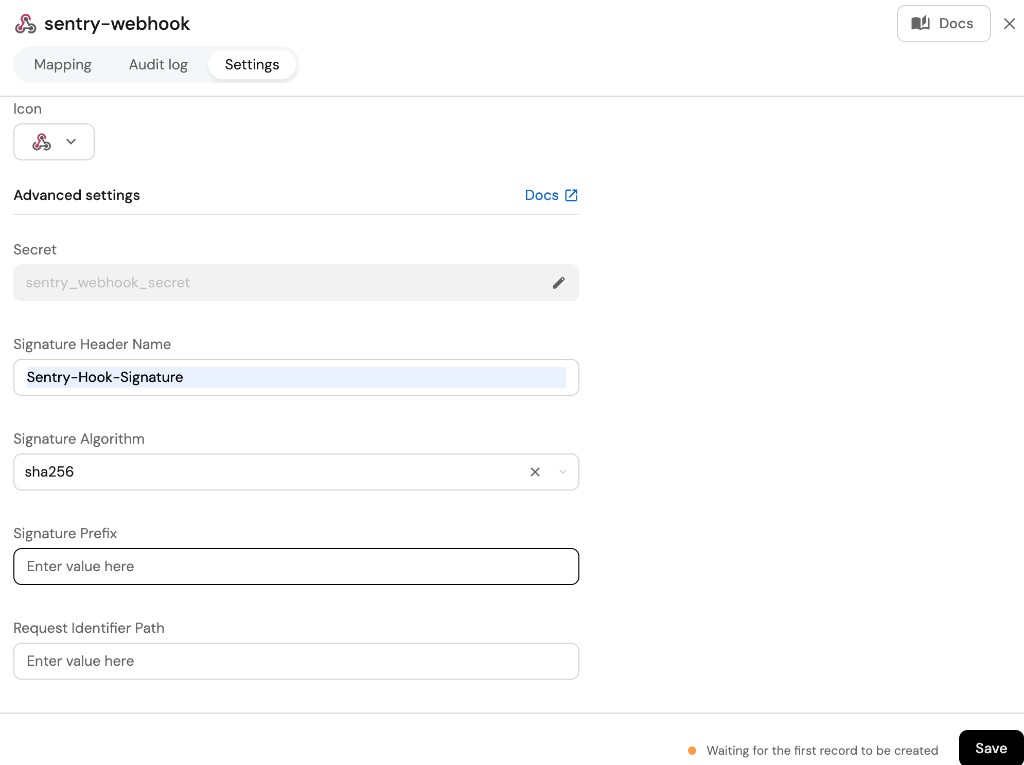
Create the following webhook configuration using Port UI: Basic details tab - fill the following details: Integration configuration tab - fill the following JQ mapping: Scroll down to Advanced settings and input the following details:Sentry issue webhook configuration (click to expand)
Sentry issue mapper;sentry_issue_mapper;A webhook configuration to map Sentry Issues to Port;Sentry;[
{
"blueprint": "sentryIssue",
"entity": {
"identifier": ".body.data.issue.id",
"title": ".body.data.issue.title",
"properties": {
"action": ".body.action",
"level": ".body.data.issue.level",
"platform": ".body.data.issue.platform",
"status": ".body.data.issue.status",
"projectID": ".body.data.issue.project.id"
}
}
}
]
sentry-hook-signature;sha256 from dropdown option;
We have left out the secret field from the security object in the webhook configuration because the secret value is generated by Sentry when creating the webhook.
So when following this example, please first create the webhook configuration in Port. Use the webhook URL from the response and create the webhook in Sentry following the Live events instructions.
After getting the secret from Sentry, you can go back to Port and update the webhook configuration with the secret.
Create a webhook in Sentry
To set up the webhook in Sentry, follow the steps in the Live events section. Use the URL you received from Port as the Webhook URL.
Now that the webhook is created, you can take the secret value generated by Sentry and use it to update the security object in your Port webhook configuration.
Relate comments to Issues
The following example adds a sentryComment blueprint, in addition to the sentryIssue blueprint shown in the previous example. In addition, it also adds a sentryIssue relation. The webhook will create or update the relation between the 2 existing entities, allowing you to map which issue a comment is made on:Sentry comments blueprint (including the sentryIssue relation)
{
"identifier": "sentryComment",
"description": "This blueprint represents a Sentry comment in our software catalog",
"title": "Sentry Comment",
"icon": "Sentry",
"schema": {
"properties": {
"action": {
"type": "string",
"title": "action",
"enum": ["created", "updated", "deleted"]
},
"comment": {
"type": "string",
"title": "Comment"
},
"project": {
"type": "string",
"title": "Project Slug"
},
"issue_id": {
"type": "string",
"title": "Issue ID"
},
"timestamp": {
"type": "string",
"title": "Comment Timestamp"
}
},
"required": []
},
"mirrorProperties": {},
"calculationProperties": {},
"relations": {
"sentryIssue": {
"title": "Issue",
"target": "sentryIssue",
"required": false,
"many": false
}
}
}
Create the following webhook configuration using Port UI: Basic details tab - fill the following details: Integration configuration tab - fill the following JQ mapping: Scroll down to Advanced settings and input the following details:Sentry comments webhook configuration (click to expand)
Sentry comment mapper;sentry_comment_mapper;A webhook configuration to map Sentry Comments to Port;Sentry;[
{
"blueprint": "sentryComment",
"entity": {
"identifier": ".body.data.comment_id",
"title": "Comment Event",
"properties": {
"action": ".body.action",
"comment": ".body.data.comment",
"project": ".body.data.project_slug",
"issue_id": ".body.data.issue_id",
"timestamp": ".body.data.timestamp"
},
"relations": {
"sentryIssue": ".body.data.issue_id | tostring"
}
}
}
]
sentry-hook-signature;sha256 from dropdown option;
In order to view the different payloads and events available in Sentry webhooks, click here
Done! any issue and comment in Sentry will trigger a webhook event. Port will parse the events according to the mapping and update the catalog entities accordingly.
Let's Test It
This section includes a sample webhook event sent from Sentry when an issue or comment is created. In addition, it includes the entity created from the event based on the webhook configuration provided in the previous section.
Payload
Here is an example of the payload structure sent to the webhook URL when a Sentry issue or comment is created:Sentry issue webhook event payload (click to expand)
{
"action": "created",
"installation": {
"uuid": "54a3e698-f389-4d86-b9f8-50093a228449"
},
"data": {
"issue": {
"id": "4253613038",
"shareId": "None",
"shortId": "PYTHON-B",
"title": "NameError: name 'total' is not defined",
"culprit": "__main__ in <module>",
"permalink": "None",
"logger": "None",
"level": "error",
"status": "unresolved",
"statusDetails": {},
"substatus": "new",
"isPublic": false,
"platform": "python",
"project": {
"id": "4504989602480128",
"name": "python",
"slug": "python",
"platform": "python"
},
"type": "error",
"metadata": {
"value": "name 'total' is not defined",
"type": "NameError",
"filename": "sentry.py",
"function": "<module>",
"display_title_with_tree_label": false
},
"numComments": 0,
"assignedTo": "None",
"isBookmarked": false,
"isSubscribed": false,
"subscriptionDetails": "None",
"hasSeen": false,
"annotations": [],
"issueType": "error",
"issueCategory": "error",
"isUnhandled": true,
"count": "1",
"userCount": 0,
"firstSeen": "2023-06-15T17:10:09.914274Z",
"lastSeen": "2023-06-15T17:10:09.914274Z"
}
},
"actor": {
"type": "application",
"id": "sentry",
"name": "Sentry"
}
}Sentry comment webhook event payload (click to expand)
{
"action": "created",
"installation": {
"uuid": "d5a2de51-0138-496a-8e79-c17747c3a40d"
},
"data": {
"comment_id": "1729635072",
"issue_id": "4253613038",
"project_slug": "python",
"timestamp": "2023-06-15T17:15:53.383120Z",
"comment": "Hello admin please take a look at this"
},
"actor": {
"type": "user",
"id": 2683666,
"name": "user@domain.com"
}
}
Mapping Result
The combination of the sample payload and the webhook configuration generates the following Port sentryIssue entity:
{
"identifier": "4253613038",
"title": "NameError: name 'total' is not defined",
"blueprint": "sentryIssue",
"icon": "Sentry",
"properties": {
"action": "created",
"level": "error",
"platform": "python",
"status": "unresolved",
"projectID": "4504989602480128"
},
"relations": {}
}
In addition, the following Port sentryComment entity will be generated:
{
"identifier": "1729635072",
"title": "Comment Event",
"blueprint": "sentryComment",
"properties": {
"action": "created",
"comment": "Hello admin please take a look at this",
"project": "python",
"issue_id": "4253613038",
"timestamp": "2023-06-15T17:15:53.383120Z"
},
"relations": {
"sentryIssue": "4253613038"
}
}