Aggregation Property
Aggregation properties allow you to calculate metrics based on the relations in your catalog.
Using the aggregation property enables you to see relevant metrics on related entities, without having to manually calculate them.
Aggregations can be performed on any blueprint that is related in any way to the current blueprint (directly, indirectly, upstream or downstream).
By default, aggregations consider all possible paths between the source and target entities. To control which path is used, see Path Filter.
Common aggregation usage
For example, if you have a microservice blueprint, you can define aggregation properties on it to calculate metrics based on related entities such as:
- Number of open jira issues related to a microservice.
- Number of CRITICAL and HIGH vulnerabilities that are not resolved related to a microservice.
- Average deployment frequency in the last week.
- Build success rate in the last month.
The aggregation property enables you to specify scorecards and initiative rules based on metrics of related entities.
For example - If you have a microservice blueprint, with related Alert blueprint, you can define a rule that will check if the number of open CRITICAL and HIGH alerts that are related to each microservice is greater than 0.
When to use Aggregation Properties
Aggregation property ideally will be defined on blueprints which are in the higher abstraction level in your catalog.
Those blueprints are usually the ones that are related to many other blueprints in your catalog, and therefore, they are the ones that can benefit the most from aggregation properties.
Specification
The aggregationProperties key is a top-level key in the JSON of an entity (similar to identifier, title, properties, etc..)
The aggregation property supports calculations by entities or by property.
-
Calculations by entities are performed on the entities that match the query (e.g. count the number of entities that match the query).
-
Calculations by property are performed on the property of the entities that match the query (e.g. sum the value of the property of the entities that match the query).
Definitions
- API
- Terraform
- Pulumi
Calculate by entities
Calculate by entities is used to calculate metrics based on the entities that match the query.
Supported methods:
count- Count the number of entities that match the query. For example, count the number of open Jira issues related to a microservice.average- Calculate the average of entities per a defined time period. For example, calculate the average deployment frequency per week.
- Entities Count
- Entities Average
In this example, we have a microservice blueprint and we want to calculate the number of open Jira issues related to each microservice.
{
  "aggregationProperties": {
    "numberOfOpenJiraIssues": {
      "title": "Number of open Jira issues",
      "target": "jiraIssue",
      "calculationSpec": {
        "calculationBy": "entities",
        "func": "count"
      },
      "query": {
        "combinator": "and",
        "rules": [
          {
            "property": "status",
            "operator": "=",
            "value": "OPEN"
          }
        ]
      }
    }
  }
}
The aggregationProperties contains a key called numberOfOpenJiraIssues which is the identifier of the aggregation property we want to define.
title- The title of the aggregation property.target- The blueprint we want to aggregate data from.query- Optional - The query that will be performed on the target blueprint. The query is based on the Filters to include or exclude specific data based on Port's Search RulescalculationSpec- The calculation specification."calculationBy": "entities"- The calculation will be performed on the entities that match the query."func": "count"- is the function we want to use for the calculation.
In this example, we have a microservice blueprint, and we want to calculate the average deployment frequency for each of the microservices.
{
  "aggregationProperties": {
    "averageDeploymentFrequency": {
      "title": "Average deployment frequency",
      "target": "deployment",
      "calculationSpec": {
        "calculationBy": "entities",
        "func": "average",
        "averageOf": "week",
        "measureTimeBy": "$createdAt"
      },
      "query": {
        "combinator": "and",
        "rules": [
          {
            "property": "status",
            "operator": "=",
            "value": "SUCCESS"
          }
        ]
      }
    }
  }
}
The aggregationProperties contains a key called averageDeploymentFrequency which is the identifier of the aggregation property we want to define.
title- The title of the aggregation property.target- The blueprint we want to aggregate data from.query- Optional - The query that will be performed on the target blueprint. The query is based on the Filters to include or exclude specific data based on Port's Search RulescalculationSpec- The calculation specification."calculationBy": "entities"- The calculation will be performed on the entities that match the query (e.g. count the number of entities that match the query)."func": "average"- is the function we want to use for the calculation."averageOf": "week"- The time period we want to calculate the average for. In this example, we want to calculate the average deployment frequency for each week. Supported Options are:hour, day ,week and month"measureTimeBy": "$createdAt"- The time property we want to measure the average by. You can use any date property in the target blueprint by default, we add $createdAt and $updatedAt as meta-properties to each entity.
Calculate by property
Calculate by property is used to calculate metrics based on the property of the entities that match the query.
The property type must be a number.
Supported methods:
sum- Sum the value of the property of the entities that match the query. For example, sum the story points of open Jira issues related to a microservice.average- Calculate the average of the property of the entities that match the query. For example, average cpu usage of a microservice.min- Calculate the minimum value of the property of the entities that match the query. For example, lowest alert severity of a microservice in the last week.max- Calculate the maximum value of the property of the entities that match the query. For example, highest alert severity of a microservice in the last week.median- Calculate the median value of the property of the entities that match the query. For example, median cpu usage of a microservice in the last week.
- Sum
- Average
- Min
- Max
- Median
In this example, we have a microservice blueprint, and we want to calculate the sum of the story points of open Jira issues related to each microservice.
{
  "aggregationProperties": {
    "sumOfStoryPoints": {
      "title": "Sum of story points",
      "target": "jiraIssue",
      "calculationSpec": {
        "calculationBy": "property",
        "func": "sum",
        "property": "storyPoints"
      },
      "query": {
        "combinator": "and",
        "rules": [
          {
            "property": "status",
            "operator": "=",
            "value": "OPEN"
          }
        ]
      }
    }
  }
}
The aggregationProperties contains a key called sumOfStoryPoints which is the identifier of the aggregation property we want to define.
title- The title of the aggregation property.target- The blueprint we want to aggregate data from.query- Optional - The query that will be performed on the target blueprint. The query is based on the Filters to include or exclude specific data based on Port's Search RulescalculationSpec- The calculation specification."calculationBy": "property"- The calculation will be performed on the property of the entities that match the query (e.g. sum the value of the property of the entities that match the query)."func": "sum"is the function we want to use for the calculation."property": "storyPoints"- The property we want to calculate the sum of. The property type must be a number.
In this example, we have a microservice blueprint, and we want to calculate the average cpu usage of each microservice.
{
  "aggregationProperties": {
    "averageCpuUsage": {
      "title": "Average CPU usage",
      "target": "deployment",
      "calculationSpec": {
        "calculationBy": "property",
        "func": "average",
        "property": "cpuUsage",
        "averageOf": "week",
        "measureTimeBy": "$createdAt"
      },
      "query": {
        "combinator": "and",
        "rules": [
          {
            "property": "status",
            "operator": "=",
            "value": "SUCCESS"
          }
        ]
      }
    }
  }
}
The aggregationProperties contains a key called averageCpuUsage which is the identifier of the aggregation property we want to define.
title- The title of the aggregation property.target- The blueprint we want to aggregate data from.query- Optional - The query that will be performed on the target blueprint. The query is based on the Filters to include or exclude specific data based on Port's Search RulescalculationSpec- The calculation specification.calculationBy-propertyThe calculation will be performed on the property of the entities that match the query (e.g. average the value of the property of the entities that match the query)."func": "average"- is the function we want to use for the calculation."property": "cpuUsage"- The property we want to calculate the average of. The property type must be a number."averageOf": "week"- The time period we want to calculate the average for. In this example, we want to calculate the average deployment frequency for each week. Supported Options are: `hour, day ,week, month and total"measureTimeBy": "$createdAt"- The time property we want to measure the average by. You can use any date property in the target blueprint by default, we add $createdAt and $updatedAt as meta-properties to each entity.
In this example, we have a microservice blueprint, and we want to calculate the minimum value of the alert severity of each microservice in the last week.
{
  "aggregationProperties": {
    "minAlertSeverity": {
      "title": "Minimum alert severity",
      "target": "alert",
      "calculationSpec": {
        "calculationBy": "property",
        "func": "min",
        "property": "severity"
      },
      "query": {
        "combinator": "and",
        "rules": [
          {
            "property": "status",
            "operator": "=",
            "value": "OPEN"
          },
          {
            "property": "$createdAt",
            "operator": "between",
            "value": {
              "preset": "lastWeek"
            }
          }
        ]
      }
    }
  }
}
The aggregationProperties contains a key called minAlertSeverity which is the identifier of the aggregation property we want to define.
title- The title of the aggregation property.target- The blueprint we want to aggregate data from.query- Optional - The query that will be performed on the target blueprint. The query is based on the Filters to include or exclude specific data based on Port's Search RulescalculationSpec- The calculation specification."calculationBy": "property"The calculation will be performed on the property of the entities that match the query (e.g. minimum value of the property of the entities that match the query)."func": "min"- is the function we want to use for the calculation."property": "severity"- The property we want to calculate the minimum of. The property type must be a number.
In this example, we have a microservice blueprint, and we want to calculate the maximum value of the alert severity of each microservice in the last week.
{
  "aggregationProperties": {
    "maxAlertSeverity": {
      "title": "Maximum alert severity",
      "target": "alert",
      "calculationSpec": {
        "calculationBy": "property",
        "func": "max",
        "property": "severity"
      },
      "query": {
        "combinator": "and",
        "rules": [
          {
            "property": "status",
            "operator": "=",
            "value": "OPEN"
          },
          {
            "property": "$createdAt",
            "operator": "between",
            "value": {
              "preset": "lastWeek"
            }
          }
        ]
      }
    }
  }
}
The aggregationProperties contains a key called maxAlertSeverity which is the identifier of the aggregation property we want to define.
title- The title of the aggregation property.target- The blueprint we want to aggregate data from.query- Optional - The query that will be performed on the target blueprint. The query is based on the Filters to include or exclude specific data based on Port's Search RulescalculationSpec- The calculation specification."calculationBy": "property"The calculation will be performed on the property of the entities that match the query (e.g. maximum value of the property of the entities that match the query)."func": "max"- is the function we want to use for the calculation."property": "severity"- The property we want to calculate the maximum of. The property type must be a number.
In this example, we have a microservice blueprint, and we want to calculate the median value of the cpu usage across all related pods of each microservice.
{
  "aggregationProperties": {
    "medianCpuUsage": {
      "title": "Median CPU usage",
      "target": "pod",
      "calculationSpec": {
        "calculationBy": "property",
        "func": "median",
        "property": "cpuUsage"
      },
      "query": {
        "combinator": "and",
        "rules": [
          {
            "property": "status",
            "operator": "=",
            "value": "OPEN"
          },
          {
            "property": "$createdAt",
            "operator": "between",
            "value": {
              "preset": "lastWeek"
            }
          }
        ]
      }
    }
  }
}
The aggregationProperties contains a key called medianCpuUsage which is the identifier of the aggregation property we want to define.
title- The title of the aggregation property.target- The blueprint we want to aggregate data from.query- Optional - The query that will be performed on the target blueprint. The query is based on the Filters to include or exclude specific data based on Port's Search RulescalculationSpec- The calculation specification."calculationBy": "property"The calculation will be performed on the property of the entities that match the query (e.g. median value of the property of the entities that match the query)."func": "median"is the function we want to use for the calculation."property": "cpuUsage"- The property we want to calculate the median of. The property type must be a number.
Calculate by entities
Calculate by entities is used to calculate metrics based on the entities that match the query.
Supported methods:
count_entities- Count the number of entities that match the query. For example, count the number of open Jira issues related to a microservice.average_entities- Calculate the average of entities per a defined time period. For example, calculate the average deployment frequency per week.
- Entities Count
- Entities Average
In this example, we create a parent blueprint with a child blueprint and an aggregation property to count the parent kids:
resource "port_blueprint" "parent_blueprint" {
  title       = "Parent Blueprint"
  icon        = "Terraform"
  identifier  = "parent"
  description = ""
  properties = {
    number_props = {
      "age" = {
        title = "Age"
      }
    }
  }
}

resource "port_blueprint" "child_blueprint" {
  title       = "Child Blueprint"
  icon        = "Terraform"
  identifier  = "child"
  description = ""
  properties = {
    number_props = {
      "age" = {
        title = "Age"
      }
    }
  }
  relations = {
    "parent" = {
      title  = "Parent"
      target = port_blueprint.parent_blueprint.identifier
    }
  }
}

resource "port_aggregation_properties" "parent_aggregation_properties" {
  blueprint_identifier = port_blueprint.parent_blueprint.identifier
  properties           = {
    count_kids = {
      target_blueprint_identifier = port_blueprint.child_blueprint.identifier
      title                       = "Count Kids"
      icon                        = "Terraform"
      description                 = "Count Kids"
      method                      = {
        count_entities = true
      }
    }
  }
}
In this example, we have a microservice blueprint, and we want to calculate the average deployment frequency for each of the microservices.
resource "port_blueprint" "microservice_blueprint" {
  title       = "Microservice Blueprint"
  icon        = "Terraform"
  identifier  = "microservice"
  description = ""
}


resource "port_blueprint" "deployment_blueprint" {
  title       = "Deployment Blueprint"
  icon        = "Terraform"
  identifier  = "deployment"
  description = ""
  relations = {
    "microservice" = {
      title  = "Microservice"
      target = port_blueprint.microservice_blueprint.identifier
    }
  }
}

resource "port_aggregation_properties" "microservice_aggregation_properties" {
  blueprint_identifier = port_blueprint.microservice_blueprint.identifier
  properties           = {
    average_deployment_frequency = {
      target_blueprint_identifier = port_blueprint.deployment_blueprint.identifier
      title                       = "Average deployment frequency"
      icon                        = "Terraform"
      description                 = "Average deployment frequency"
      method                      = {
        average_entities = {
          average_of      = "week"
          measure_time_by = "$createdAt"
        }
      }
    }
  }
}
Calculate by property
Calculate by property is used to calculate metrics based on the property of the entities that match the query.
The property type must be a number.
Supported methods:
average_by_property- Calculate the average of the property of the entities that match the query. For example, average cpu usage of a microservice.aggregate_by_property- Aggregate the value of the property of the entities that match the query, supported aggregation functions are:sum, min, max, median. For example, sum the story points of open Jira issues related to a microservice.
- Sum
- Average
- Min
- Max
- Median
In this example, we have a microservice blueprint, and we want to calculate the sum of the story points of open Jira issues related to each microservice.
resource "port_blueprint" "microservice_blueprint" {
  title       = "Microservice Blueprint"
  icon        = "Terraform"
  identifier  = "microservice"
  description = ""
}

resource "port_blueprint" "jira_issue_blueprint" {
  title       = "Jira Issue Blueprint"
  icon        = "Terraform"
  identifier  = "jira_issue"
  description = ""
  properties = {
    number_props = {
      "storyPoints" = {
        title = "Story Points"
      }
    }
  }
  relations = {
    "microservice" = {
      title  = "Microservice"
      target = port_blueprint.microservice_blueprint.identifier
    }
  }
}

resource "port_aggregation_properties" "microservice_aggregation_properties" {
  blueprint_identifier = port_blueprint.microservice_blueprint.identifier
  properties           = {
    sum_of_story_points = {
      target_blueprint_identifier = port_blueprint.jira_issue_blueprint.identifier
      title                       = "Sum of story points"
      icon                        = "Terraform"
      description                 = "Sum of story points"
      method                      = {
        aggregate_by_property = {
          func     = "sum"
          property = "storyPoints"
        }
      }
    }
  }
}
In this example, we have a microservice blueprint, and we want to calculate the average cpu usage of each microservice.
resource "port_blueprint" "microservice_blueprint" {
  title       = "Microservice Blueprint"
  icon        = "Terraform"
  identifier  = "microservice"
  description = ""
}

resource "port_blueprint" "deployment_blueprint" {
  title       = "Deployment Blueprint"
  icon        = "Terraform"
  identifier  = "deployment"
  description = ""
  properties = {
    number_props = {
      "cpuUsage" = {
        title = "CPU Usage"
      }
    }
  }
  relations = {
    "microservice" = {
      title  = "Microservice"
      target = port_blueprint.microservice_blueprint.identifier
    }
  }
}

resource "port_aggregation_properties" "microservice_aggregation_properties" {
  blueprint_identifier = port_blueprint.microservice_blueprint.identifier
  properties           = {
    average_cpu_usage = {
      target_blueprint_identifier = port_blueprint.deployment_blueprint.identifier
      title                       = "Average CPU usage"
      icon                        = "Terraform"
      description                 = "Average CPU usage"
      method                      = {
        average_by_property = {
          average_of      = "week"
          measure_time_by = "$createdAt"
          property        = "cpuUsage"
        }
      }
    }
  }
}
In this example, we have a microservice blueprint, and we want to calculate the minimum value of the alert severity of each microservice in the last week.
resource "port_blueprint" "microservice_blueprint" {
  title       = "Microservice Blueprint"
  icon        = "Terraform"
  identifier  = "microservice"
  description = ""
}

resource "port_blueprint" "alert_blueprint" {
  title       = "Alert Blueprint"
  icon        = "Terraform"
  identifier  = "alert"
  description = ""
  properties = {
    number_props = {
      "severity" = {
        title = "Severity"
      }
    }
  }
  relations = {
    "microservice" = {
      title  = "Microservice"
      target = port_blueprint.microservice_blueprint.identifier
    }
  }
}

resource "port_aggregation_properties" "microservice_aggregation_properties" {
  blueprint_identifier = port_blueprint.microservice_blueprint.identifier
  properties           = {
    min_alert_severity = {
      target_blueprint_identifier = port_blueprint.alert_blueprint.identifier
      title                       = "Minimum alert severity"
      icon                        = "Terraform"
      description                 = "Minimum alert severity"
      method                      = {
        aggregate_by_property = {
          func     = "min"
          property = "severity"
        }
      }
    }
  }
}
In this example, we have a microservice blueprint, and we want to calculate the maximum value of the alert severity of each microservice in the last week.
resource "port_blueprint" "microservice_blueprint" {
  title       = "Microservice Blueprint"
  icon        = "Terraform"
  identifier  = "microservice"
  description = ""
}

resource "port_blueprint" "alert_blueprint" {
  title       = "Alert Blueprint"
  icon        = "Terraform"
  identifier  = "alert"
  description = ""
  properties = {
    number_props = {
      "severity" = {
        title = "Severity"
      }
    }
  }
  relations = {
    "microservice" = {
      title  = "Microservice"
      target = port_blueprint.microservice_blueprint.identifier
    }
  }
}

resource "port_aggregation_properties" "microservice_aggregation_properties" {
  blueprint_identifier = port_blueprint.microservice_blueprint.identifier
  properties           = {
    max_alert_severity = {
      target_blueprint_identifier = port_blueprint.alert_blueprint.identifier
      title                       = "Maximum alert severity"
      icon                        = "Terraform"
      description                 = "Maximum alert severity"
      method                      = {
        aggregate_by_property = {
          func     = "max"
          property = "severity"
        }
      }
    }
  }
}
In this example, we have a microservice blueprint, and we want to calculate the median value of the cpu usage across all related pods of each microservice.
resource "port_blueprint" "microservice_blueprint" {
  title       = "Microservice Blueprint"
  icon        = "Terraform"
  identifier  = "microservice"
  description = ""
}

resource "port_blueprint" "pod_blueprint" {
  title       = "Pod Blueprint"
  icon        = "Terraform"
  identifier  = "pod"
  description = ""
  properties = {
    number_props = {
      "cpuUsage" = {
        title = "CPU Usage"
      }
    }
  }
  relations = {
    "microservice" = {
      title  = "Microservice"
      target = port_blueprint.microservice_blueprint.identifier
    }
  }
}

resource "port_aggregation_properties" "microservice_aggregation_properties" {
  blueprint_identifier = port_blueprint.microservice_blueprint.identifier
  properties           = {
    median_cpu_usage = {
      target_blueprint_identifier = port_blueprint.pod_blueprint.identifier
      title                       = "Median CPU usage"
      icon                        = "Terraform"
      description                 = "Median CPU usage"
      method                      = {
        aggregate_by_property = {
          func     = "median"
          property = "cpuUsage"
        }
      }
    }
  }
}
Using a query in aggregation properties
You can use the query to filter the entities you want to perform the calculation on.
The query is based on the Filters to include or exclude specific data based on Port's Search Rules
Query Example
Create a repository blueprint and a pull request blueprint and an aggregation property to calculate the average of fix pull request per month:
To do that we will add a query to the aggregation property to filter only pull requests with fixed title:
resource "port_blueprint" "repository_blueprint" {
  title       = "Repository Blueprint"
  icon        = "Terraform"
  identifier  = "repository"
  description = ""
}

resource "port_blueprint" "pull_request_blueprint" {
  title       = "Pull Request Blueprint"
  icon        = "Terraform"
  identifier  = "pull_request"
  description = ""
  properties = {
    string_props = {
      "status" = {
        title = "Status"
      }
    }
  }
  relations = {
    "repository" = {
      title  = "Repository"
      target = port_blueprint.repository_blueprint.identifier
    }
  }
}

resource "port_aggregation_properties" "repository_aggregation_properties" {
  blueprint_identifier = port_blueprint.repository_blueprint.identifier
  properties           = {
    fix_pull_requests_count = {
      target_blueprint_identifier = port_blueprint.pull_request_blueprint.identifier
      title                       = "Pull Requests Per Day"
      icon                        = "Terraform"
      description                 = "Pull Requests Per Day"
      method                      = {
        average_entities = {
          average_of      = "month"
          measure_time_by = "$createdAt"
        }
      }
      query = jsonencode(
        {
          "combinator" : "and",
          "rules" : [
            {
              "property" : "$title",
              "operator" : "ContainsAny",
              "value" : ["fix", "fixed", "fixing", "Fix"]
            }
          ]
        }
      )
    }
  }
}
Calculate by entities
Calculate by entities is used to calculate metrics based on the entities that match the query.
Supported methods:
countEntities- Count the number of entities that match the query. For example, count the number of open Jira issues related to a microservice.averageEntities- Calculate the average of entities per a defined time period. For example, calculate the average deployment frequency per week.
In Pulumi, aggregation properties are defined using the port.AggregationProperties resource (separate from the blueprint). Below are examples in different languages.
- TypeScript
- Python
- JavaScript
- Go
Entities count - Count the number of child entities related to each parent:
import * as pulumi from "@pulumi/pulumi";
import * as port from "@port-labs/port";

const parentBlueprint = new port.Blueprint("parentBlueprint", {
  identifier: "parent",
  title: "Parent Blueprint",
  properties: {
    numberProps: {
      age: { title: "Age" },
    },
  },
});

const childBlueprint = new port.Blueprint("childBlueprint", {
  identifier: "child",
  title: "Child Blueprint",
  properties: {
    numberProps: {
      age: { title: "Age" },
    },
  },
  relations: {
    parent: {
      title: "Parent",
      target: parentBlueprint.identifier,
    },
  },
});

const parentAggregationProperties = new port.AggregationProperties("parentAggregationProperties", {
  blueprintIdentifier: parentBlueprint.identifier,
  properties: {
    count_kids: {
      targetBlueprintIdentifier: childBlueprint.identifier,
      title: "Count Kids",
      icon: "Terraform",
      description: "Count Kids",
      method: {
        countEntities: true,
      },
    },
  },
});
Entities average - Average deployment frequency per week for each microservice:
import * as pulumi from "@pulumi/pulumi";
import * as port from "@port-labs/port";

const microserviceBlueprint = new port.Blueprint("microserviceBlueprint", {
  identifier: "microservice",
  title: "Microservice Blueprint",
});

const deploymentBlueprint = new port.Blueprint("deploymentBlueprint", {
  identifier: "deployment",
  title: "Deployment Blueprint",
  relations: {
    microservice: {
      title: "Microservice",
      target: microserviceBlueprint.identifier,
    },
  },
});

const microserviceAggregationProperties = new port.AggregationProperties("microserviceAggregationProperties", {
  blueprintIdentifier: microserviceBlueprint.identifier,
  properties: {
    average_deployment_frequency: {
      targetBlueprintIdentifier: deploymentBlueprint.identifier,
      title: "Average deployment frequency",
      icon: "Terraform",
      description: "Average deployment frequency",
      method: {
        averageEntities: {
          averageOf: "week",
          measureTimeBy: "$createdAt",
        },
      },
    },
  },
});
Entities count - Count the number of child entities related to each parent:
"""A Python Pulumi program"""

import pulumi
from port_pulumi import Blueprint, AggregationProperties

parent_blueprint = Blueprint(
    "parentBlueprint",
    identifier="parent",
    title="Parent Blueprint",
    properties={
        "number_props": {
            "age": {"title": "Age"},
        },
    },
)

child_blueprint = Blueprint(
    "childBlueprint",
    identifier="child",
    title="Child Blueprint",
    properties={
        "number_props": {
            "age": {"title": "Age"},
        },
    },
    relations={
        "parent": {
            "title": "Parent",
            "target": parent_blueprint.identifier,
        },
    },
)

parent_aggregation_properties = AggregationProperties(
    "parentAggregationProperties",
    blueprint_identifier=parent_blueprint.identifier,
    properties={
        "count_kids": {
            "target_blueprint_identifier": child_blueprint.identifier,
            "title": "Count Kids",
            "icon": "Terraform",
            "description": "Count Kids",
            "method": {
                "count_entities": True,
            },
        },
    },
)
Entities average - Average deployment frequency per week for each microservice:
"""A Python Pulumi program"""

import pulumi
from port_pulumi import Blueprint, AggregationProperties

microservice_blueprint = Blueprint(
    "microserviceBlueprint",
    identifier="microservice",
    title="Microservice Blueprint",
)

deployment_blueprint = Blueprint(
    "deploymentBlueprint",
    identifier="deployment",
    title="Deployment Blueprint",
    relations={
        "microservice": {
            "title": "Microservice",
            "target": microservice_blueprint.identifier,
        },
    },
)

microservice_aggregation_properties = AggregationProperties(
    "microserviceAggregationProperties",
    blueprint_identifier=microservice_blueprint.identifier,
    properties={
        "average_deployment_frequency": {
            "target_blueprint_identifier": deployment_blueprint.identifier,
            "title": "Average deployment frequency",
            "icon": "Terraform",
            "description": "Average deployment frequency",
            "method": {
                "average_entities": {
                    "average_of": "week",
                    "measure_time_by": "$createdAt",
                },
            },
        },
    },
)
Entities count - Count the number of child entities related to each parent:
"use strict";
const pulumi = require("@pulumi/pulumi");
const port = require("@port-labs/port");

const parentBlueprint = new port.Blueprint("parentBlueprint", {
  identifier: "parent",
  title: "Parent Blueprint",
  properties: {
    numberProps: {
      age: { title: "Age" },
    },
  },
});

const childBlueprint = new port.Blueprint("childBlueprint", {
  identifier: "child",
  title: "Child Blueprint",
  properties: {
    numberProps: {
      age: { title: "Age" },
    },
  },
  relations: {
    parent: {
      title: "Parent",
      target: parentBlueprint.identifier,
    },
  },
});

const parentAggregationProperties = new port.AggregationProperties("parentAggregationProperties", {
  blueprintIdentifier: parentBlueprint.identifier,
  properties: {
    count_kids: {
      targetBlueprintIdentifier: childBlueprint.identifier,
      title: "Count Kids",
      icon: "Terraform",
      description: "Count Kids",
      method: {
        countEntities: true,
      },
    },
  },
});
Entities average - Average deployment frequency per week for each microservice:
"use strict";
const pulumi = require("@pulumi/pulumi");
const port = require("@port-labs/port");

const microserviceBlueprint = new port.Blueprint("microserviceBlueprint", {
  identifier: "microservice",
  title: "Microservice Blueprint",
});

const deploymentBlueprint = new port.Blueprint("deploymentBlueprint", {
  identifier: "deployment",
  title: "Deployment Blueprint",
  relations: {
    microservice: {
      title: "Microservice",
      target: microserviceBlueprint.identifier,
    },
  },
});

const microserviceAggregationProperties = new port.AggregationProperties("microserviceAggregationProperties", {
  blueprintIdentifier: microserviceBlueprint.identifier,
  properties: {
    average_deployment_frequency: {
      targetBlueprintIdentifier: deploymentBlueprint.identifier,
      title: "Average deployment frequency",
      icon: "Terraform",
      description: "Average deployment frequency",
      method: {
        averageEntities: {
          averageOf: "week",
          measureTimeBy: "$createdAt",
        },
      },
    },
  },
});
Entities count - Count the number of child entities related to each parent:
package main

import (
	"github.com/port-labs/pulumi-port/sdk/v2/go/port"
	"github.com/pulumi/pulumi/sdk/v3/go/pulumi"
)

func main() {
	pulumi.Run(func(ctx *pulumi.Context) error {
		parentBlueprint, err := port.NewBlueprint(ctx, "parentBlueprint", &port.BlueprintArgs{
			Identifier: pulumi.String("parent"),
			Title:      pulumi.String("Parent Blueprint"),
			Properties: port.BlueprintPropertiesArgs{
				NumberProps: port.BlueprintPropertiesNumberPropsMap{
					"age": port.BlueprintPropertiesNumberPropsArgs{
						Title: pulumi.String("Age"),
					},
				},
			},
		})
		if err != nil {
			return err
		}

		childBlueprint, err := port.NewBlueprint(ctx, "childBlueprint", &port.BlueprintArgs{
			Identifier: pulumi.String("child"),
			Title:      pulumi.String("Child Blueprint"),
			Properties: port.BlueprintPropertiesArgs{
				NumberProps: port.BlueprintPropertiesNumberPropsMap{
					"age": port.BlueprintPropertiesNumberPropsArgs{
						Title: pulumi.String("Age"),
					},
				},
			},
			Relations: port.BlueprintRelationArgsMap{
				"parent": port.BlueprintRelationArgs{
					Title:  pulumi.String("Parent"),
					Target: parentBlueprint.Identifier,
				},
			},
		})
		if err != nil {
			return err
		}

		_, err = port.NewAggregationProperties(ctx, "parentAggregationProperties", &port.AggregationPropertiesArgs{
			BlueprintIdentifier: parentBlueprint.Identifier,
			Properties: port.AggregationPropertiesPropertiesMap{
				"count_kids": port.AggregationPropertiesPropertiesArgs{
					TargetBlueprintIdentifier: childBlueprint.Identifier,
					Title:                    pulumi.String("Count Kids"),
					Icon:                     pulumi.String("Terraform"),
					Description:              pulumi.String("Count Kids"),
					Method: port.AggregationPropertiesPropertiesMethodArgs{
						CountEntities: pulumi.Bool(true),
					},
				},
			},
		})
		return err
	})
}
Entities average - Average deployment frequency per week for each microservice:
package main

import (
	"github.com/port-labs/pulumi-port/sdk/v2/go/port"
	"github.com/pulumi/pulumi/sdk/v3/go/pulumi"
)

func main() {
	pulumi.Run(func(ctx *pulumi.Context) error {
		microserviceBlueprint, err := port.NewBlueprint(ctx, "microserviceBlueprint", &port.BlueprintArgs{
			Identifier: pulumi.String("microservice"),
			Title:      pulumi.String("Microservice Blueprint"),
		})
		if err != nil {
			return err
		}

		deploymentBlueprint, err := port.NewBlueprint(ctx, "deploymentBlueprint", &port.BlueprintArgs{
			Identifier: pulumi.String("deployment"),
			Title:      pulumi.String("Deployment Blueprint"),
			Relations: port.BlueprintRelationArgsMap{
				"microservice": port.BlueprintRelationArgs{
					Title:  pulumi.String("Microservice"),
					Target: microserviceBlueprint.Identifier,
				},
			},
		})
		if err != nil {
			return err
		}

		_, err = port.NewAggregationProperties(ctx, "microserviceAggregationProperties", &port.AggregationPropertiesArgs{
			BlueprintIdentifier: microserviceBlueprint.Identifier,
			Properties: port.AggregationPropertiesPropertiesMap{
				"average_deployment_frequency": port.AggregationPropertiesPropertiesArgs{
					TargetBlueprintIdentifier: deploymentBlueprint.Identifier,
					Title:                    pulumi.String("Average deployment frequency"),
					Icon:                     pulumi.String("Terraform"),
					Description:              pulumi.String("Average deployment frequency"),
					Method: port.AggregationPropertiesPropertiesMethodArgs{
						AverageEntities: &port.AggregationPropertiesPropertiesMethodAverageEntitiesArgs{
							AverageOf:     pulumi.String("week"),
							MeasureTimeBy: pulumi.String("$createdAt"),
						},
					},
				},
			},
		})
		return err
	})
}
Calculate by property
Calculate by property is used to calculate metrics based on the property of the entities that match the query. The property type must be a number. Use aggregateByProperty with func set to "sum", "min", "max", or "median", or use averageByProperty for time-based averages.
Sum example (TypeScript) - Sum of story points of open Jira issues per microservice:
import * as pulumi from "@pulumi/pulumi";
import * as port from "@port-labs/port";

const microserviceBlueprint = new port.Blueprint("microserviceBlueprint", {
  identifier: "microservice",
  title: "Microservice Blueprint",
});

const jiraIssueBlueprint = new port.Blueprint("jiraIssueBlueprint", {
  identifier: "jira_issue",
  title: "Jira Issue Blueprint",
  properties: {
    numberProps: {
      storyPoints: { title: "Story Points" },
    },
  },
  relations: {
    microservice: {
      title: "Microservice",
      target: microserviceBlueprint.identifier,
    },
  },
});

const microserviceAggregationProperties = new port.AggregationProperties("microserviceAggregationProperties", {
  blueprintIdentifier: microserviceBlueprint.identifier,
  properties: {
    sum_of_story_points: {
      targetBlueprintIdentifier: jiraIssueBlueprint.identifier,
      title: "Sum of story points",
      icon: "Terraform",
      description: "Sum of story points",
      method: {
        aggregateByProperty: {
          func: "sum",
          property: "storyPoints",
        },
      },
    },
  },
});
Using a query in aggregation properties
You can use the query property to filter the entities you want to perform the calculation on. The query is based on Port's Search Rules.
Query example (TypeScript) - Average of fix pull requests per month per repository:
import * as pulumi from "@pulumi/pulumi";
import * as port from "@port-labs/port";

const repositoryBlueprint = new port.Blueprint("repositoryBlueprint", {
  identifier: "repository",
  title: "Repository Blueprint",
});

const pullRequestBlueprint = new port.Blueprint("pullRequestBlueprint", {
  identifier: "pull_request",
  title: "Pull Request Blueprint",
  properties: {
    stringProps: {
      status: { title: "Status" },
    },
  },
  relations: {
    repository: {
      title: "Repository",
      target: repositoryBlueprint.identifier,
    },
  },
});

const repositoryAggregationProperties = new port.AggregationProperties("repositoryAggregationProperties", {
  blueprintIdentifier: repositoryBlueprint.identifier,
  properties: {
    fix_pull_requests_count: {
      targetBlueprintIdentifier: pullRequestBlueprint.identifier,
      title: "Pull Requests Per Day",
      icon: "Terraform",
      description: "Pull Requests Per Day",
      method: {
        averageEntities: {
          averageOf: "month",
          measureTimeBy: "$createdAt",
        },
      },
      query: JSON.stringify({
        combinator: "and",
        rules: [
          {
            property: "$title",
            operator: "ContainsAny",
            value: ["fix", "fixed", "fixing", "Fix"],
          },
        ],
      }),
    },
  },
});
Path Filter
The pathFilter option lets you control which entities are included in your aggregation calculation based on their relationship path from the source entity. This is useful for complex relationship chains, where you may want to aggregate data only from entities connected through specific paths.
When a pathFilter is defined, Port will include only entities that can be reached through the exact relationship path you specify.
- Forwards path →
Following relations forwards, from the source of a relation to its target (e.g., from a repository to its services). - Backwards path ←
Following relations backwards, from the target of a relation to its source (e.g., from a service back to its repository).
Structure
| Field | Description |
|---|---|
pathFilter.path | An array containing the full path of relation identifiers to traverse. |
pathFilter.fromBlueprint | (Optional) The blueprint to start the path traversal from. Can be the target blueprint or omitted. If omitted, traversal starts from the source blueprint. |
For forwards paths
{
  "pathFilter": [
    {
      "path": ["relation1", "relation2", "relation3"]
    }
  ]
}
For backwards paths
{
  "pathFilter": [
    {
      "path": ["relation1", "relation2", "relation3"],
      "fromBlueprint": "{{targetBlueprint}}"
    }
  ]
}
Examples
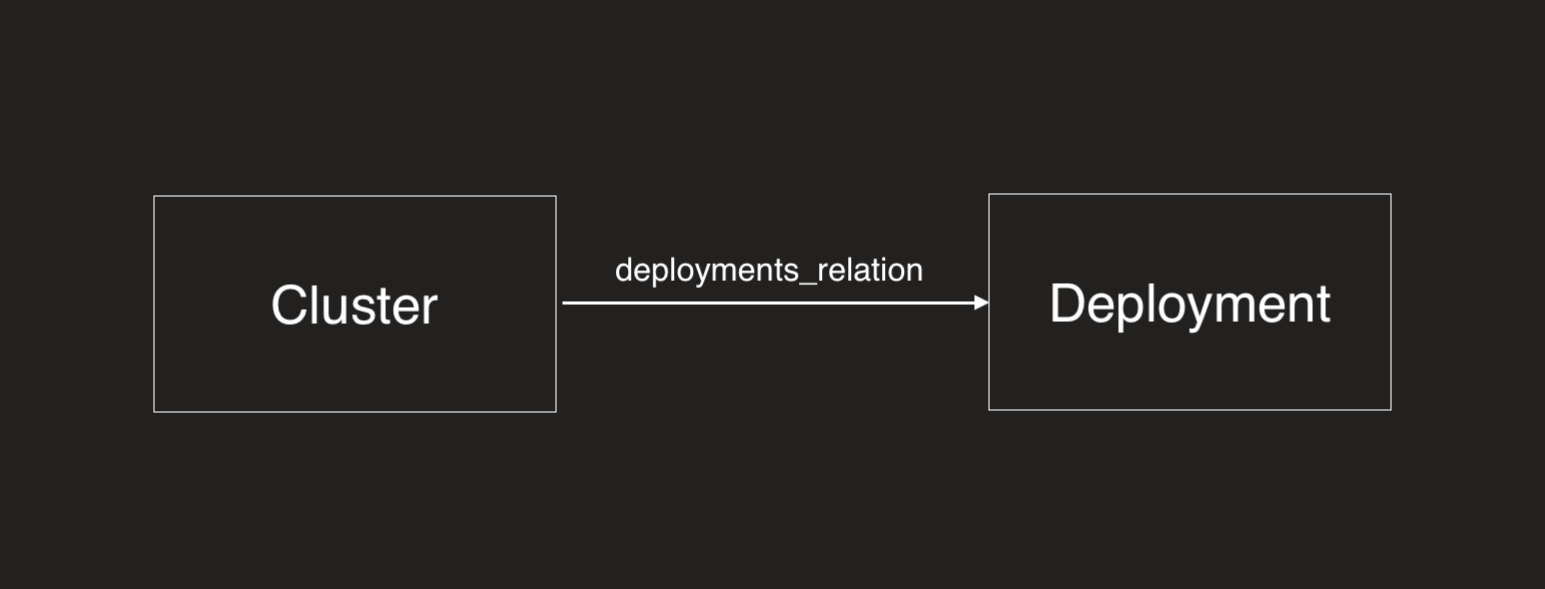
Suppose you have the following data model:
- API
- Terraform
- Pulumi
Example 1: Standard Path Filter - forwards path
Count how many deployments are directly related to a cluster:
{
  "identifier": "cluster",
  "title": "Cluster",
  "aggregationProperties": {
    "deploymentCount": {
      "title": "Deployment Count",
      "target": "deployment",
      "pathFilter": [
        {
          "path": ["deployments_relation"]
        }
      ],
      "calculationSpec": {
        "calculationBy": "entities",
        "func": "count"
      }
    }
  }
}
The pathFilter with "path": ["deployments_relation"] counts deployments that are directly related to the cluster through the deployments_relation relation.
Example 2: Using fromBlueprint - backwards path
Count how many clusters are related to a deployment:
{
  "identifier": "deployment",
  "title": "Deployment",
  "aggregationProperties": {
    "clusterCount": {
      "title": "Cluster Count",
      "target": "cluster",
      "pathFilter": [
        {
          "path": ["deployments_relation"],
          "fromBlueprint": "cluster"
        }
      ],
      "calculationSpec": {
        "calculationBy": "entities",
        "func": "count"
      }
    }
  }
}
The fromBlueprint: "cluster" specifies that the path traversal should start from the cluster blueprint (the target), then follow the path backwards through deployments_relation to deployment.
Example 1: Standard Path Filter - forwards path
Count how many deployments are directly related to a cluster:
resource "port_blueprint" "cluster_blueprint" {
  identifier = "cluster"
  title      = "Cluster"
  relations = {
    "deployments_relation" = {
      title  = "Deployments"
      target = port_blueprint.deployment_blueprint.identifier
    }
  }
}

resource "port_blueprint" "deployment_blueprint" {
  identifier = "deployment"
  title      = "Deployment"
}

resource "port_aggregation_properties" "cluster_aggregation_properties" {
  blueprint_identifier = port_blueprint.cluster_blueprint.identifier
  properties           = {
    deployment_count = {
      target_blueprint_identifier = port_blueprint.deployment_blueprint.identifier
      title                       = "Deployment Count"
      icon                        = "Terraform"
      description                 = "Deployment Count"
      path_filter                 = [
        {
          path = ["deployments_relation"]
        }
      ]
      method                      = {
        count_entities = true
      }
    }
  }
}
The path = ["deployments_relation"] counts deployments that are directly related to the cluster through the deployments_relation relation.
Example 2: Using fromBlueprint - backwards path
Count how many clusters are related to a deployment:
resource "port_blueprint" "deployment_blueprint" {
  identifier = "deployment"
  title      = "Deployment"
}

resource "port_blueprint" "cluster_blueprint" {
  identifier = "cluster"
  title      = "Cluster"
  relations = {
    "deployments_relation" = {
      title  = "Deployments"
      target = port_blueprint.deployment_blueprint.identifier
    }
  }
}

resource "port_aggregation_properties" "deployment_aggregation_properties" {
  blueprint_identifier = port_blueprint.deployment_blueprint.identifier
  properties           = {
    cluster_count = {
      target_blueprint_identifier = port_blueprint.cluster_blueprint.identifier
      title                       = "Cluster Count"
      icon                        = "Terraform"
      description                 = "Cluster Count"
      path_filter                 = [
        {
          path = ["deployments_relation"]
          from_blueprint = "cluster"
        }
      ]
      method                      = {
        count_entities = true
      }
    }
  }
}
The from_blueprint = "cluster" specifies that the path traversal should start from the cluster blueprint (the target), then follow the path backwards through deployments_relation to deployment.
Example 1: Standard path filter - forwards path
Count how many deployments are directly related to a cluster:
import * as pulumi from "@pulumi/pulumi";
import * as port from "@port-labs/port";

const deploymentBlueprint = new port.Blueprint("deploymentBlueprint", {
  identifier: "deployment",
  title: "Deployment",
});

const clusterBlueprint = new port.Blueprint("clusterBlueprint", {
  identifier: "cluster",
  title: "Cluster",
  relations: {
    deployments_relation: {
      title: "Deployments",
      target: deploymentBlueprint.identifier,
    },
  },
});

const clusterAggregationProperties = new port.AggregationProperties("clusterAggregationProperties", {
  blueprintIdentifier: clusterBlueprint.identifier,
  properties: {
    deployment_count: {
      targetBlueprintIdentifier: deploymentBlueprint.identifier,
      title: "Deployment Count",
      icon: "Terraform",
      description: "Deployment Count",
      pathFilters: [
        {
          paths: ["deployments_relation"],
        },
      ],
      method: {
        countEntities: true,
      },
    },
  },
});
The pathFilters with paths: ["deployments_relation"] counts deployments that are directly related to the cluster through the deployments_relation relation.
Example 2: Using fromBlueprint - backwards path
Count how many clusters are related to a deployment:
import * as pulumi from "@pulumi/pulumi";
import * as port from "@port-labs/port";

const deploymentBlueprint = new port.Blueprint("deploymentBlueprint", {
  identifier: "deployment",
  title: "Deployment",
});

const clusterBlueprint = new port.Blueprint("clusterBlueprint", {
  identifier: "cluster",
  title: "Cluster",
  relations: {
    deployments_relation: {
      title: "Deployments",
      target: deploymentBlueprint.identifier,
    },
  },
});

const deploymentAggregationProperties = new port.AggregationProperties("deploymentAggregationProperties", {
  blueprintIdentifier: deploymentBlueprint.identifier,
  properties: {
    cluster_count: {
      targetBlueprintIdentifier: clusterBlueprint.identifier,
      title: "Cluster Count",
      icon: "Terraform",
      description: "Cluster Count",
      pathFilters: [
        {
          paths: ["deployments_relation"],
          fromBlueprint: "cluster",
        },
      ],
      method: {
        countEntities: true,
      },
    },
  },
});
The fromBlueprint: "cluster" specifies that the path traversal should start from the cluster blueprint (the target), then follow the path backwards through deployments_relation to deployment.
Path filters can affect the performance of aggregation calculations. In general, shorter and more direct paths perform better than long or complex multi-hop paths.
Examples
Below is a collection of real-world aggregation property use cases organized by category. Each includes a description of the use case and the JSON definition you can copy directly into your blueprint.
DevOps & deployments
Deployment frequency (weekly average) (click to expand)
Track how often deployments occur per week for each service.
{
  "deploymentFrequency": {
    "title": "Deployment frequency",
    "target": "deployment",
    "calculationSpec": {
      "calculationBy": "entities",
      "func": "average",
      "averageOf": "week",
      "measureTimeBy": "$createdAt"
    },
    "query": {
      "combinator": "and",
      "rules": [
        {
          "property": "status",
          "operator": "=",
          "value": "SUCCESS"
        }
      ]
    }
  }
}
Total deployments count
Count the total number of deployments for a service.
{
  "totalDeployments": {
    "title": "Total deployments",
    "target": "deployment",
    "calculationSpec": {
      "calculationBy": "entities",
      "func": "count"
    }
  }
}
Failed deployments in the last week
Count deployments that failed in the past 7 days.
{
  "failedDeploymentsLastWeek": {
    "title": "Failed deployments (last week)",
    "target": "deployment",
    "calculationSpec": {
      "calculationBy": "entities",
      "func": "count"
    },
    "query": {
      "combinator": "and",
      "rules": [
        {
          "property": "status",
          "operator": "=",
          "value": "FAILED"
        },
        {
          "property": "$createdAt",
          "operator": "between",
          "value": {
            "preset": "lastWeek"
          }
        }
      ]
    }
  }
}
Total CI/CD pipelines
Count the number of workflows/pipelines associated with a repository.
{
  "totalPipelines": {
    "title": "Total pipelines",
    "target": "githubWorkflow",
    "calculationSpec": {
      "calculationBy": "entities",
      "func": "count"
    }
  }
}
Pull requests & code review
Open pull requests count
Count all open PRs for a service or repository.
{
  "openPullRequests": {
    "title": "Open pull requests",
    "target": "githubPullRequest",
    "calculationSpec": {
      "calculationBy": "entities",
      "func": "count"
    },
    "query": {
      "combinator": "and",
      "rules": [
        {
          "property": "status",
          "operator": "=",
          "value": "open"
        }
      ]
    }
  }
}
Merged PRs per week
Track the average number of PRs merged per week.
{
  "mergedPRsPerWeek": {
    "title": "Merged PRs per week",
    "target": "githubPullRequest",
    "calculationSpec": {
      "calculationBy": "entities",
      "func": "average",
      "averageOf": "week",
      "measureTimeBy": "mergedAt"
    },
    "query": {
      "combinator": "and",
      "rules": [
        {
          "property": "status",
          "operator": "=",
          "value": "merged"
        }
      ]
    }
  }
}
Average PR lead time (hours)
Calculate the average time from PR creation to merge.
{
  "averagePRLeadTime": {
    "title": "Average PR lead time (hours)",
    "target": "githubPullRequest",
    "calculationSpec": {
      "calculationBy": "property",
      "func": "average",
      "property": "leadTimeHours",
      "averageOf": "total",
      "measureTimeBy": "$createdAt"
    },
    "query": {
      "combinator": "and",
      "rules": [
        {
          "property": "status",
          "operator": "=",
          "value": "merged"
        }
      ]
    }
  }
}
Total lines changed
Sum the total lines added and deleted across all PRs.
{
  "totalLinesChanged": {
    "title": "Total lines changed",
    "target": "githubPullRequest",
    "calculationSpec": {
      "calculationBy": "property",
      "func": "sum",
      "property": "linesChanged"
    }
  }
}
Issues & project management
Open Jira issues count
Count open issues assigned to a service or team.
{
  "openJiraIssues": {
    "title": "Open Jira issues",
    "target": "jiraIssue",
    "calculationSpec": {
      "calculationBy": "entities",
      "func": "count"
    },
    "query": {
      "combinator": "and",
      "rules": [
        {
          "property": "status",
          "operator": "in",
          "value": ["To Do", "In Progress", "In Review"]
        }
      ]
    }
  }
}
Total story points (open work)
Sum story points for all open issues.
{
  "totalStoryPoints": {
    "title": "Total story points (open)",
    "target": "jiraIssue",
    "calculationSpec": {
      "calculationBy": "property",
      "func": "sum",
      "property": "storyPoints"
    },
    "query": {
      "combinator": "and",
      "rules": [
        {
          "property": "status",
          "operator": "!=",
          "value": "Done"
        }
      ]
    }
  }
}
High-priority bugs count
Count critical and high-priority bugs.
{
  "highPriorityBugs": {
    "title": "High priority bugs",
    "target": "jiraIssue",
    "calculationSpec": {
      "calculationBy": "entities",
      "func": "count"
    },
    "query": {
      "combinator": "and",
      "rules": [
        {
          "property": "issueType",
          "operator": "=",
          "value": "Bug"
        },
        {
          "property": "priority",
          "operator": "in",
          "value": ["Critical", "High"]
        },
        {
          "property": "status",
          "operator": "!=",
          "value": "Done"
        }
      ]
    }
  }
}
Security & vulnerabilities
Critical vulnerabilities count
Count unresolved critical and high severity vulnerabilities.
{
  "criticalVulnerabilities": {
    "title": "Critical vulnerabilities",
    "target": "vulnerability",
    "calculationSpec": {
      "calculationBy": "entities",
      "func": "count"
    },
    "query": {
      "combinator": "and",
      "rules": [
        {
          "property": "severity",
          "operator": "in",
          "value": ["CRITICAL", "HIGH"]
        },
        {
          "property": "status",
          "operator": "!=",
          "value": "RESOLVED"
        }
      ]
    }
  }
}
Total open vulnerabilities
Count all unresolved vulnerabilities regardless of severity.
{
  "openVulnerabilities": {
    "title": "Open vulnerabilities",
    "target": "vulnerability",
    "calculationSpec": {
      "calculationBy": "entities",
      "func": "count"
    },
    "query": {
      "combinator": "and",
      "rules": [
        {
          "property": "status",
          "operator": "!=",
          "value": "RESOLVED"
        }
      ]
    }
  }
}
Incidents & alerts
Open incidents count
Count active incidents for a service.
{
  "openIncidents": {
    "title": "Open incidents",
    "target": "incident",
    "calculationSpec": {
      "calculationBy": "entities",
      "func": "count"
    },
    "query": {
      "combinator": "and",
      "rules": [
        {
          "property": "status",
          "operator": "in",
          "value": ["triggered", "acknowledged"]
        }
      ]
    }
  }
}
Mean time to resolve (MTTR)
Calculate the average time to resolve incidents.
{
  "mttr": {
    "title": "MTTR (hours)",
    "target": "incident",
    "calculationSpec": {
      "calculationBy": "property",
      "func": "average",
      "property": "timeToResolveHours",
      "averageOf": "month",
      "measureTimeBy": "resolvedAt"
    },
    "query": {
      "combinator": "and",
      "rules": [
        {
          "property": "status",
          "operator": "=",
          "value": "resolved"
        }
      ]
    }
  }
}
P1 incidents in the last month
Count high-severity incidents from the past month.
{
  "p1IncidentsLastMonth": {
    "title": "P1 incidents (last month)",
    "target": "incident",
    "calculationSpec": {
      "calculationBy": "entities",
      "func": "count"
    },
    "query": {
      "combinator": "and",
      "rules": [
        {
          "property": "severity",
          "operator": "=",
          "value": "P1"
        },
        {
          "property": "$createdAt",
          "operator": "between",
          "value": {
            "preset": "lastMonth"
          }
        }
      ]
    }
  }
}
Infrastructure & resources
Running pods count
Count pods in running state for a workload.
{
  "runningPods": {
    "title": "Running pods",
    "target": "pod",
    "calculationSpec": {
      "calculationBy": "entities",
      "func": "count"
    },
    "query": {
      "combinator": "and",
      "rules": [
        {
          "property": "status",
          "operator": "=",
          "value": "Running"
        }
      ]
    }
  }
}
Average CPU usage
Calculate average CPU usage across related resources.
{
  "averageCpuUsage": {
    "title": "Average CPU usage (%)",
    "target": "pod",
    "calculationSpec": {
      "calculationBy": "property",
      "func": "average",
      "property": "cpuUsage",
      "averageOf": "total",
      "measureTimeBy": "$updatedAt"
    }
  }
}
Total memory allocated
Sum memory allocation across all pods.
{
  "totalMemoryAllocated": {
    "title": "Total memory allocated (MB)",
    "target": "pod",
    "calculationSpec": {
      "calculationBy": "property",
      "func": "sum",
      "property": "memoryAllocatedMB"
    }
  }
}
SLOs & compliance
Number of SLOs defined
Count how many SLOs are defined for a service.
{
  "numberOfSLOs": {
    "title": "Number of SLOs",
    "target": "serviceLevelObjective",
    "calculationSpec": {
      "calculationBy": "entities",
      "func": "count"
    }
  }
}
Failing SLOs count
Count SLOs that are currently not meeting their targets.
{
  "failingSLOs": {
    "title": "Failing SLOs",
    "target": "serviceLevelObjective",
    "calculationSpec": {
      "calculationBy": "entities",
      "func": "count"
    },
    "query": {
      "combinator": "and",
      "rules": [
        {
          "property": "status",
          "operator": "=",
          "value": "Failed"
        }
      ]
    }
  }
}
Has PR template (boolean check)
Count PR templates to determine if one exists (use with calculation property to convert to boolean).
{
  "hasPRTemplate": {
    "title": "Has PR template",
    "target": "pullRequestTemplate",
    "calculationSpec": {
      "calculationBy": "entities",
      "func": "count"
    }
  }
}
Costs & cloud resources
Total monthly cost
Sum the cost of all related cloud resources.
{
  "totalMonthlyCost": {
    "title": "Total monthly cost ($)",
    "target": "cloudResource",
    "calculationSpec": {
      "calculationBy": "property",
      "func": "sum",
      "property": "monthlyCost"
    }
  }
}
Number of cloud resources
Count cloud resources associated with a service or environment.
{
  "cloudResourceCount": {
    "title": "Cloud resources",
    "target": "cloudResource",
    "calculationSpec": {
      "calculationBy": "entities",
      "func": "count"
    }
  }
}
Limitations
- The aggregation property value for all entities of a blueprint will be recalculated every 15 minutes.
- The maximum number of entities based on the blueprint where the aggregation property is defined is 20,000.
- When calculating by property (
sum,average,min,max,median), only number type properties are supported.