Catalog auto discovery
This feature is currently in open beta and available to all organizations. Should you encounter any bugs or functionality issues, please let us know so we can rectify them as soon as possible. Your feedback is greatly appreciated! ⭐
If you do not see the feature in your application, please contact Port's support team.
The auto discovery capability uses Port AI to discover entities and their relations. This helps you maintain a complete and accurate catalog, especially for entities that are not automatically created through integrations (see common use-cases below).
Common use cases
- Services: Service blueprint centralizes different components of a service like its repository, incidents for example. For that reason, unlike GitHub repositories or PagerDuty services that sync automatically from integrations, services are typically created manually. Auto discovery helps you identify and create these missing services.
- Users: Discover users from related entities. For instance, if you have GitHub repositories synced, we can analyze pull requests and issues entities to suggest users who contributed to them but do not yet exist in your catalog.
When to use catalog auto discovery
This feature is most effective for blueprints that don't have a single clear source of truth. Below are some guidelines to help you decide when to use catalog discovery and when to use classic integration mapping.
When classic data mapping is preferred
Use integration mapping when an entity has a clear, single source of truth, for example:
- Repositories: When a repository is ingested directly from your SCM tool (e.g., GitHub, GitLab), it makes more sense to use integration mapping to create and maintain it.
When catalog auto discovery is preferred
Use catalog discovery when an entity can be created based on multiple relations to different blueprints, without a clear source of truth or a single mapping pattern:
- Services: A service can be identified through various sources such as Jira projects, Snyk projects, PagerDuty services, Sonar projects, or a combination of these. Since no single integration fully represents the service, catalog discovery can analyze these related entities to suggest services.
- Users: A user can be derived from multiple relations, including Jira users, Snyk users, PagerDuty users, and more. Catalog discovery helps unify these sources to identify users who should exist in your catalog.
How to use catalog auto discovery
Run the discovery:
-
Navigate to the Catalog page of your portal.
-
Open the catalog page of the blueprint for which you want to discover new entities.
-
Click on the

 button in the top right corner of the page.
 -
For the best results, we recommend providing the definition of the blueprint you want to discover, along with clear instructions for patterns or specific properties that should be considered.
For example:
- Mono-repo microservices:
Services are represented as code in a repository.Check the file structure of each repository to identify services.Services may be found in specific folders, such as "apps" or "services".
- Service repository identification:
Focus on repos that have keywords that can indicate they are services(e.g., "service", "ms", "srv").Ignore repos of libraries and packages. Having also a PagerDuty servicewith a similar name as a repo is a strong indication that this is a service.
- Identify users:
Check "Jira issues" assignees and "pull requests" to identify developers in the organization.
- Mono-repo microservices:
-
Select related blueprints to analyze. The entities from these blueprints will be used to identify patterns and suggest new entities for your target blueprint. This field is mandatory and is automatically filled with all directly related blueprints.
-
Click on the
Discoverbutton.
Review and edit suggestions:
Once the process is complete, a list of suggested entities will be displayed, divided into two sections: Create and Update.
You can:
- Edit individual entity suggestions.
- Approve or decline suggestions individually or in bulk.
- View the proposed updates to existing entities by clicking the

 button.
Suggested entities persist until they are approved or declined. You can close the discovery results window and return to review pending suggestions at any time by accessing the discovery results from the blueprint's catalog page using the button.
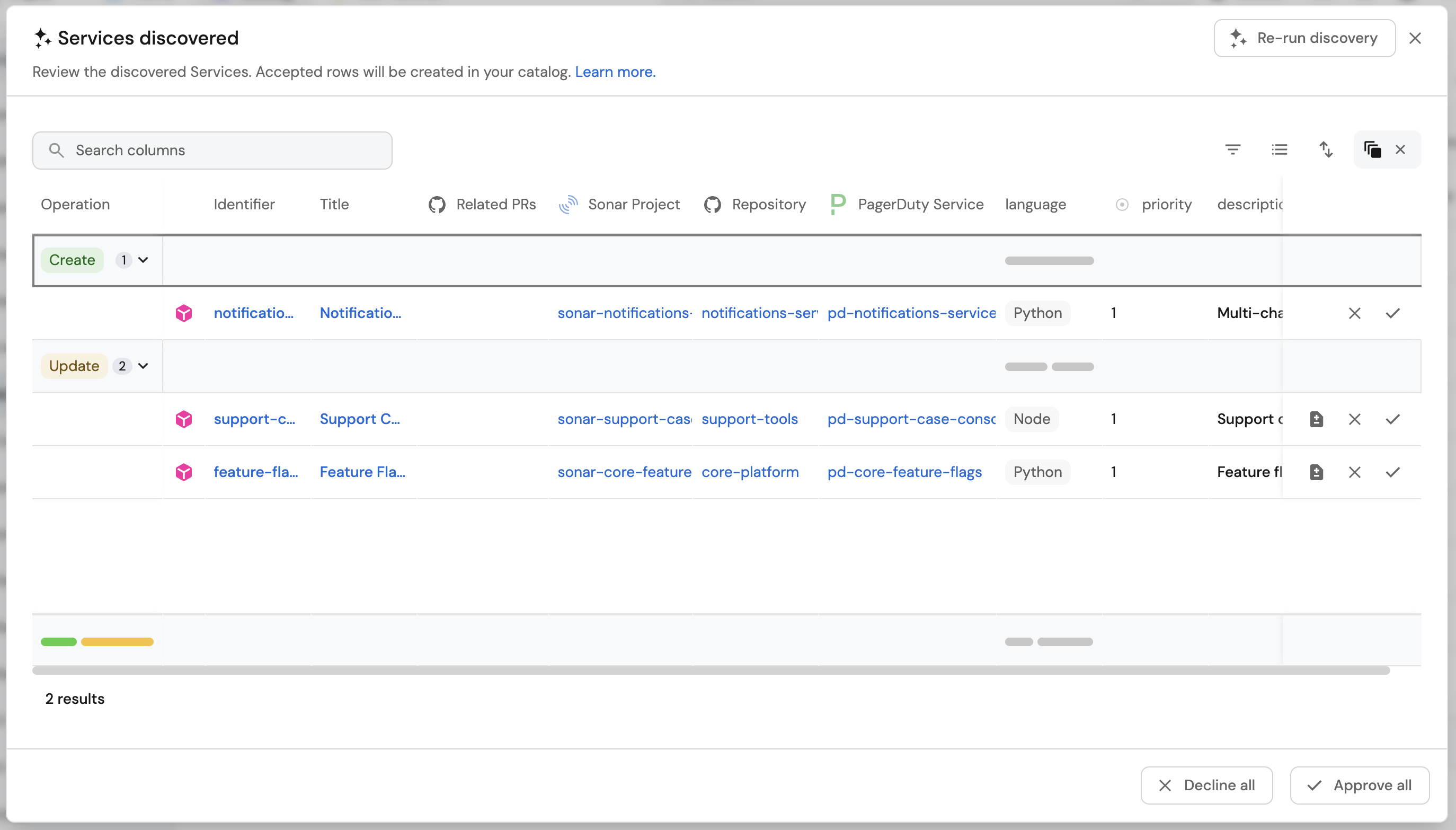
Re-run the discovery
You can re-run the discovery process at any time to generate additional or different suggestions. Each discovery run analyzes the current state of your catalog and may produce new suggestions based on newly added entities, updated relationships, or refined patterns. Re-running the discovery does not affect previously approved or declined suggestions.
This feature is also available via API for a more programatic execution of the process. Refer to the API reference catalog auto discovery for the full list of paths.
Permissions
The permissions are derived from the blueprint permissions.
You can approve suggested entities only if you have write access to the blueprint.
For more information about blueprint permissions, see the set catalog RBAC documentation.
To learn more about how Port AI uses your data, see the security and data controls documentation.
Limitations
- Entity evaluation limit: Discovery evaluates only the 500 most recently added entities from each related blueprint.
- Property truncation: Only the first 100 characters of each property value are analyzed. Longer content (such as large markdown fields) will be truncated.
- LLM provider: This feature currently uses Port's LLM and does not support Bring Your Own LLM (BYOLLM).
FAQs
Which LLM model is used? (click to expand)
The AI uses the default LLM defined in Port. To learn more, see the LLM models and providers documentation.
Bring Your Own LLM (BYOLLM) is not currently supported for catalog auto discovery.
Are there usage limits? (click to expand)
It depends on your LLM setup. To learn more, see the limits and usage documentation.
Is the AI trained based on my data? (click to expand)
No, Port AI does not use your data to train models. To learn more, see the security and data controls documentation.
How can I improve the auto discovery results? (click to expand)
You can improve results by:
- Providing more specific instructions in the prompt about patterns to look for.
- Including clear definitions of what constitutes your target entity type.
- Selecting the most relevant related blueprints for analysis.
- Re-running the discovery after refining your prompt based on initial results.