Agent management
Agent management is about governing every AI agent operating in your organization - what data they can access, what actions they can take, and who can use them. That includes code-first agents you build with SDKs in your own repos or CI (for example OpenAI Agents SDK, Anthropic Claude Agent SDK, or Claude Code), cloud-managed agents hosted on vendor control planes (for example AWS Bedrock / AgentCore, Azure AI Foundry, or Cursor Cloud Agents), and Port-native agents configured inside Port.
What roles do AI agents play in Port?
Agents interact with your agentic SDLC platform in three complementary ways. Understanding these patterns helps you decide when to let an existing agent consume Port, when the platform should trigger agents on its own, and when to provision a new agent.
AI agents as platform consumers
The most intuitive role is the agent as a user of the platform. For example, an engineer asks a coding agent to add an endpoint to a payments service. Before writing code, the agent pulls the service's owner, dependencies, and standards from Port, then spins up a preview environment and runs tests through self-service workflows.
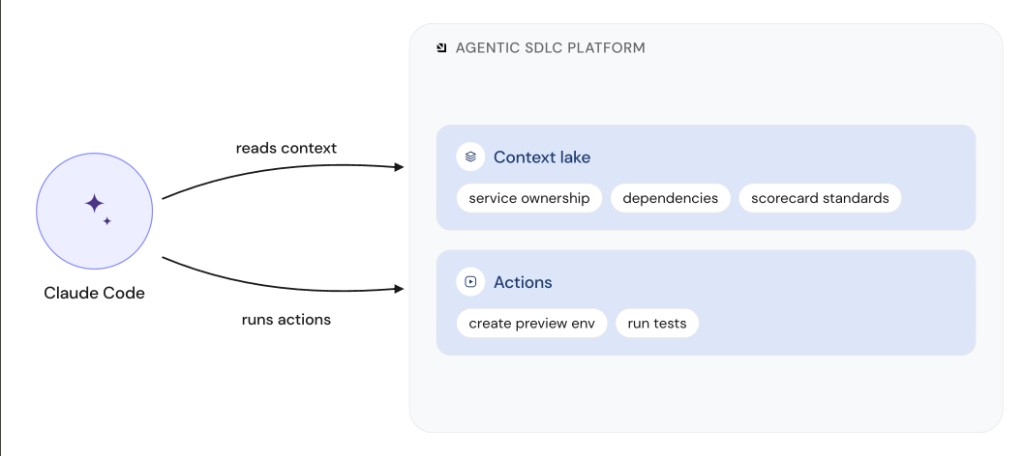
Here the agent works side by side with the developer. It reads from Context Lake and runs governed actions, the same way a human would use the platform. Use this pattern when developers already work in tools like Claude Code, Cursor, or GitHub Copilot. The Port MCP server exposes catalog context and workflows so those agents operate with the same source of truth and guardrails as humans.
AI agents as internal platform components
The next level treats the agent as part of the platform engine, not only as a user of it. For example, when a vulnerability is opened, Port can take a remediation agent from the agent registry (or invoke an agent for that case without using a registered one) and run it inside a workflow to remediate across affected services.
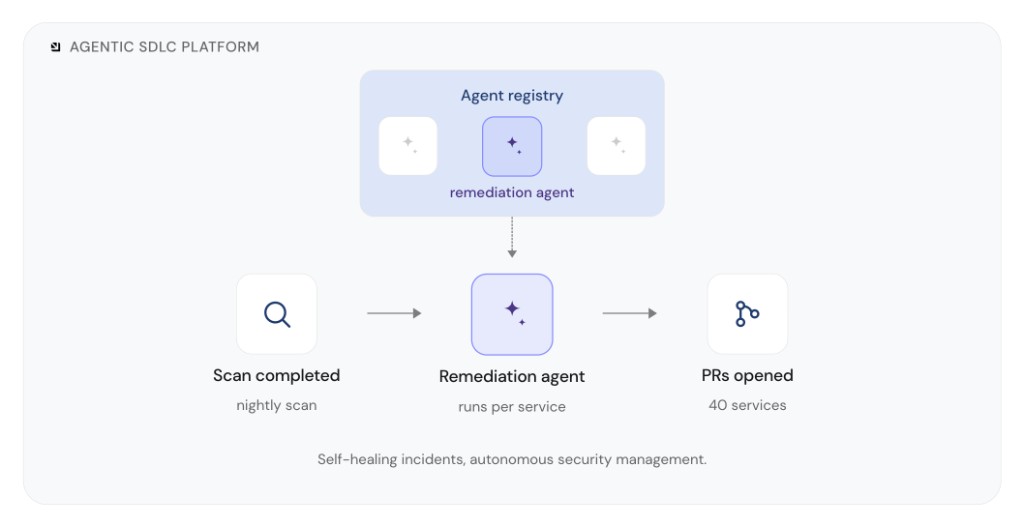
Nobody has to request an agent for each case. The platform triggers the agent from an event, and owning teams wake up to outcomes such as open PRs. Use this pattern for autonomous work such as security remediation, self-healing incidents, or other event-driven loops where the agent is a pillar of the platform itself.
AI as reusable building blocks
The third role is AI as a reusable building block. For example, an engineer needs an agent. They pick the model, tools, network landscape, and use case, and the platform hands back an agent that already sits on the golden path, with identity, approved tool access, and the right scope.
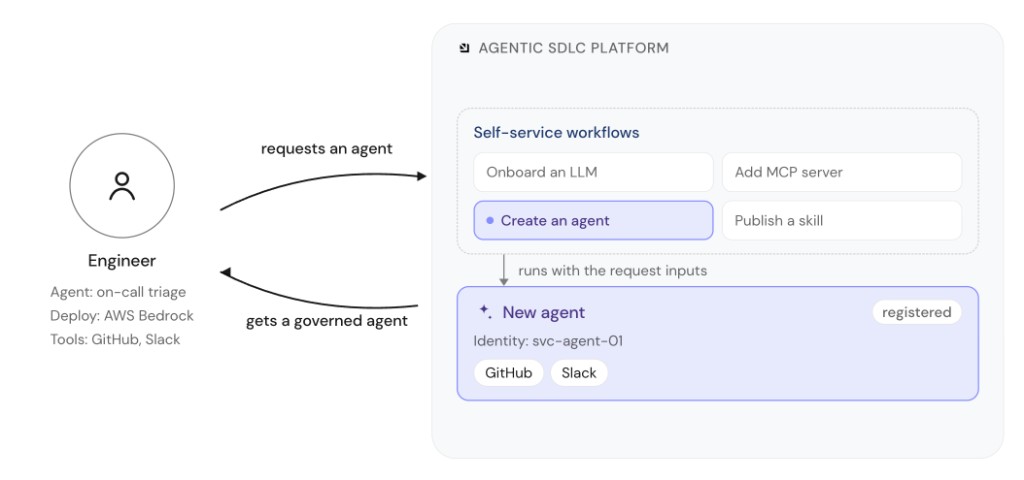
"Agent" here also covers related AI artifacts such as LLMs, MCP servers, and skills. Teams often struggle to enforce the right tools and access, apply guardrails the way they would for any other service or resource, and hand over an agent once it is built. Self-service workflows such as Create an agent, Onboard an LLM, Add MCP server, and Publish a skill turn that lifecycle into a governed process for creating, registering, and sharing AI artifacts across the organization.
Govern agents, skills, and MCP at scale
As engineering teams adopt AI agents, the number of agents, skills, prompts, and MCP servers grows quickly. Without a shared layer to discover and govern them, each team operates in isolation, and platform teams lose the ability to enforce standards or answer basic operational questions.
Without shared governance, agents, skills, prompts, and MCP servers end up scattered across teams, making it hard to see what exists, control access, or avoid duplication. Each team maintains separate configurations and there is no single place to track ownership, security, or approved tools.
How Port helps
Port gives you one place to discover and govern agents, skills, prompts, and MCP across your organization:
| You need to… | Port capability |
|---|---|
| Route and govern model traffic at scale, then connect gateway data to teams and services | AI Gateway |
| Discover agents on external platforms, code-first (OpenAI Agents SDK, Claude Code, GitHub Actions) or cloud-managed (Bedrock / AgentCore, Azure AI Foundry, Cursor Cloud Agents) | External agents |
| Maintain a registry of external agents with ownership and status in Context Lake | Agent registry |
| Govern which skills, prompts, and MCP servers teams may use | AI registry (skills, prompts, MCP registry) |
| Build and run agents natively in Port | Port custom agents |
| Scope what agents can read from Context Lake | Context Lake data access |
| Connect IDEs and external tools to your Context Lake | Port MCP server |
Port brings agents, skills, prompts, and MCP under one governance layer so teams can move fast without losing control.
What's in this section
AI Gateway
AI gateways route every model call through a single control point for routing, budgets, guardrails, and observability. Port sits on top of that layer, connecting gateway data to your software catalog, self-service workflows, and scorecards so you can govern agents, keys, and tools at organizational scale.
External agents
Connect and govern agents hosted outside Port, whether you build them with SDKs in code or run them on cloud-managed platforms. Discover agents in Context Lake, trigger sessions from workflows, and track deployments through an agent registry.
Port MCP server
Connect IDEs, AI tools, and agents to Port using natural language. The MCP server exposes your Context Lake and workflows as callable tools, so agents like Claude, Cursor, and GitHub Copilot can query the catalog and take governed actions from wherever developers already work.
Learn more about the Port MCP server →
Port custom agents
Customize and orchestrate complicated workflows inside Port. Build intelligent agents that can be used as part of automations and engineering workflows.
Use Port custom agents to:
- Automate incident response workflows
- Create intelligent PR review processes
- Build custom task management assistants
- Generate automated deployment reports
- Orchestrate multi-step engineering processes
AI registry
Connect IDEs and agents to Port, publish skills and prompts, and govern which MCP servers teams may use. This part of Agent management groups the Port MCP server, MCP registry, Skills, Skills usage analytics, and Prompts documentation.
Use the AI registry to:
- Install and secure the Port MCP server for builders and developers.
- Track approved MCP servers and installation guidance in Context Lake.
- Define skills and prompt blueprints that Port AI and MCP clients can load at runtime.
- Measure skill adoption from Cursor and Claude integrations.