Factory.ai


Port's Factory.ai integration surfaces Droid environments, computers, sessions, and organization users in your Context Lake. From there, you can start or continue Droid turns directly from Port workflows with the execute_droid action.

Execute a Droid turn
Use Port workflows to run Factory Droid headlessly against an environment (provision a new computer and session), an existing computer (new session), or an existing session (follow-up). See the Factory.ai integration action page for the full field reference and workflow examples.
Factory does not emit outbound webhooks. Catalog updates rely on scheduled or manual resync, and the execute_droid action polls Factory when waitForCompletion is true (default).
Prerequisites
- A Factory API key with access to the Factory Public API (
Authorization: Bearer <key>). - Your Port user role is set to
Admin.
Setup
Choose one of the installation methods below. If you are not sure which option to use, review the installation methods overview.
The prerequisites required for installation are listed below.
-
Go to the Factory.ai Connectors page in Port.
-
Under
Select your installation method, chooseHosted by Port. -
Configure the
Installation parametersandAdvanced configurationas you wish (see below for details).
Installation parameters
Each integration requires specific parameters (such as an API token, a URL, etc.), as seen in Port's UI when installing it. Hover over the ⓘ icon next to each parameter to see more details about it.
Advanced configuration
- During the installation process each integration may have additional settings under the
Advanced configurationsection in Port's UI. Additionally, each integration has one or more settings that can be configured after installation. To do so, click on the integration's name in the Connectors page and navigate to theSettingtab. Hover over the ⓘ icon next to each setting to see more details about it.
Port secrets
Some integration settings require sensitive pieces of data, such as tokens. For these settings, Port secrets will be used, ensuring that your sensitive data is encrypted and secure.
When filling in such a setting, its value will be obscured (shown as ••••••••).
For each such setting, Port will automatically create a secret in your organization.
To see all secrets in your organization, follow these steps.
Port source IP addresses
When using this installation method, Port will make outbound calls to your 3rd-party applications from static IP addresses. You may need to add these addresses to your allowlist, in order to allow Port to interact with the integrated service:
- Europe (EU):
54.73.167.226,63.33.143.237,54.76.185.219 - United States (US):
3.234.37.33,54.225.172.136,3.225.234.99
-
Go to the Factory.ai Connectors page in the Port app.
-
Select the
Self-hostedmethod. -
A
helmcommand will be displayed, with default values already filled out (e.g. your Port client ID, client secret, etc). Copy the command, replace the placeholders with your values, then run it in your terminal to install the integration.
Live event support
Currently, live events are not supported for this integration.
Resyncs will be performed periodically (with a configurable interval), or manually triggered by you via Port's UI.
Therefore, real-time events (including GitOps) will not be ingested into Port immediately.
Live events support for this integration is WIP and will be supported in the near future.
The resync interval can be configured using the scheduledResyncInterval parameter. See the optional parameters section below for more details.
Required parameters:
port.clientId- Your Port client ID.port.clientSecret- Your Port client secret.port.baseUrl- Your Port API URL (https://api.port.iofor EU,https://api.us.port.iofor US).integration.identifier- A unique identifier for your integration.integration.type- The integration to be installed.integration.eventListener.type- The event listener type. Read more about event listeners.integration.secrets.factoryApiKey- Factory API key used to authenticate with the Factory Public API. Create one at Factory API keys.
Optional parameters (click to expand)
integration.config.factoryApiHost- Base URL for the Factory Public API. Defaults tohttps://api.factory.ai.scheduledResyncInterval- The number of minutes between each resync. When not set, the integration will resync for each event listener resync event.initializePortResources- Whentrue, the integration will create default blueprints and the Port App config mapping.sendRawDataExamples- Whentrue, sends raw data examples from the third-party API to Port for testing and managing the integration mapping.
- GitHub
- Jenkins
- Azure DevOps
- GitLab
- Go to the Factory.ai Connectors page in the Port app.
- Under Select your installation method, choose your desired CI/CD platform.
- Copy the workflow and replace the placeholders with your values.
Below are the available parameters and their descriptions.
| Parameter | Description | Required? | Secret?Store this value as a GitHub Actions secret |
|---|---|---|---|
port_client_id | Your Port client ID (How to get the credentials). | ✓ | ✓ |
port_client_secret | Your Port client secret (How to get the credentials). | ✓ | ✓ |
port_base_url | Your Port API URL (https://api.port.io for EU, https://api.us.port.io for US). | ✓ | ✗ |
factory_api_key | Factory API key used to authenticate with the Factory Public API. | ✓ | ✓ |
factory_api_host | Base URL for the Factory Public API. Defaults to https://api.factory.ai. | ✗ | ✗ |
initialize_port_resources | Default true. When set to true, the integration will create default blueprints and the Port app config mapping. | ✗ | ✗ |
integration_identifier | The identifier of the integration that will be installed. | ✗ | ✗ |
send_raw_data_examples | Enable sending raw data examples from the third-party API to Port for testing and managing the integration mapping. Default is true. | ✗ | ✗ |
Your Jenkins agent must be able to run Docker commands.
Below are the available parameters and their descriptions.
| Parameter | Description | Required? | Secret?Store this value as a Jenkins credential (Secret Text) |
|---|---|---|---|
OCEAN__ | Your Port client ID (How to get the credentials). | ✓ | ✓ |
OCEAN__ | Your Port client secret (How to get the credentials). | ✓ | ✓ |
OCEAN__ | Your Port API URL (https://api.port.io for EU, https://api.us.port.io for US). | ✓ | ✗ |
OCEAN__ | Factory API key used to authenticate with the Factory Public API. | ✓ | ✓ |
OCEAN__ | Base URL for the Factory Public API. Defaults to https://api.factory.ai. | ✗ | ✗ |
OCEAN__ | Default true. When set to true, the integration will create default blueprints and the Port app config mapping. | ✗ | ✗ |
OCEAN__ | The identifier of the integration that will be installed. | ✗ | ✗ |
OCEAN__ | Enable sending raw data examples from the third-party API to Port for testing and managing the integration mapping. Default is true. | ✗ | ✗ |
Here is an example for a Jenkinsfile pipeline file:Jenkins pipeline (click to expand)
Prerequisites
- Your Azure Devops agent should be able to run docker commands. Learn more about agents here.
- You must have permissions to create and manage Azure DevOps variable groups for storing credentials.
Set up your credentials
- Create a Variable Group: Name it port-ocean-credentials.
- Store the required variables (see the table below).
- Authorize Your Pipeline:
-
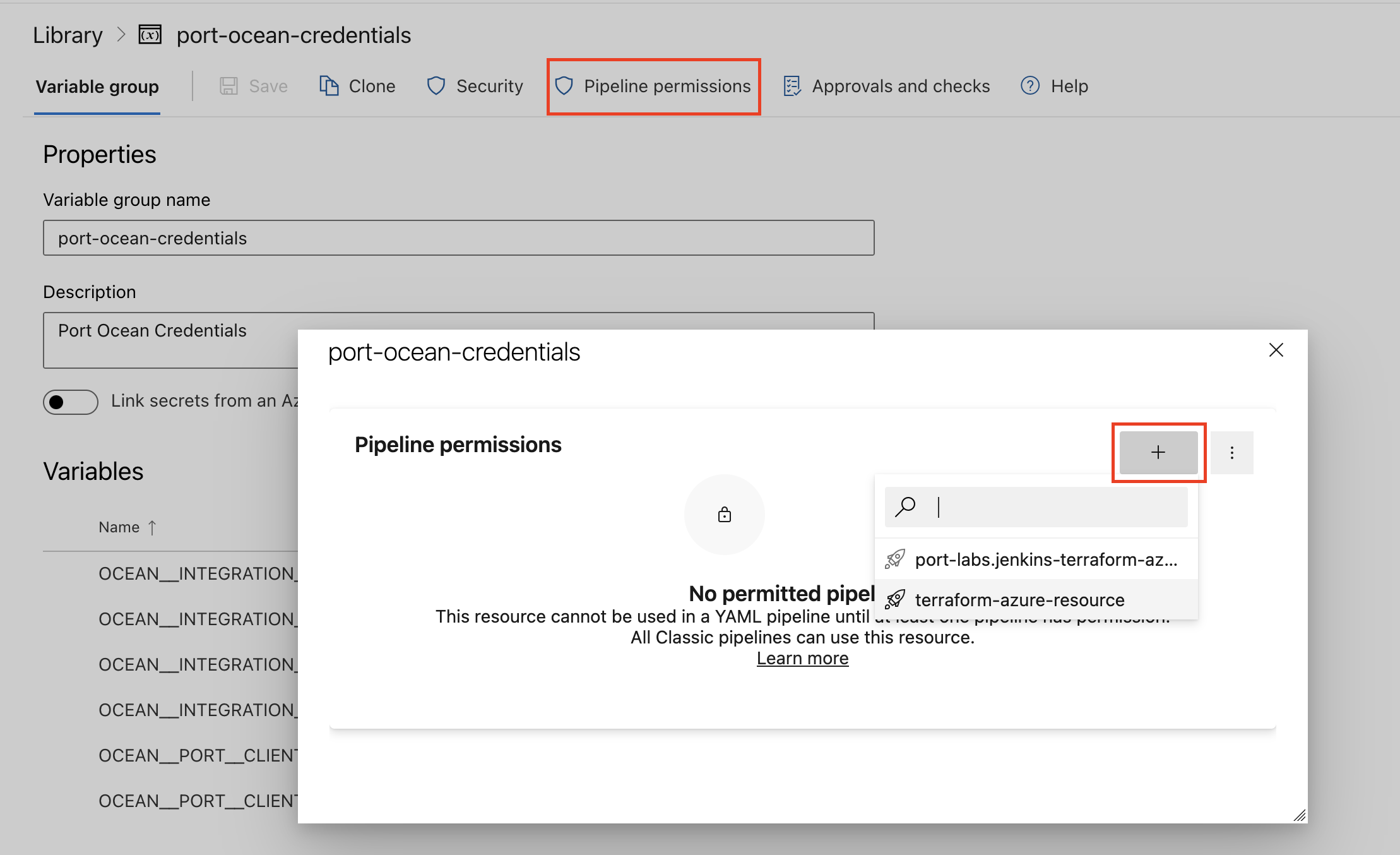
Go to "Library" -> "Variable groups."
-
Find port-ocean-credentials and click on it.
-
Select "Pipeline Permissions" and add your pipeline to the authorized list.
-
Below are the available parameters and their descriptions.
| Parameter | Description | Required? | Secret?Store this value as an Azure DevOps pipeline variable |
|---|---|---|---|
OCEAN__ | Your Port client ID (How to get the credentials). | ✓ | ✓ |
OCEAN__ | Your Port client secret (How to get the credentials). | ✓ | ✓ |
OCEAN__ | Your Port API URL (https://api.port.io for EU, https://api.us.port.io for US). | ✓ | ✗ |
OCEAN__ | Factory API key used to authenticate with the Factory Public API. | ✓ | ✓ |
OCEAN__ | Base URL for the Factory Public API. Defaults to https://api.factory.ai. | ✗ | ✗ |
OCEAN__ | Default true. When set to true, the integration will create default blueprints and the Port app config mapping. | ✗ | ✗ |
OCEAN__ | The identifier of the integration that will be installed. | ✗ | ✗ |
OCEAN__ | Enable sending raw data examples from the third-party API to Port for testing and managing the integration mapping. Default is true. | ✗ | ✗ |
Here is an example for a azure-pipeline.yml pipeline file:Azure pipeline (click to expand)
- Go to the Factory.ai Connectors page in the Port app.
- Under Select your installation method, choose your desired CI/CD platform.
- Copy the workflow and replace the placeholders with your values.
Below are the available parameters and their descriptions.
| Parameter | Description | Required? | Secret?Store this value as a GitLab CI/CD variable |
|---|---|---|---|
OCEAN__ | Your Port client ID (How to get the credentials). | ✓ | ✓ |
OCEAN__ | Your Port client secret (How to get the credentials). | ✓ | ✓ |
OCEAN__ | Your Port API URL (https://api.port.io for EU, https://api.us.port.io for US). | ✓ | ✗ |
OCEAN__ | Factory API key used to authenticate with the Factory Public API. | ✓ | ✓ |
OCEAN__ | Base URL for the Factory Public API. Defaults to https://api.factory.ai. | ✗ | ✗ |
OCEAN__ | Default true. When set to true, the integration will create default blueprints and the Port app config mapping. | ✗ | ✗ |
OCEAN__ | The identifier of the integration that will be installed. | ✗ | ✗ |
OCEAN__ | Enable sending raw data examples from the third-party API to Port for testing and managing the integration mapping. Default is true. | ✗ | ✗ |
Configuration
Port integrations use a YAML mapping block to ingest data from the third-party API into Port.
The mapping uses the JQ JSON processor to transform fields and shape incoming Factory data into Port entities.
Resource selectors
In addition to query, each resource supports optional selector fields that map to Factory list query parameters:
| Resource | Field | Default | Description |
|---|---|---|---|
environment | serviceAccountId | unset | Optional serviceAccountId query param for GET /api/v0/environments. |
computer | serviceAccountId | unset | Optional filter for GET /api/v0/computers. |
computer | hostId | unset | Optional host filter for GET /api/v0/computers. |
computer | includeProvisioningSteps | unset | When set, include provisioning steps in each computer payload. |
computer | includeUnlisted | unset | When true, include unlisted computers in the list response. |
session | computerId | unset | Optional filter to list sessions for one computer. |
session | limit | 100 | Page size for cursor pagination (1–100). |
user | limit | 100 | Page size for cursor pagination (1–100). |
If your organization does not have Factory Sessions API access, list calls can return HTTP 403. The integration soft-fails for session during resync (other kinds still reconcile). Contact Factory support or your account team if you expect session data but see none after sync.
Default mapping configuration
Default mapping configuration (click to expand)
deleteDependentEntities: true
createMissingRelatedEntities: true
resources:
  - kind: environment
    selector:
      query: 'true'
    port:
      entity:
        mappings:
          identifier: .id
          title: .name
          blueprint: '"factory_environment"'
          properties:
            status: .status
            scope: .scope
            isDefault: .isDefault
            sourceName: .source.name
            providerName: .source.provider.name
            repositoryUrls: '[.repositories[]?.url | select(. != null and . != "")]'
            latestBuildStatus: .latestBuild.status
            createdAt: '(.createdAt / 1000 | strftime("%Y-%m-%dT%H:%M:%SZ"))'
            updatedAt: '(.updatedAt / 1000 | strftime("%Y-%m-%dT%H:%M:%SZ"))'
  - kind: computer
    selector:
      query: 'true'
    port:
      entity:
        mappings:
          identifier: .id
          title: .name
          blueprint: '"factory_computer"'
          properties:
            status: .status
            providerStatus: .providerStatus
            providerType: .providerType
            isListed: .isListed
            diskBand: .disk.band
            ownerPrincipalKind: .ownerPrincipalKind
            lastSeenAt: '(.lastSeenAt / 1000 | strftime("%Y-%m-%dT%H:%M:%SZ"))?'
            createdAt: '(.createdAt / 1000 | strftime("%Y-%m-%dT%H:%M:%SZ"))'
          relations:
            environment: >-
              .computerSource
              | if .kind == "environment" then .environmentId
                elif .kind == "template" then .templateId
                else empty end
  - kind: user
    selector:
      query: 'true'
    port:
      entity:
        mappings:
          identifier: .id
          title: >-
            ([.firstName, .lastName] | map(select(. != null and . != "")) | join(" "))
            as $name
            | if $name == "" then .email else $name end
          blueprint: '"factory_user"'
          properties:
            email: .email
            firstName: .firstName
            lastName: .lastName
            role: .role
            status: .status
            lastSignInAt: .lastSignInAt
            createdAt: .createdAt
  - kind: session
    selector:
      query: 'true'
    port:
      entity:
        mappings:
          identifier: .sessionId
          title: '.title // .sessionId'
          blueprint: '"factory_session"'
          properties:
            status: .status
            messageCount: .messageCount
            factoryCredits: .factoryCredits
            model: .sessionSettings.model
            interactionMode: .sessionSettings.interactionMode
            autonomyLevel: .sessionSettings.autonomyLevel
            repoRoot: .sessionSettings.worktree.repoRoot
            createdAt: '(.createdAt / 1000 | strftime("%Y-%m-%dT%H:%M:%SZ"))'
            updatedAt: '(.updatedAt / 1000 | strftime("%Y-%m-%dT%H:%M:%SZ"))'
            completedAt: '(.completedAt / 1000 | strftime("%Y-%m-%dT%H:%M:%SZ"))?'
          relations:
            computer: .computerId
            parentSession: .parent_session_id
Mapping & examples per resource
To view and test the integration mapping against sample API responses, use the jq playground in your connectors page.
{
  "identifier": "factory_environment",
  "title": "Factory Environment",
  "icon": "FactoryAi",
  "schema": {
    "properties": {
      "status": {
        "type": "string",
        "title": "Status",
        "enum": [
          "building",
          "ready",
          "failed"
        ],
        "enumColors": {
          "building": "blue",
          "ready": "green",
          "failed": "red"
        }
      },
      "scope": {
        "type": "string",
        "title": "Scope",
        "enum": [
          "user",
          "organization"
        ],
        "enumColors": {
          "user": "lightGray",
          "organization": "blue"
        }
      },
      "isDefault": {
        "type": "boolean",
        "title": "Default Environment"
      },
      "sourceName": {
        "type": "string",
        "title": "Source"
      },
      "providerName": {
        "type": "string",
        "title": "Provider"
      },
      "repositoryUrls": {
        "type": "array",
        "title": "Repository URLs",
        "items": {
          "type": "string",
          "format": "url"
        }
      },
      "latestBuildStatus": {
        "type": "string",
        "title": "Latest Build Status",
        "enum": [
          "queued",
          "building",
          "validating",
          "succeeded",
          "failed",
          "superseded"
        ],
        "enumColors": {
          "queued": "lightGray",
          "building": "blue",
          "validating": "purple",
          "succeeded": "green",
          "failed": "red",
          "superseded": "yellow"
        }
      },
      "createdAt": {
        "type": "string",
        "format": "date-time",
        "title": "Created At"
      },
      "updatedAt": {
        "type": "string",
        "format": "date-time",
        "title": "Updated At"
      }
    },
    "required": []
  },
  "relations": {}
}
resources:
  - kind: environment
    selector:
      query: 'true'
    port:
      entity:
        mappings:
          identifier: .id
          title: .name
          blueprint: '"factory_environment"'
          properties:
            status: .status
            scope: .scope
            isDefault: .isDefault
            sourceName: .source.name
            providerName: .source.provider.name
            repositoryUrls: '[.repositories[]?.url | select(. != null and . != "")]'
            latestBuildStatus: .latestBuild.status
            createdAt: '(.createdAt / 1000 | strftime("%Y-%m-%dT%H:%M:%SZ"))'
            updatedAt: '(.updatedAt / 1000 | strftime("%Y-%m-%dT%H:%M:%SZ"))'
{
  "id": "env-1",
  "name": "Default",
  "repositories": [
    {
      "url": "https://github.com/acme/app",
      "script": ""
    }
  ],
  "source": {
    "id": "src-1",
    "name": "Ubuntu",
    "supportsRepositories": true,
    "supportsSetupScripts": true,
    "provider": {
      "id": "prov-1",
      "name": "Factory"
    }
  },
  "createdAt": 1700000000000,
  "updatedAt": 1700000100000,
  "status": "ready",
  "scope": "organization",
  "isDefault": true,
  "latestBuild": {
    "status": "succeeded"
  }
}
Monitoring and sync status
To learn more about how to monitor and check the sync status of your integration, see the relevant documentation.