Devin


Port's Devin integration surfaces Devin sessions, playbooks, knowledge notes, and organization secret metadata in your Context Lake. From there, you can start new Devin sessions, send follow-up messages, terminate runs, and archive sessions directly from Port workflows.

Start a Devin session
Use this workflow to open a new Devin session with a prompt, optional playbook, repositories, and knowledge. See the Devin integration action page for the full node field reference.
Send a follow-up message
Use this workflow to continue an existing Devin session when it is idle. See the Devin integration action page for the full node field reference.
Port MCP
When enablePortMcp is true on create_session or send_message, the integration injects a per-session user secret keyed MCP_PORT_TOKEN with a short-lived Port access token for the workflow node's executionIdentity. Devin reads that value as ${MCP_PORT_TOKEN} in MCP HTTP headers.
- Configure a Customize MCP HTTP server in your Devin organization once, with
Authorization: Bearer ${MCP_PORT_TOKEN}and the Port MCP URL for your region (https://mcp.port.io/v1orhttps://mcp.us.port.io/v1). - Set
executionIdentityon the integration action node (actororservice_account). - Set
enablePortMcp: trueon the action inputs.
The integration does not install or rotate Devin MCP servers. The secret key is fixed as MCP_PORT_TOKEN (not configurable). See Managed Port MCP and the Port MCP server overview.
Session tracking
Devin does not send outbound webhooks. When reportCompletion is true on create_session or send_message, the Port workflow run stays IN_PROGRESS until Devin finishes the turn (or fails). A background SessionTracker polls Devin on sessionTrackingIntervalSeconds (default 30).
The integration persists tracking state with tags on the Devin session (not in Port). Reserved tags start with port: and cannot be set in workflow inputs.
| Tag | Meaning |
|---|---|
port:managed | Session was created by this integration. Drives managedByPort in the catalog. |
port:pending:<installationId> | A Port run for this installation is waiting on the session. |
port:external-id:devin:<runId> | Links the session to the Port run. |
port:sent-at:<epochSeconds> | Turn start time. Only messages after this timestamp count for the current turn. |
On each poll, the integration posts new session messages to the Port run log as [devin] ... or [user] .... When the turn completes, the node output includes pull requests, structured output, ACU usage, and timestamps. Runs waiting longer than sessionTrackingMaxHours (default 72) fail with a timeout.
Workflow actions that touch sessions: create_session, send_message, terminate_session, and archive_session. See the Devin integration action page.
Prerequisites
- A Devin service-user API key (
cog_*) under Devin Settings → Service users with:ViewOrgSessionsandManageOrgSessions(resync, actions, tracking).- Read access to playbooks, knowledge notes, and secrets for catalog resync.
ImpersonateOrgSessionswhen you usecreateAsUserIdormessageAsUserId.
- Your Devin organization ID.
- Your Port user role is set to
Admin.
Setup
Choose one of the installation methods below. If you are not sure which option to use, review the installation methods overview.
The prerequisites required for installation are listed below.
-
Go to the Devin Connectors page in Port.
-
Under
Select your installation method, chooseHosted by Port. -
Configure the
Installation parametersandAdvanced configurationas you wish (see below for details).
Installation parameters
Each integration requires specific parameters (such as an API token, a URL, etc.), as seen in Port's UI when installing it. Hover over the ⓘ icon next to each parameter to see more details about it.
Advanced configuration
- During the installation process each integration may have additional settings under the
Advanced configurationsection in Port's UI. Additionally, each integration has one or more settings that can be configured after installation. To do so, click on the integration's name in the Connectors page and navigate to theSettingtab. Hover over the ⓘ icon next to each setting to see more details about it.
Port secrets
Some integration settings require sensitive pieces of data, such as tokens. For these settings, Port secrets will be used, ensuring that your sensitive data is encrypted and secure.
When filling in such a setting, its value will be obscured (shown as ••••••••).
For each such setting, Port will automatically create a secret in your organization.
To see all secrets in your organization, follow these steps.
Port source IP addresses
When using this installation method, Port will make outbound calls to your 3rd-party applications from static IP addresses. You may need to add these addresses to your allowlist, in order to allow Port to interact with the integrated service:
- Europe (EU):
54.73.167.226,63.33.143.237,54.76.185.219 - United States (US):
3.234.37.33,54.225.172.136,3.225.234.99
-
Go to the Devin Connectors page in the Port app.
-
Select the
Self-hostedmethod. -
A
helmcommand will be displayed, with default values already filled out (e.g. your Port client ID, client secret, etc). Copy the command, replace the placeholders with your values, then run it in your terminal to install the integration.
Required parameters:
port.clientId- Your Port client ID.port.clientSecret- Your Port client secret.port.baseUrl- Your Port API URL (https://api.port.iofor EU,https://api.us.port.iofor US).integration.identifier- A unique identifier for your integration.integration.type- The integration to be installed.integration.eventListener.type- The event listener type. Read more about event listeners. UsePOLLING(or Hosted by Port) so session tracking can poll Devin while workflow runs wait on sessions.integration.secrets.devinApiKey- Devin service-user API key (cog_*) with permissions to manage sessions and read playbooks, knowledge notes, secrets, and organization members.integration.config.devinOrgId- Devin organization ID the service user belongs to.
Optional parameters (click to expand)
| Parameter | Description |
|---|---|
integration.config.devinApiHost | Devin API host. Defaults to https://api.devin.ai. |
integration.config.sessionTrackingIntervalSeconds | How often, in seconds, the integration polls Devin for sessions with a Port run waiting on them. Defaults to 30. This interval also controls how often new session messages are posted to workflow run logs. |
integration.config.sessionTrackingMaxHours | Maximum hours a Port run may wait for a Devin session turn before the run fails with a timeout. Defaults to 72. |
integration.config.enableActionsProcessing | When true, processes workflow integration actions (required for create_session, send_message, and session tracking). On self-hosted installs, enable explicitly if your chart exposes this flag. |
scheduledResyncInterval | The number of minutes between each resync. When not set, the integration will resync for each event listener resync event. |
initializePortResources | When true, the integration will create default blueprints and the Port App config mapping. |
sendRawDataExamples | When true, sends raw data examples from the third-party API to Port for testing and managing the integration mapping. |
- GitHub
- Jenkins
- Azure DevOps
- GitLab
- Go to the Devin Connectors page in the Port app.
- Under Select your installation method, choose your desired CI/CD platform.
- Copy the workflow and replace the placeholders with your values.
Below are the available parameters and their descriptions.
| Parameter | Description | Required? | Secret?Store this value as a GitHub Actions secret |
|---|---|---|---|
port_client_id | Your Port client ID (How to get the credentials). | ✓ | ✓ |
port_client_secret | Your Port client secret (How to get the credentials). | ✓ | ✓ |
port_base_url | Your Port API URL (https://api.port.io for EU, https://api.us.port.io for US). | ✓ | ✗ |
devin_api_key | Devin service-user API key (cog_*) used to authenticate with the Devin API. | ✓ | ✓ |
devin_org_id | Devin organization ID the service user belongs to. | ✗ | ✗ |
devin_api_host | The host of the Devin API. Defaults to https://api.devin.ai. | ✗ | ✗ |
session_tracking_interval_seconds | Poll interval in seconds for session tracking and run log streaming. Defaults to 30. | ✗ | ✗ |
session_tracking_max_hours | Maximum hours a Port run may wait on a Devin session before timing out. Defaults to 72. | ✗ | ✗ |
initialize_port_resources | Default true. When set to true, the integration will create default blueprints and the Port app config mapping. | ✗ | ✗ |
integration_identifier | The identifier of the integration that will be installed. | ✗ | ✗ |
send_raw_data_examples | Enable sending raw data examples from the third-party API to Port for testing and managing the integration mapping. Default is true. | ✗ | ✗ |
Your Jenkins agent must be able to run Docker commands.
Below are the available parameters and their descriptions.
| Parameter | Description | Required? | Secret?Store this value as a Jenkins credential (Secret Text) |
|---|---|---|---|
OCEAN__ | Your Port client ID (How to get the credentials). | ✓ | ✓ |
OCEAN__ | Your Port client secret (How to get the credentials). | ✓ | ✓ |
OCEAN__ | Your Port API URL (https://api.port.io for EU, https://api.us.port.io for US). | ✓ | ✗ |
OCEAN__ | Devin service-user API key (cog_*) used to authenticate with the Devin API. | ✓ | ✓ |
OCEAN__ | Devin organization ID the service user belongs to. | ✗ | ✗ |
OCEAN__ | The host of the Devin API. Defaults to https://api.devin.ai. | ✗ | ✗ |
OCEAN__ | Poll interval in seconds for session tracking and run log streaming. Defaults to 30. | ✗ | ✗ |
OCEAN__ | Maximum hours a Port run may wait on a Devin session before timing out. Defaults to 72. | ✗ | ✗ |
OCEAN__ | Default true. When set to true, the integration will create default blueprints and the Port app config mapping. | ✗ | ✗ |
OCEAN__ | The identifier of the integration that will be installed. | ✗ | ✗ |
OCEAN__ | Enable sending raw data examples from the third-party API to Port for testing and managing the integration mapping. Default is true. | ✗ | ✗ |
Here is an example for a Jenkinsfile pipeline file:Jenkins pipeline (click to expand)
Prerequisites
- Your Azure Devops agent should be able to run docker commands. Learn more about agents here.
- You must have permissions to create and manage Azure DevOps variable groups for storing credentials.
Set up your credentials
- Create a Variable Group: Name it port-ocean-credentials.
- Store the required variables (see the table below).
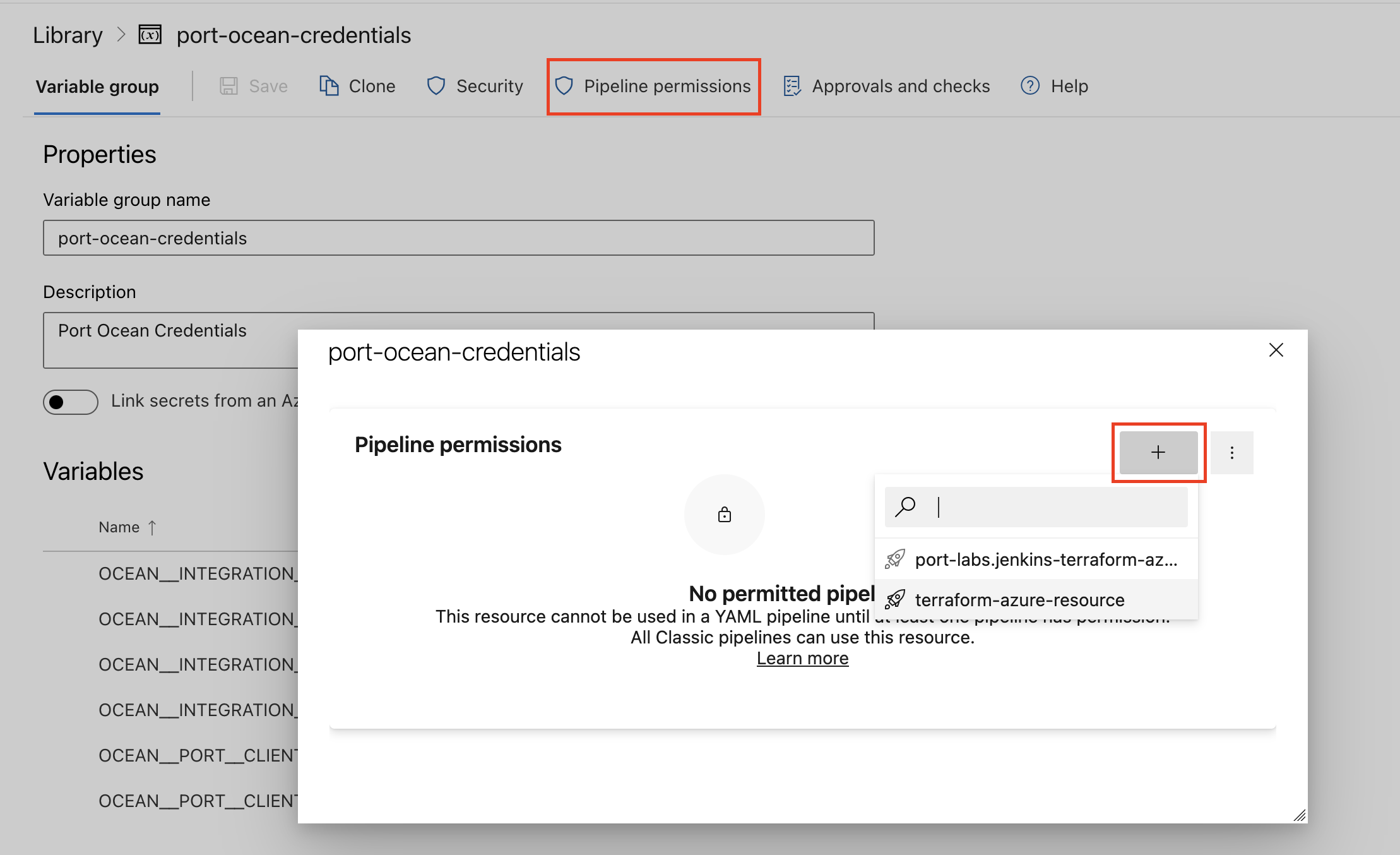
- Authorize Your Pipeline:
-
Go to "Library" -> "Variable groups."
-
Find port-ocean-credentials and click on it.
-
Select "Pipeline Permissions" and add your pipeline to the authorized list.
-
Below are the available parameters and their descriptions.
| Parameter | Description | Required? | Secret?Store this value as an Azure DevOps pipeline variable |
|---|---|---|---|
OCEAN__ | Your Port client ID (How to get the credentials). | ✓ | ✓ |
OCEAN__ | Your Port client secret (How to get the credentials). | ✓ | ✓ |
OCEAN__ | Your Port API URL (https://api.port.io for EU, https://api.us.port.io for US). | ✓ | ✗ |
OCEAN__ | Devin service-user API key (cog_*) used to authenticate with the Devin API. | ✓ | ✓ |
OCEAN__ | Devin organization ID the service user belongs to. | ✗ | ✗ |
OCEAN__ | The host of the Devin API. Defaults to https://api.devin.ai. | ✗ | ✗ |
OCEAN__ | Poll interval in seconds for session tracking and run log streaming. Defaults to 30. | ✗ | ✗ |
OCEAN__ | Maximum hours a Port run may wait on a Devin session before timing out. Defaults to 72. | ✗ | ✗ |
OCEAN__ | Default true. When set to true, the integration will create default blueprints and the Port app config mapping. | ✗ | ✗ |
OCEAN__ | The identifier of the integration that will be installed. | ✗ | ✗ |
OCEAN__ | Enable sending raw data examples from the third-party API to Port for testing and managing the integration mapping. Default is true. | ✗ | ✗ |
Here is an example for a azure-pipeline.yml pipeline file:Azure pipeline (click to expand)
- Go to the Devin Connectors page in the Port app.
- Under Select your installation method, choose your desired CI/CD platform.
- Copy the workflow and replace the placeholders with your values.
Below are the available parameters and their descriptions.
| Parameter | Description | Required? | Secret?Store this value as a GitLab CI/CD variable |
|---|---|---|---|
OCEAN__ | Your Port client ID (How to get the credentials). | ✓ | ✓ |
OCEAN__ | Your Port client secret (How to get the credentials). | ✓ | ✓ |
OCEAN__ | Your Port API URL (https://api.port.io for EU, https://api.us.port.io for US). | ✓ | ✗ |
OCEAN__ | Devin service-user API key (cog_*) used to authenticate with the Devin API. | ✓ | ✓ |
OCEAN__ | Devin organization ID the service user belongs to. | ✗ | ✗ |
OCEAN__ | The host of the Devin API. Defaults to https://api.devin.ai. | ✗ | ✗ |
OCEAN__ | Poll interval in seconds for session tracking and run log streaming. Defaults to 30. | ✗ | ✗ |
OCEAN__ | Maximum hours a Port run may wait on a Devin session before timing out. Defaults to 72. | ✗ | ✗ |
OCEAN__ | Default true. When set to true, the integration will create default blueprints and the Port app config mapping. | ✗ | ✗ |
OCEAN__ | The identifier of the integration that will be installed. | ✗ | ✗ |
OCEAN__ | Enable sending raw data examples from the third-party API to Port for testing and managing the integration mapping. Default is true. | ✗ | ✗ |
Configuration
Port integrations use a YAML mapping block to ingest data from the third-party API into Port.
The mapping uses the JQ JSON processor to transform fields and shape incoming Devin data into Port entities.
Catalog resync
Catalog resources do not use incremental Ocean resync yet.
- Sessions are listed in a rolling window controlled by
createdAfterDays(default30). Older sessions may be removed from Port on the next full sync. - Playbooks, knowledge notes, and secrets are fully listed on each resync (paginated). Secret entities contain metadata only; Devin never returns secret values.
Resource selectors
In addition to query, each resource supports optional selector fields in your Port App config:
| Resource | Field | Default | Description |
|---|---|---|---|
session | includeArchived | false | Include archived Devin sessions. |
session | createdAfterDays | 30 | Only ingest sessions created within this many days. |
session | onlyManagedByPort | false | When true, ingest only sessions tagged port:managed. |
playbook | includeEnterprise | false | Include enterprise playbooks. |
Default mapping configuration
Default mapping configuration (click to expand)
resources:
  - kind: playbook
    selector:
      query: 'true'
      includeEnterprise: false
    port:
      entity:
        mappings:
          identifier: .playbook_id
          title: .title
          blueprint: '"devin_playbook"'
          properties:
            body: .body
            macro: .macro
            accessType: .access_type
            createdBy: .created_by
            createdAt: .created_at | todate
            updatedAt: .updated_at | todate
  - kind: knowledge-note
    selector:
      query: 'true'
    port:
      entity:
        mappings:
          identifier: .note_id
          title: .name
          blueprint: '"devin_knowledge_note"'
          properties:
            body: .body
            trigger: .trigger
            folderPath: .folder_path
            pinnedRepo: .pinned_repo
            enabled: .is_enabled
            accessType: .access_type
            createdAt: .created_at | todate
            updatedAt: .updated_at | todate
  - kind: secret
    selector:
      query: 'true'
    port:
      entity:
        mappings:
          identifier: .secret_id
          title: .key // .secret_id
          blueprint: '"devin_secret"'
          properties:
            note: .note
            secretType: .secret_type
            accessType: .access_type
            sensitive: .is_sensitive
            createdBy: .created_by
            createdAt: .created_at | todate
  - kind: session
    selector:
      query: 'true'
      includeArchived: false
      createdAfterDays: 30
      onlyManagedByPort: false
    port:
      entity:
        mappings:
          identifier: .session_id
          title: .title // .session_id
          blueprint: '"devin_session"'
          properties:
            status: .status
            statusDetail: .status_detail
            url: .url
            origin: .origin
            category: .category
            tags: .tags
            managedByPort: 'any(.tags[]?; . == "port:managed")'
            pullRequests: '[.pull_requests[]?.pr_url]'
            acusConsumed: .acus_consumed
            onDemandUsage: .on_demand_usage
            devinMode: .devin_mode
            archived: .is_archived
            createdAt: .created_at | todate
            updatedAt: .updated_at | todate
          relations:
            playbook: .playbook_id
            parentSession: .parent_session_id
Mapping & examples per resource
To view and test the integration mapping against sample API responses, use the jq playground in your connectors page.
{
  "identifier": "devin_session",
  "title": "Devin Session",
  "icon": "Devin",
  "schema": {
    "properties": {
      "status": {
        "type": "string",
        "title": "Status",
        "enum": ["new", "claimed", "running", "resuming", "suspended", "exit", "error"],
        "enumColors": {
          "new": "lightGray",
          "claimed": "lightGray",
          "running": "blue",
          "resuming": "blue",
          "suspended": "yellow",
          "exit": "green",
          "error": "red"
        }
      },
      "statusDetail": {
        "type": "string",
        "title": "Status detail"
      },
      "url": {
        "type": "string",
        "title": "Devin URL",
        "format": "url"
      },
      "origin": {
        "type": "string",
        "title": "Origin"
      },
      "category": {
        "type": "string",
        "title": "Category"
      },
      "tags": {
        "type": "array",
        "title": "Tags",
        "items": {
          "type": "string"
        }
      },
      "managedByPort": {
        "type": "boolean",
        "title": "Managed by Port"
      },
      "pullRequests": {
        "type": "array",
        "title": "Pull request URLs",
        "items": {
          "type": "string",
          "format": "url"
        }
      },
      "acusConsumed": {
        "type": "number",
        "title": "ACUs consumed"
      },
      "onDemandUsage": {
        "type": "number",
        "title": "On-demand usage"
      },
      "devinMode": {
        "type": "string",
        "title": "Devin mode"
      },
      "archived": {
        "type": "boolean",
        "title": "Archived"
      },
      "createdAt": {
        "type": "string",
        "format": "date-time",
        "title": "Created At"
      },
      "updatedAt": {
        "type": "string",
        "format": "date-time",
        "title": "Updated At"
      }
    },
    "required": []
  },
  "relations": {
    "playbook": {
      "title": "Playbook",
      "target": "devin_playbook",
      "required": false,
      "many": false
    },
    "parentSession": {
      "title": "Parent session",
      "target": "devin_session",
      "required": false,
      "many": false
    }
  }
}
resources:
  - kind: session
    selector:
      query: 'true'
      includeArchived: false
      createdAfterDays: 30
      onlyManagedByPort: false
    port:
      entity:
        mappings:
          identifier: .session_id
          title: .title // .session_id
          blueprint: '"devin_session"'
          properties:
            status: .status
            statusDetail: .status_detail
            url: .url
            origin: .origin
            category: .category
            tags: .tags
            managedByPort: 'any(.tags[]?; . == "port:managed")'
            pullRequests: '[.pull_requests[]?.pr_url]'
            acusConsumed: .acus_consumed
            onDemandUsage: .on_demand_usage
            devinMode: .devin_mode
            archived: .is_archived
            createdAt: .created_at | todate
            updatedAt: .updated_at | todate
          relations:
            playbook: .playbook_id
            parentSession: .parent_session_id
{
  "session_id": "devin-REDACTED-session-id",
  "title": "Investigate flaky CI in service-auth",
  "status": "running",
  "status_detail": "waiting_for_user",
  "url": "https://app.devin.ai/sessions/devin-REDACTED-session-id",
  "origin": "api",
  "category": "devin",
  "tags": ["port:managed", "team:platform"],
  "pull_requests": [{"pr_url": "https://github.com/org-REDACTED/repo/pull/1234"}],
  "acus_consumed": 42,
  "on_demand_usage": false,
  "devin_mode": "standard",
  "is_archived": false,
  "created_at": 1762000000,
  "updated_at": 1762003600,
  "playbook_id": "playbook-REDACTED",
  "parent_session_id": null
}
Monitoring and sync status
To learn more about how to monitor and check the sync status of your integration, see the relevant documentation.