Cursor cloud agents


Port's Cursor Cloud Agents integration surfaces your Cursor cloud agents and their runs in your Context Lake. From there, you can launch new agents or send follow-up prompts to existing ones directly from Port workflows.

Core support
Trigger a Cursor cloud agent
Use this workflow to send a follow-up prompt to an existing Cursor cloud agent. See the Cursor Cloud Agents integration action page for the full node field reference.
Create a Cursor cloud agent
Use this workflow to let platform engineers or developers launch a new Cursor cloud agent through a self-service form. See the Cursor Cloud Agents integration action page for the full node field reference.
Launching a new Cursor cloud agent always starts a run and billable work immediately. See Action semantics on the integration action page for details.
Prerequisites
- A Cursor API key with access to the Cloud Agents API.
- Optionally configure a webhook signing secret (
webhookSigningSecret) to verify incoming Cursor webhooks. The value must be at least 32 characters. Generate a random string withopenssl rand -hex 32and provide it during installation. When unset, webhook signature verification is skipped. - Your Port user role is set to
Admin.
On the Cursor Enterprise plan, you can use a service account API key as the integration's cursor_api_key instead of a personal key. Runs are then attributed to the service account rather than an individual, so the integration keeps working as people and roles change. This requires the Cursor GitHub app to be connected at the team level with the target repositories authorized, and usage bills to your team's usage pool. Note that a service account key cannot reuse a user's saved MCP OAuth logins.
Setup
Choose one of the installation methods below. If you are not sure which option to use, review the installation methods overview.
The prerequisites required for installation are listed below.
-
Go to the Cursor Cloud Agents Connectors page in Port.
-
Under
Select your installation method, chooseHosted by Port. -
Configure the
Installation parametersandAdvanced configurationas you wish (see below for details).
Installation parameters
Each integration requires specific parameters (such as an API token, a URL, etc.), as seen in Port's UI when installing it. Hover over the ⓘ icon next to each parameter to see more details about it.
Advanced configuration
- During the installation process each integration may have additional settings under the
Advanced configurationsection in Port's UI. Additionally, each integration has one or more settings that can be configured after installation. To do so, click on the integration's name in the Connectors page and navigate to theSettingtab. Hover over the ⓘ icon next to each setting to see more details about it.
Port secrets
Some integration settings require sensitive pieces of data, such as tokens. For these settings, Port secrets will be used, ensuring that your sensitive data is encrypted and secure.
When filling in such a setting, its value will be obscured (shown as ••••••••).
For each such setting, Port will automatically create a secret in your organization.
To see all secrets in your organization, follow these steps.
Port source IP addresses
When using this installation method, Port will make outbound calls to your 3rd-party applications from static IP addresses. You may need to add these addresses to your allowlist, in order to allow Port to interact with the integrated service:
- Europe (EU):
54.73.167.226,63.33.143.237,54.76.185.219 - United States (US):
3.234.37.33,54.225.172.136,3.225.234.99
-
Go to the Cursor Cloud Agents Connectors page in your portal.
-
Select the
Self-hostedmethod. -
A
helmcommand will be displayed, with default values already filled out (e.g. your Port client ID, client secret, etc). Copy the command, replace the placeholders with your values, then run it in your terminal to install the integration.
Required parameters:
port.clientId- Your Port client ID.port.clientSecret- Your Port client secret.port.baseUrl- Your Port API URL (https://api.port.iofor EU,https://api.us.port.iofor US).integration.identifier- A unique identifier for your integration.integration.type- The integration to be installed.integration.eventListener.type- The event listener type. Read more about event listeners.integration.secrets.cursorApiKey- Cursor API key used to authenticate with the Cloud Agents API.integration.secrets.webhookSigningSecret- Optional secret used to sign and verify Cursor v0 agent status webhooks. When set, it must be at least 32 characters. This value is sent to Cursor as the webhook secret and used to validate incoming callbacks. When unset, signature verification is skipped. Generate withopenssl rand -hex 32.
Optional parameters (click to expand)
integration.config.cursorApiHost- The host of the Cursor API. Defaults tohttps://api.cursor.com.integration.config.cursorConsoleHost- The host of the Cursor console, used to build agent links in action run output. Defaults tohttps://cursor.com.scheduledResyncInterval- The number of minutes between each resync. When not set, the integration will resync for each event listener resync event.initializePortResources- Whentrue, the integration will create default blueprints and the Port App config mapping.sendRawDataExamples- Whentrue, sends raw data examples from the third-party API to Port for testing and managing the integration mapping.
- GitHub
- Jenkins
- Azure DevOps
- GitLab
- Go to the Cursor Cloud Agents Connectors page in your portal.
- Under Select your installation method, choose your desired CI/CD platform.
- Copy the workflow and replace the placeholders with your values.
Below are the available parameters and their descriptions.
| Parameter | Description | Required? | Secret?Store this value as a GitHub Actions secret |
|---|---|---|---|
port_client_id | Your Port client ID (How to get the credentials). | ✓ | ✓ |
port_client_secret | Your Port client secret (How to get the credentials). | ✓ | ✓ |
port_base_url | Your Port API URL (https://api.port.io for EU, https://api.us.port.io for US). | ✓ | ✗ |
cursor_api_key | Cursor API key used to authenticate with the Cloud Agents API. | ✓ | ✓ |
cursor_api_host | The host of the Cursor API. Defaults to https://api.cursor.com. | ✗ | ✗ |
cursor_console_host | The host of the Cursor console, used to build agent links in action run output. Defaults to https://cursor.com. | ✗ | ✗ |
webhook_signing_secret | Optional secret used to verify Cursor v0 agent status webhooks. When unset, signature verification is skipped. | ✗ | ✓ |
initialize_port_resources | Default true. When set to true, the integration will create default blueprints and the Port app config mapping. | ✗ | ✗ |
integration_identifier | The identifier of the integration that will be installed. | ✗ | ✗ |
send_raw_data_examples | Enable sending raw data examples from the third-party API to Port for testing and managing the integration mapping. Default is true. | ✗ | ✗ |
Your Jenkins agent must be able to run Docker commands.
Below are the available parameters and their descriptions.
| Parameter | Description | Required? | Secret?Store this value as a Jenkins credential (Secret Text) |
|---|---|---|---|
OCEAN__ | Your Port client ID (How to get the credentials). | ✓ | ✓ |
OCEAN__ | Your Port client secret (How to get the credentials). | ✓ | ✓ |
OCEAN__ | Your Port API URL (https://api.port.io for EU, https://api.us.port.io for US). | ✓ | ✗ |
OCEAN__ | Cursor API key used to authenticate with the Cloud Agents API. | ✓ | ✓ |
OCEAN__ | The host of the Cursor API. Defaults to https://api.cursor.com. | ✗ | ✗ |
OCEAN__ | The host of the Cursor console, used to build agent links in action run output. Defaults to https://cursor.com. | ✗ | ✗ |
OCEAN__ | Optional secret used to verify Cursor v0 agent status webhooks. When unset, signature verification is skipped. | ✗ | ✓ |
OCEAN__ | Default true. When set to true, the integration will create default blueprints and the Port app config mapping. | ✗ | ✗ |
OCEAN__ | The identifier of the integration that will be installed. | ✗ | ✗ |
OCEAN__ | Enable sending raw data examples from the third-party API to Port for testing and managing the integration mapping. Default is true. | ✗ | ✗ |
Here is an example for a Jenkinsfile pipeline file:Jenkins pipeline (click to expand)
Prerequisites
- Your Azure Devops agent should be able to run docker commands. Learn more about agents here.
- You must have permissions to create and manage Azure DevOps variable groups for storing credentials.
Set up your credentials
- Create a Variable Group: Name it port-ocean-credentials.
- Store the required variables (see the table below).
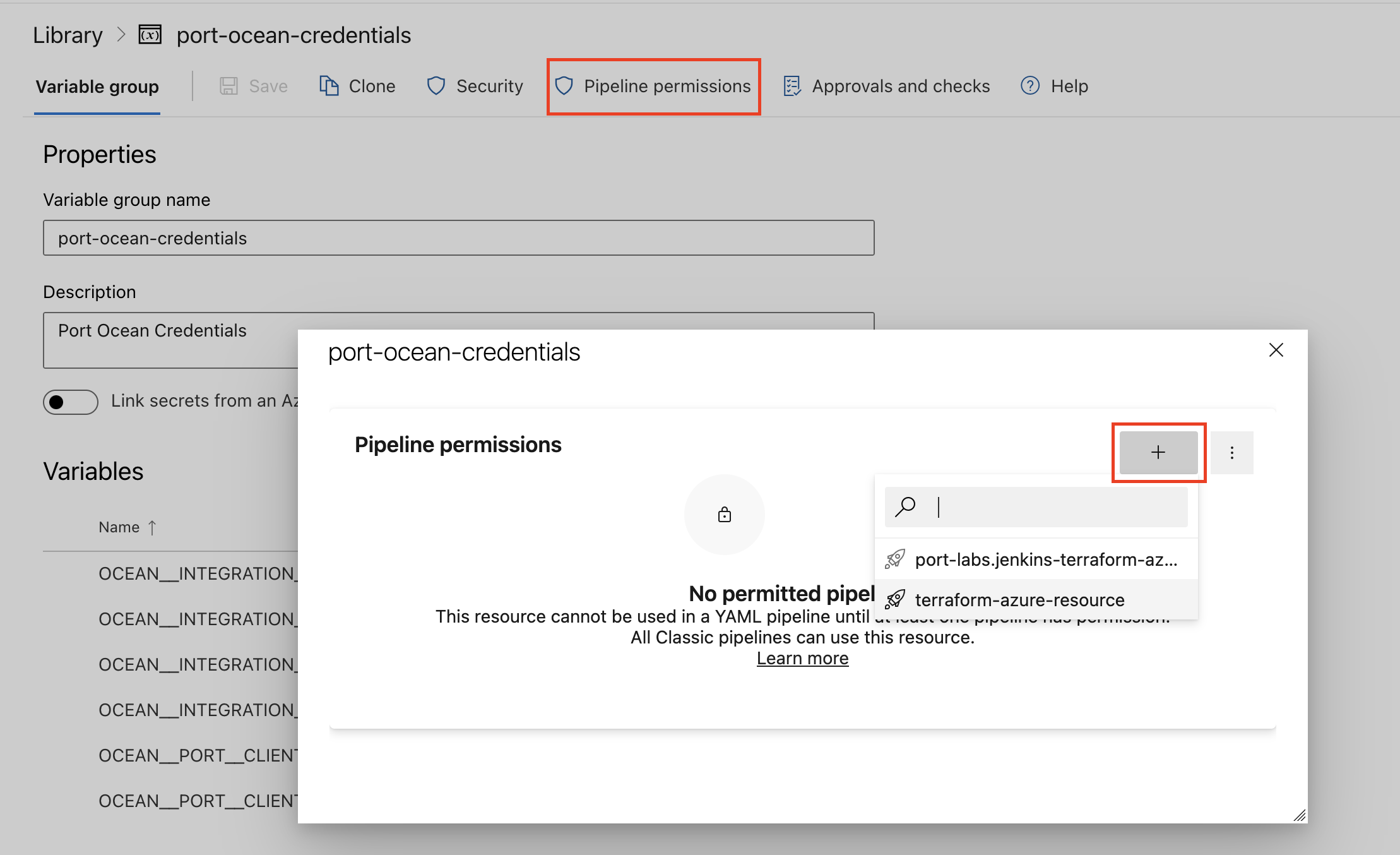
- Authorize Your Pipeline:
-
Go to "Library" -> "Variable groups."
-
Find port-ocean-credentials and click on it.
-
Select "Pipeline Permissions" and add your pipeline to the authorized list.
-
Below are the available parameters and their descriptions.
| Parameter | Description | Required? | Secret?Store this value as an Azure DevOps pipeline variable |
|---|---|---|---|
OCEAN__ | Your Port client ID (How to get the credentials). | ✓ | ✓ |
OCEAN__ | Your Port client secret (How to get the credentials). | ✓ | ✓ |
OCEAN__ | Your Port API URL (https://api.port.io for EU, https://api.us.port.io for US). | ✓ | ✗ |
OCEAN__ | Cursor API key used to authenticate with the Cloud Agents API. | ✓ | ✓ |
OCEAN__ | The host of the Cursor API. Defaults to https://api.cursor.com. | ✗ | ✗ |
OCEAN__ | The host of the Cursor console, used to build agent links in action run output. Defaults to https://cursor.com. | ✗ | ✗ |
OCEAN__ | Optional secret used to verify Cursor v0 agent status webhooks. When unset, signature verification is skipped. | ✗ | ✓ |
OCEAN__ | Default true. When set to true, the integration will create default blueprints and the Port app config mapping. | ✗ | ✗ |
OCEAN__ | The identifier of the integration that will be installed. | ✗ | ✗ |
OCEAN__ | Enable sending raw data examples from the third-party API to Port for testing and managing the integration mapping. Default is true. | ✗ | ✗ |
Here is an example for a azure-pipeline.yml pipeline file:Azure pipeline (click to expand)
- Go to the Cursor Cloud Agents Connectors page in your portal.
- Under Select your installation method, choose your desired CI/CD platform.
- Copy the workflow and replace the placeholders with your values.
Below are the available parameters and their descriptions.
| Parameter | Description | Required? | Secret?Store this value as a GitLab CI/CD variable |
|---|---|---|---|
OCEAN__ | Your Port client ID (How to get the credentials). | ✓ | ✓ |
OCEAN__ | Your Port client secret (How to get the credentials). | ✓ | ✓ |
OCEAN__ | Your Port API URL (https://api.port.io for EU, https://api.us.port.io for US). | ✓ | ✗ |
OCEAN__ | Cursor API key used to authenticate with the Cloud Agents API. | ✓ | ✓ |
OCEAN__ | The host of the Cursor API. Defaults to https://api.cursor.com. | ✗ | ✗ |
OCEAN__ | The host of the Cursor console, used to build agent links in action run output. Defaults to https://cursor.com. | ✗ | ✗ |
OCEAN__ | Optional secret used to verify Cursor v0 agent status webhooks. When unset, signature verification is skipped. | ✗ | ✓ |
OCEAN__ | Default true. When set to true, the integration will create default blueprints and the Port app config mapping. | ✗ | ✗ |
OCEAN__ | The identifier of the integration that will be installed. | ✗ | ✗ |
OCEAN__ | Enable sending raw data examples from the third-party API to Port for testing and managing the integration mapping. Default is true. | ✗ | ✗ |
Configuration
Port integrations use a YAML mapping block to ingest data from the third-party API into Port.
The mapping uses the JQ JSON processor to transform fields and shape incoming Cursor data into Port entities.
Resource selectors
In addition to query, each resource supports optional selector fields in your Port App config:
| Resource | Field | Default | Description |
|---|---|---|---|
agent | includeArchived | false | Include archived agents from Cursor's List Agents API. |
run | includeArchived | false | Include archived agents when fanning out to List Runs (Cursor has no separate archived filter on List Runs). |
run | enrichRunsWithUsage | true | Fetch token usage per agent and merge it into each run during sync. Set to false to skip usage API calls. |
run | oldestRunDate | unset | ISO 8601 UTC timestamp. Stop paginating runs for each agent once a run older than this cutoff is reached (runs are newest-first). |
Example with a run sync window and usage enrichment disabled:
resources:
  - kind: agent
    selector:
      query: 'true'
      includeArchived: false
    port:
      entity:
        mappings:
          identifier: .id
          title: .name
          blueprint: '"cursor_agent"'
  - kind: run
    selector:
      query: 'true'
      includeArchived: false
      enrichRunsWithUsage: false
      oldestRunDate: "2026-01-01T00:00:00Z"
    port:
      entity:
        mappings:
          identifier: .id
          title: .id
          blueprint: '"cursor_run"'
Webhook configuration
Cursor's v0 API attaches a webhook per agent at launch time - there is no account-wide webhook subscription to configure in a Cursor console. On create_agent, set apiVersion to v0 and reportCompletion to true; the integration then attaches a static callback URL as the agent's webhook when it launches it. trigger_agent follow-ups always use the v1 API but still receive completion callbacks on agents that were v0-created with a webhook.
<base_url>/integration/webhook
Where <base_url> is:
- Hosted by Port: the live events base URL shown in the install step above.
- Self-hosted: the
liveEvents.baseUrlyou configured during installation.
Optionally configure webhookSigningSecret on the integration (a sensitive installation setting). When set, it must be at least 32 characters. That value is sent to Cursor as the webhook secret and used to validate the X-Webhook-Signature header on incoming webhooks. When unset, signature verification is skipped.
Configure webhookSigningSecret so incoming webhooks are authenticated. Without it, any caller that knows your callback URL can post status updates. Use at least 32 characters. openssl rand -hex 32 produces a 64-character value that meets Cursor's requirement.
Generate a value with for example:
openssl rand -hex 32
Store it as an organization secret during SaaS installation, or set OCEAN__INTEGRATION__CONFIG__WEBHOOK_SIGNING_SECRET for self-hosted deployments.
Default mapping configuration
Default mapping configuration (click to expand)
resources:
  - kind: agent
    selector:
      query: 'true'
    port:
      entity:
        mappings:
          identifier: .id
          title: .name
          blueprint: '"cursor_agent"'
          properties:
            status: .status
            url: .url
            repoUrls: |
              [.repos[]?.url // empty]
              | map(select(. != null and . != ""))
              | map(if startswith("http") then . else "https://" + . end)
              | map(select(test("^https?://.+")))
            createdAt: .createdAt
            updatedAt: .updatedAt
  - kind: run
    selector:
      query: 'true'
    port:
      entity:
        mappings:
          identifier: .id
          title: .id
          blueprint: '"cursor_run"'
          properties:
            status: .status
            durationMs: .durationMs
            branches: '[.git.branches[]?.branch | select(. != null and . != "")] // []'
            prUrls: '[.git.branches[]?.prUrl? | select(. != null)] // []'
            inputTokens: .usage.inputTokens
            outputTokens: .usage.outputTokens
            cacheReadTokens: .usage.cacheReadTokens
            cacheWriteTokens: .usage.cacheWriteTokens
            totalTokens: .usage.totalTokens
            createdAt: .createdAt
            updatedAt: .updatedAt
          relations:
            agent: .agentId
Mapping & examples per resource
To view and test the integration mapping against sample API responses, use the jq playground in your connectors page.
Cursor's List Runs and Get Run endpoints don't return token usage inline. When enrichRunsWithUsage is true (the default), the integration makes one extra request per agent to Cursor's usage endpoint and merges each run's usage into its payload before mapping, so the usage field shown in the sample payload below isn't present in Cursor's own List Runs response. Set enrichRunsWithUsage to false on the run resource to skip those calls.
{
  "identifier": "cursor_agent",
  "title": "Cursor Agent",
  "icon": "Cursor",
  "schema": {
    "properties": {
      "status": {
        "type": "string",
        "title": "Status",
        "enum": ["ACTIVE", "IDLE", "ARCHIVED"],
        "enumColors": {
          "ACTIVE": "blue",
          "IDLE": "yellow",
          "ARCHIVED": "lightGray"
        }
      },
      "url": {
        "type": "string",
        "title": "Cursor URL",
        "format": "url"
      },
      "repoUrls": {
        "type": "array",
        "title": "Repository URLs",
        "items": {
          "type": "string",
          "format": "url"
        }
      },
      "createdAt": {
        "type": "string",
        "format": "date-time",
        "title": "Created At"
      },
      "updatedAt": {
        "type": "string",
        "format": "date-time",
        "title": "Updated At"
      }
    },
    "required": []
  },
  "mirrorProperties": {},
  "calculationProperties": {},
  "aggregationProperties": {},
  "relations": {}
}
resources:
  - kind: agent
    selector:
      query: 'true'
    port:
      entity:
        mappings:
          identifier: .id
          title: .name
          blueprint: '"cursor_agent"'
          properties:
            status: .status
            url: .url
            repoUrls: |
              [.repos[]?.url // empty]
              | map(select(. != null and . != ""))
              | map(if startswith("http") then . else "https://" + . end)
              | map(select(test("^https?://.+")))
            createdAt: .createdAt
            updatedAt: .updatedAt
{
  "id": "bc-35b4cb3f-5817-4859-bd44-115a68019c27",
  "name": "Mcp server user access",
  "status": "ARCHIVED",
  "env": {
    "type": "cloud"
  },
  "repos": [
    {
      "url": "github.com/talsabagport/kubectl-opslevel",
      "startingRef": "main"
    }
  ],
  "workOnCurrentBranch": false,
  "autoCreatePR": false,
  "skipReviewerRequest": false,
  "url": "https://cursor.com/agents/bc-35b4cb3f-5817-4859-bd44-115a68019c27",
  "createdAt": "2026-06-04T10:59:39.801Z",
  "updatedAt": "2026-06-09T14:29:11.846Z",
  "latestRunId": "run-a097bb31-bde3-45d2-8492-34e5e5ebd01a"
}
Monitoring and sync status
To learn more about how to monitor and check the sync status of your integration, see the relevant documentation.