Claude managed agents

Port's Claude Managed Agents integration surfaces your Anthropic agents, environments, sessions, vaults, and memory stores in your Context Lake. From there, you can trigger agent sessions directly from Port workflows or let platform engineers create new agents through self-service forms.

Core support
For a full end-to-end example that combines both a create-agent and a trigger-agent workflow, see the guide Assign PR reviewers with a Claude managed agent.
Trigger a Claude agent
Use this workflow to start a new session or continue an existing one, and send a user message to the agent. See the Claude managed agents integration action page for the full workflow JSON and node field reference. For a worked example, see the guide Assign PR reviewers with a Claude managed agent.
When a session includes a github_repository resource and githubAuthorizationToken is configured on the integration, the token is automatically injected so the session can clone and push to the repository. This works without the GitHub MCP server. To also open pull requests, the agent needs a vault with GitHub MCP credentials (see the MCP server setup section on the integration action page).
Create a Claude agent
Use this workflow to let platform engineers or developers create a new Claude managed agent through a self-service form. See the Claude managed agents integration action page for the full workflow JSON and node field reference. For a worked example, see the guide Assign PR reviewers with a Claude managed agent.
MCP server setup
Port MCP is enabled by default when you create or trigger an agent (enablePortMcp). On update, set the flag explicitly.
To attach managed Port MCP credentials automatically, set executionIdentity on the trigger_agent node (actor or service_account). Port mints a short-lived token and the integration attaches a vault credential for you. You do not need to create a Port token vault yourself. GitHub MCP still requires a vault that you create and attach.
For full details, see MCP server setup and Execution identity.
Prerequisites
- An Anthropic API key.
- Your Port user role is set to
Admin.
Setup
Choose one of the installation methods below. If you are not sure which option to use, review the installation methods overview.
The prerequisites required for installation are listed below.
-
Go to the Claude Managed Agents Connectors page in Port.
-
Under
Select your installation method, chooseHosted by Port. -
Configure the
Installation parametersandAdvanced configurationas you wish (see below for details).
Installation parameters
Each integration requires specific parameters (such as an API token, a URL, etc.), as seen in Port's UI when installing it. Hover over the ⓘ icon next to each parameter to see more details about it.
Advanced configuration
- During the installation process each integration may have additional settings under the
Advanced configurationsection in Port's UI. Additionally, each integration has one or more settings that can be configured after installation. To do so, click on the integration's name in the Connectors page and navigate to theSettingtab. Hover over the ⓘ icon next to each setting to see more details about it.
Port secrets
Some integration settings require sensitive pieces of data, such as tokens. For these settings, Port secrets will be used, ensuring that your sensitive data is encrypted and secure.
When filling in such a setting, its value will be obscured (shown as ••••••••).
For each such setting, Port will automatically create a secret in your organization.
To see all secrets in your organization, follow these steps.
Port source IP addresses
When using this installation method, Port will make outbound calls to your 3rd-party applications from static IP addresses. You may need to add these addresses to your allowlist, in order to allow Port to interact with the integrated service:
- Europe (EU):
54.73.167.226,63.33.143.237,54.76.185.219 - United States (US):
3.234.37.33,54.225.172.136,3.225.234.99
-
Go to the Claude Managed Agents Connectors page in your portal.
-
Select the
Self-hostedmethod. -
A
helmcommand will be displayed, with default values already filled out (e.g. your Port client ID, client secret, etc). Copy the command, replace the placeholders with your values, then run it in your terminal to install the integration.
Required parameters:
port.clientId- Your Port client ID.port.clientSecret- Your Port client secret.port.baseUrl- Your Port API URL (https://api.port.iofor EU,https://api.us.port.iofor US).integration.identifier- A unique identifier for your integration.integration.type- The integration to be installed.integration.eventListener.type- The event listener type. Read more about event listeners.integration.secrets.anthropicApiKey- Anthropic API key used to authenticate with the Managed Agents API.
Optional parameters (click to expand)
integration.config.anthropicApiHost- Anthropic API host. Defaults tohttps://api.anthropic.com.integration.config.anthropicVersion- Anthropic API version. Defaults to2023-06-01.integration.config.platformConsoleHost- Claude Console host, used to build session links in action run output. Defaults tohttps://platform.claude.com.integration.config.verifyWebhookSecrets- Whentrue(default for new installs), verify Claude live-event webhook signatures whenwebhookSigningSecretis set. If the secret is missing, webhooks are still handled and verification is skipped.integration.config.webhookSigningSecret- Claude webhook signing secret. On Hosted by Port this is set automatically when the webhook is first registered. For self-hosted realtime installs, rotate the secret in Claude Console (Manage > Webhooks) (Claude shows it only once) and set the new value here to enable signature verification. Not used for CI (ONCE) installs.integration.config.githubAuthorizationToken- GitHub personal access token. Injected intogithub_repositorysession resources so sessions can clone and push to repositories.scheduledResyncInterval- The number of minutes between each resync. When not set, the integration will resync for each event listener resync event.initializePortResources- Whentrue, the integration will create default blueprints and the Port App config mapping.sendRawDataExamples- Whentrue, sends raw data examples from the third-party API to Port for testing and managing the integration mapping.
If you're running high volumes of live events in a self-hosted deployment and want better reliability, event durability, or horizontal scalability, you can optionally set up Port's dedicated live events infrastructure. See live events at scale for details.
- GitHub
- Jenkins
- Azure DevOps
- GitLab
- Go to the Claude Managed Agents Connectors page in your portal.
- Under Select your installation method, choose your desired CI/CD platform.
- Copy the workflow and replace the placeholders with your values.
Below are the available parameters and their descriptions.
| Parameter | Description | Required? | Secret?Store this value as a GitHub Actions secret |
|---|---|---|---|
port_client_id | Your Port client ID (How to get the credentials). | ✓ | ✓ |
port_client_secret | Your Port client secret (How to get the credentials). | ✓ | ✓ |
port_base_url | Your Port API URL (https://api.port.io for EU, https://api.us.port.io for US). | ✓ | ✗ |
anthropic_api_key | Anthropic API key used to authenticate with the Managed Agents API. | ✓ | ✓ |
anthropic_api_host | Anthropic API host. Defaults to https://api.anthropic.com. | ✗ | ✗ |
anthropic_version | Anthropic API version. Defaults to 2023-06-01. | ✗ | ✗ |
platform_console_host | Claude Console host, used to build session links in action run output. Defaults to https://platform.claude.com. | ✗ | ✗ |
github_authorization_token | GitHub personal access token. Injected into github_repository session resources so sessions can clone and push to repositories. | ✗ | ✓ |
max_concurrent_session_streams | Maximum number of agent sessions that can be streamed live at the same time. Defaults to 10. Increase if your pod has more resources; decrease to limit memory usage. | ✗ | ✗ |
flush_interval_seconds | How often (in seconds) buffered agent messages are posted to Port run logs during a live session. Defaults to 5. | ✗ | ✗ |
flush_batch_size | Maximum number of log entries to accumulate before flushing early during a burst of activity. Defaults to 25. | ✗ | ✗ |
initialize_port_resources | Default true. When set to true, the integration will create default blueprints and the Port app config mapping. | ✗ | ✗ |
integration_identifier | The identifier of the integration that will be installed. | ✗ | ✗ |
send_raw_data_examples | Enable sending raw data examples from the third-party API to Port for testing and managing the integration mapping. Default is true. | ✗ | ✗ |
Your Jenkins agent must be able to run Docker commands.
Below are the available parameters and their descriptions.
| Parameter | Description | Required? | Secret?Store this value as a Jenkins credential (Secret Text) |
|---|---|---|---|
OCEAN__ | Your Port client ID (How to get the credentials). | ✓ | ✓ |
OCEAN__ | Your Port client secret (How to get the credentials). | ✓ | ✓ |
OCEAN__ | Your Port API URL (https://api.port.io for EU, https://api.us.port.io for US). | ✓ | ✗ |
OCEAN__ | Anthropic API key used to authenticate with the Managed Agents API. | ✓ | ✓ |
OCEAN__ | Anthropic API host. Defaults to https://api.anthropic.com. | ✗ | ✗ |
OCEAN__ | Anthropic API version. Defaults to 2023-06-01. | ✗ | ✗ |
OCEAN__ | Claude Console host, used to build session links in action run output. Defaults to https://platform.claude.com. | ✗ | ✗ |
OCEAN__ | GitHub personal access token. Injected into github_repository session resources so sessions can clone and push to repositories. | ✗ | ✓ |
OCEAN__ | Maximum number of agent sessions that can be streamed live at the same time. Defaults to 10. Increase if your pod has more resources; decrease to limit memory usage. | ✗ | ✗ |
OCEAN__ | How often (in seconds) buffered agent messages are posted to Port run logs during a live session. Defaults to 5. | ✗ | ✗ |
OCEAN__ | Maximum number of log entries to accumulate before flushing early during a burst of activity. Defaults to 25. | ✗ | ✗ |
OCEAN__ | Default true. When set to true, the integration will create default blueprints and the Port app config mapping. | ✗ | ✗ |
OCEAN__ | The identifier of the integration that will be installed. | ✗ | ✗ |
OCEAN__ | Enable sending raw data examples from the third-party API to Port for testing and managing the integration mapping. Default is true. | ✗ | ✗ |
Here is an example for a Jenkinsfile pipeline file:Jenkins pipeline (click to expand)
Prerequisites
- Your Azure Devops agent should be able to run docker commands. Learn more about agents here.
- You must have permissions to create and manage Azure DevOps variable groups for storing credentials.
Set up your credentials
- Create a Variable Group: Name it port-ocean-credentials.
- Store the required variables (see the table below).
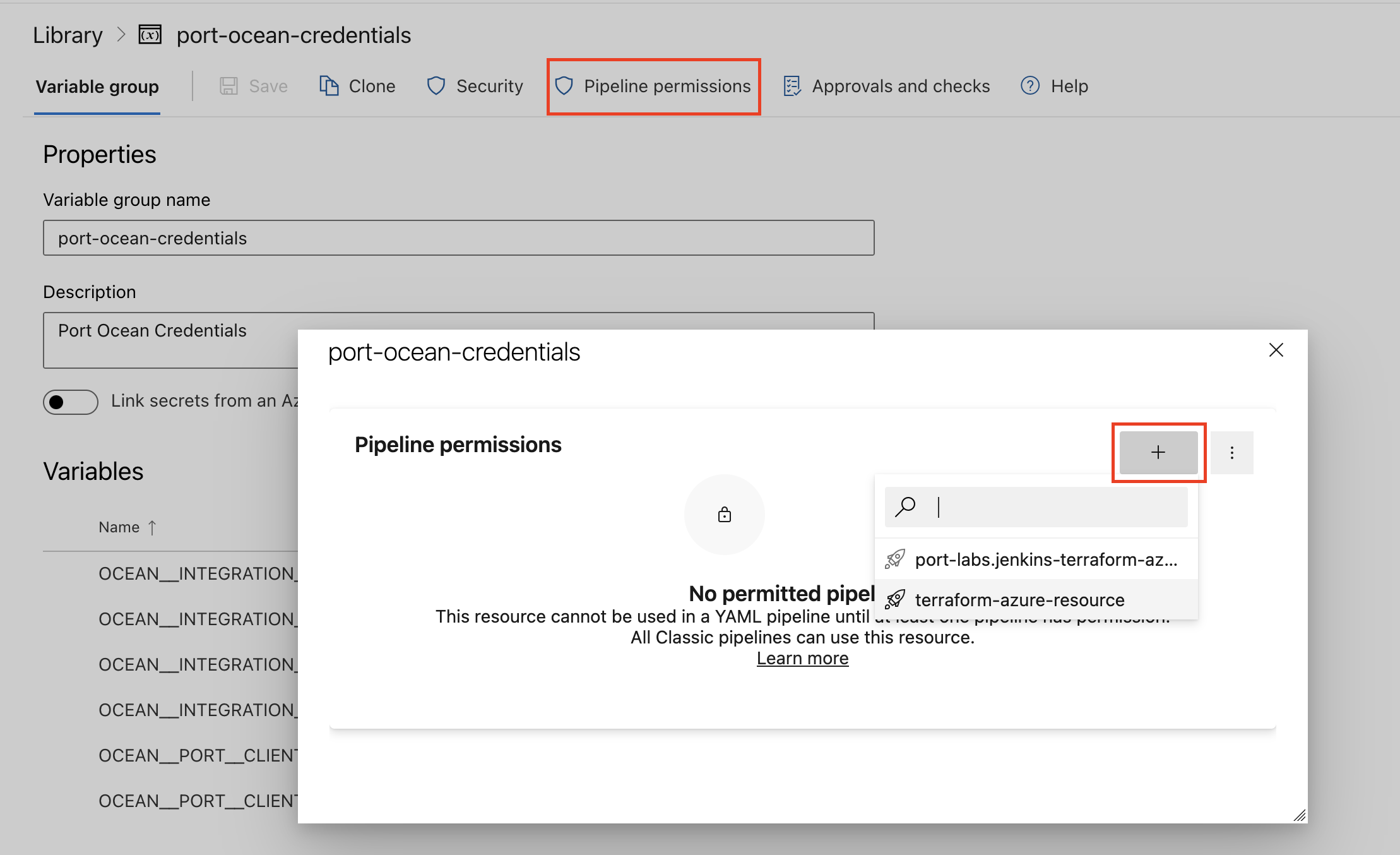
- Authorize Your Pipeline:
-
Go to "Library" -> "Variable groups."
-
Find port-ocean-credentials and click on it.
-
Select "Pipeline Permissions" and add your pipeline to the authorized list.
-
Below are the available parameters and their descriptions.
| Parameter | Description | Required? | Secret?Store this value as an Azure DevOps pipeline variable |
|---|---|---|---|
OCEAN__ | Your Port client ID (How to get the credentials). | ✓ | ✓ |
OCEAN__ | Your Port client secret (How to get the credentials). | ✓ | ✓ |
OCEAN__ | Your Port API URL (https://api.port.io for EU, https://api.us.port.io for US). | ✓ | ✗ |
OCEAN__ | Anthropic API key used to authenticate with the Managed Agents API. | ✓ | ✓ |
OCEAN__ | Anthropic API host. Defaults to https://api.anthropic.com. | ✗ | ✗ |
OCEAN__ | Anthropic API version. Defaults to 2023-06-01. | ✗ | ✗ |
OCEAN__ | Claude Console host, used to build session links in action run output. Defaults to https://platform.claude.com. | ✗ | ✗ |
OCEAN__ | GitHub personal access token. Injected into github_repository session resources so sessions can clone and push to repositories. | ✗ | ✓ |
OCEAN__ | Maximum number of agent sessions that can be streamed live at the same time. Defaults to 10. Increase if your pod has more resources; decrease to limit memory usage. | ✗ | ✗ |
OCEAN__ | How often (in seconds) buffered agent messages are posted to Port run logs during a live session. Defaults to 5. | ✗ | ✗ |
OCEAN__ | Maximum number of log entries to accumulate before flushing early during a burst of activity. Defaults to 25. | ✗ | ✗ |
OCEAN__ | Default true. When set to true, the integration will create default blueprints and the Port app config mapping. | ✗ | ✗ |
OCEAN__ | The identifier of the integration that will be installed. | ✗ | ✗ |
OCEAN__ | Enable sending raw data examples from the third-party API to Port for testing and managing the integration mapping. Default is true. | ✗ | ✗ |
Here is an example for a azure-pipeline.yml pipeline file:Azure pipeline (click to expand)
- Go to the Claude Managed Agents Connectors page in your portal.
- Under Select your installation method, choose your desired CI/CD platform.
- Copy the workflow and replace the placeholders with your values.
Below are the available parameters and their descriptions.
| Parameter | Description | Required? | Secret?Store this value as a GitLab CI/CD variable |
|---|---|---|---|
OCEAN__ | Your Port client ID (How to get the credentials). | ✓ | ✓ |
OCEAN__ | Your Port client secret (How to get the credentials). | ✓ | ✓ |
OCEAN__ | Your Port API URL (https://api.port.io for EU, https://api.us.port.io for US). | ✓ | ✗ |
OCEAN__ | Anthropic API key used to authenticate with the Managed Agents API. | ✓ | ✓ |
OCEAN__ | Anthropic API host. Defaults to https://api.anthropic.com. | ✗ | ✗ |
OCEAN__ | Anthropic API version. Defaults to 2023-06-01. | ✗ | ✗ |
OCEAN__ | Claude Console host, used to build session links in action run output. Defaults to https://platform.claude.com. | ✗ | ✗ |
OCEAN__ | GitHub personal access token. Injected into github_repository session resources so sessions can clone and push to repositories. | ✗ | ✓ |
OCEAN__ | Maximum number of agent sessions that can be streamed live at the same time. Defaults to 10. Increase if your pod has more resources; decrease to limit memory usage. | ✗ | ✗ |
OCEAN__ | How often (in seconds) buffered agent messages are posted to Port run logs during a live session. Defaults to 5. | ✗ | ✗ |
OCEAN__ | Maximum number of log entries to accumulate before flushing early during a burst of activity. Defaults to 25. | ✗ | ✗ |
OCEAN__ | Default true. When set to true, the integration will create default blueprints and the Port app config mapping. | ✗ | ✗ |
OCEAN__ | The identifier of the integration that will be installed. | ✗ | ✗ |
OCEAN__ | Enable sending raw data examples from the third-party API to Port for testing and managing the integration mapping. Default is true. | ✗ | ✗ |
Configuration
Port integrations use a YAML mapping block to ingest data from the third-party API into Port.
The mapping uses the JQ JSON processor to transform fields and shape incoming Claude data into Port entities.
Webhook configuration
On start, when the event listener can process webhooks and a public base URL is set, the integration auto-configures a Claude Platform webhook (creates it if missing, or merges any missing events if one already exists) that points at:
<base_url>/integration/webhook
Live events update agent, environment, session, vault, and memory-store. These resources are also refreshed on resync. Skill entities are updated on resync only.
| Resource | Live webhooks | Resync |
|---|---|---|
| agent | Yes | Yes |
| environment | Yes | Yes |
| session | Yes | Yes |
| vault | Yes | Yes |
| memory-store | Yes | Yes |
| skill | No | Yes |
The webhook is subscribed to:
- Session:
session.status_run_started,session.status_idled,session.status_rescheduled,session.status_terminated,session.deleted,session.updated - Agent:
agent.created,agent.updated,agent.archived,agent.deleted - Environment:
environment.created,environment.updated,environment.archived,environment.deleted - Memory store:
memory_store.created,memory_store.archived,memory_store.deleted - Vault:
vault.created,vault.archived,vault.deleted
By installation method
Hosted by Port
No manual Claude Console setup is required. On start, the integration auto-configures the webhook and stores the signing secret returned on create as a Port organization secret, then sets webhookSigningSecret on the integration spec. verifyWebhookSecrets defaults to true for new installs.
Self-hosted (realtime)
The integration auto-configures the webhook when the event listener processes webhooks and OCEAN__BASE_URL / liveEvents.baseUrl is a publicly reachable URL.
Claude shows the signing secret only once, when the webhook is created. On self-hosted installs that secret is kept in memory for the current process. Webhooks are still handled if the secret is not configured; signature verification is skipped. To enable verification across restarts, rotate the signing secret in Claude Console (Manage > Webhooks), then set the new value as webhookSigningSecret (Helm: integration.config.webhookSigningSecret, or OCEAN__INTEGRATION__CONFIG__WEBHOOK_SIGNING_SECRET).
CI / one-shot (ONCE event listener)
CI installs do not receive live events. The ONCE listener skips webhook registration, so catalog updates happen only when the pipeline runs. You do not need to configure webhookSigningSecret for CI.
Signature verification
When verifyWebhookSecrets is true (the default) and webhookSigningSecret is configured, the integration validates the Standard Webhooks signature on every request and rejects invalid signatures. If no signing secret is configured, webhooks are still processed and verification is skipped (a warning is logged).
Only self-hosted realtime installs need you to persist webhookSigningSecret yourself (usually after rotating it in Claude Console, since Claude shows it only once). Hosted by Port stores it automatically. CI installs do not use live webhooks.
Default mapping configuration
Default mapping configuration (click to expand)
resources:
  - kind: environment
    selector:
      query: 'true'
    port:
      entity:
        mappings:
          identifier: .id
          title: .name
          blueprint: '"claude_environment"'
          properties:
            description: .description
            scope: .scope
            environmentType: .config.type
            metadata: .metadata
            createdAt: .created_at
            updatedAt: .updated_at
            archivedAt: .archived_at
  - kind: vault
    selector:
      query: 'true'
    port:
      entity:
        mappings:
          identifier: .id
          title: .display_name
          blueprint: '"claude_vault"'
          properties:
            metadata: .metadata
            createdAt: .created_at
            updatedAt: .updated_at
            archivedAt: .archived_at
  - kind: memory-store
    selector:
      query: 'true'
    port:
      entity:
        mappings:
          identifier: .id
          title: .name
          blueprint: '"claude_memory_store"'
          properties:
            description: .description
            metadata: .metadata
            createdAt: .created_at
            updatedAt: .updated_at
            archivedAt: .archived_at
  - kind: skill
    selector:
      query: 'true'
    port:
      entity:
        mappings:
          identifier: .id
          title: '.display_title // .id'
          blueprint: '"claude_skill"'
          properties:
            displayTitle: .display_title
            source: .source
            latestVersion: .latest_version
            createdAt: .created_at
            updatedAt: .updated_at
  - kind: agent
    selector:
      query: 'true'
    port:
      entity:
        mappings:
          identifier: .id
          title: .name
          blueprint: '"claude_agent"'
          properties:
            description: .description
            model: .model.id
            system: .system
            version: .version
            metadata: .metadata
            mcpServers: '[.mcp_servers[]?.name] // []'
            createdAt: .created_at
            updatedAt: .updated_at
            archivedAt: .archived_at
          relations:
            skills: '[.skills[]? | select(.type == "custom") | .skill_id]'
            delegateAgents: '[.multiagent.agents[]?.id] // []'
  - kind: session
    selector:
      query: 'true'
    port:
      entity:
        mappings:
          identifier: .id
          title: '.title // .id'
          blueprint: '"claude_session"'
          properties:
            status: .status
            inputTokens: .usage.input_tokens
            outputTokens: .usage.output_tokens
            cacheReadInputTokens: .usage.cache_read_input_tokens
            activeSeconds: .stats.active_seconds
            durationSeconds: .stats.duration_seconds
            agentVersion: .agent.version
            githubRepositories: '[.resources[]? | select(.type == "github_repository") | .url]'
            metadata: .metadata
            createdAt: .created_at
            updatedAt: .updated_at
            archivedAt: .archived_at
          relations:
            agent: .agent.id
            environment: .environment_id
            memoryStores: '[.resources[]? | select(.type == "memory_store") | .memory_store_id]'
            vaults: .vault_ids
Mapping & examples per resource
To view and test the integration mapping against sample API responses, use the jq playground in your connectors page.
{
  "identifier": "claude_agent",
  "title": "Claude Agent",
  "icon": "Claude",
  "schema": {
    "properties": {
      "description": {
        "type": "string",
        "title": "Description"
      },
      "model": {
        "type": "string",
        "title": "Model"
      },
      "system": {
        "type": "string",
        "title": "System prompt"
      },
      "version": {
        "type": "number",
        "title": "Version"
      },
      "metadata": {
        "type": "object",
        "title": "Metadata"
      },
      "mcpServers": {
        "type": "array",
        "title": "MCP servers",
        "items": {
          "type": "string"
        }
      },
      "createdAt": {
        "type": "string",
        "format": "date-time",
        "title": "Created At"
      },
      "updatedAt": {
        "type": "string",
        "format": "date-time",
        "title": "Updated At"
      },
      "archivedAt": {
        "type": "string",
        "format": "date-time",
        "title": "Archived At"
      }
    },
    "required": []
  },
  "mirrorProperties": {},
  "calculationProperties": {},
  "aggregationProperties": {},
  "relations": {
    "skills": {
      "title": "Skills",
      "target": "claude_skill",
      "required": false,
      "many": true
    },
    "delegateAgents": {
      "title": "Delegate agents",
      "target": "claude_agent",
      "required": false,
      "many": true
    }
  }
}
resources:
  - kind: agent
    selector:
      query: 'true'
    port:
      entity:
        mappings:
          identifier: .id
          title: .name
          blueprint: '"claude_agent"'
          properties:
            description: .description
            model: .model.id
            system: .system
            version: .version
            metadata: .metadata
            mcpServers: '[.mcp_servers[]?.name] // []'
            createdAt: .created_at
            updatedAt: .updated_at
            archivedAt: .archived_at
          relations:
            skills: '[.skills[]? | select(.type == "custom") | .skill_id]'
            delegateAgents: '[.multiagent.agents[]?.id] // []'
{
  "id": "agt_01abc123def456",
  "name": "Code Review Agent",
  "description": "Reviews pull requests and suggests improvements.",
  "model": {
    "id": "claude-sonnet-4-5"
  },
  "system": "You are a senior software engineer. Review code changes for correctness, style, and security.",
  "version": 2,
  "metadata": {
    "team": "platform",
    "owner": "alice"
  },
  "mcp_servers": [
    { "name": "github", "url": "https://mcp.github.com" }
  ],
  "skills": [
    { "type": "custom", "skill_id": "skl_01review111" }
  ],
  "multiagent": {
    "type": "coordinator",
    "agents": [
      { "id": "agt_01delegate222", "type": "agent", "version": 1 }
    ]
  },
  "created_at": "2026-01-10T08:00:00Z",
  "updated_at": "2026-06-01T12:00:00Z",
  "archived_at": null
}
Monitoring and sync status
To learn more about how to monitor and check the sync status of your integration, see the relevant documentation.