Webhook
The webhook backend allows you to trigger your own custom webhooks, for both self-service actions and automations.
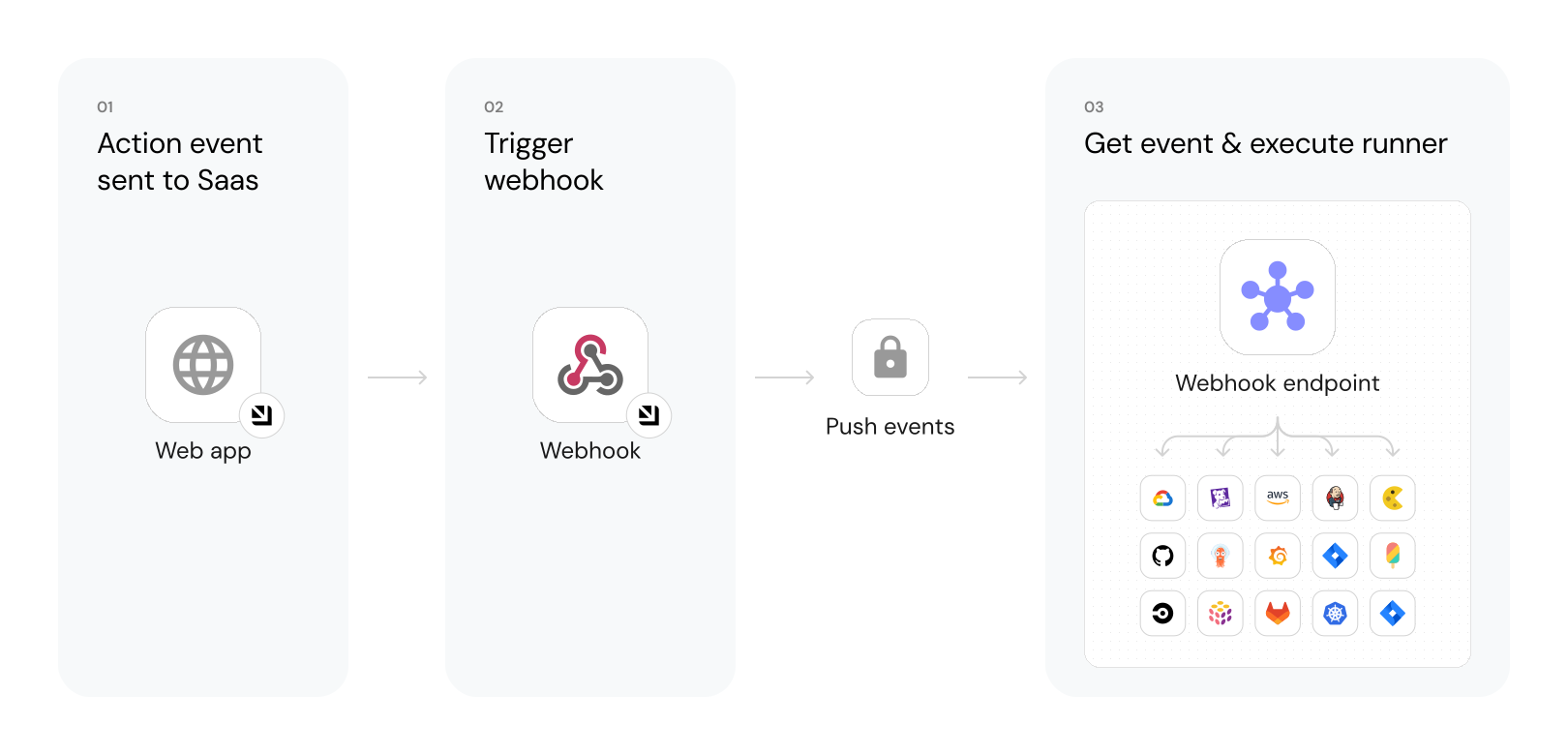
The steps shown in the image above are as follows:
-
Port generates an invocation of an action/automation.
-
Port signs the payload + timestamp using
HMAC-SHA-256and puts it in the request header.Validating the webhook request using the request headers ensures that:
- The request payload has not been tampered with.
- The sender of the message is Port.
- The received message is not a replay of an older message.
To learn more, refer to the validate webhook signature page.
-
Port publishes an invoked action/automation via a
POSTrequest to the customer definedURL. -
A listener implemented on the client side receives the
POSTrequest and runs custom logic provided by the user.A listener can be any service that can receive HTTP requests and execute code based on the payload, for example:
- AWS Lambda.
- Python code that reads from the topic.
- Docker container running code.
You can implement webhook handling in the way that best fits your organization and infrastructure.
An example flow would be:
- A developer executes a self-service action to deploy a new version of an existing
Microservice. - The
Createaction is sent to the definedURLwebhook. - An AWS Lambda function is triggered by this new action message.
- The Lambda function deploys a new version of the microservice.
- When the Lambda is done, it reports back to Port about the new microservice
Deployment.
Configuration
When choosing webhook as the backend type, there are several configurations you can customize:
Invocation type
To use a webhook as your backend, set the Invocation type to Trigger Webhook URL.
When editing the JSON file, set the type field in the invocationMethod object to WEBHOOK.
Use self-hosted agent
The Port execution agent provides a secure and convenient way to act upon webhook invocations of self-service actions and automations. The agent pulls the new invocation event from your dedicated Kafka topic, and sends it to the URL you specified.
If you prefer to send a webhook without using the agent, you can validate the webhook signature for increased security.
To use the agent, set the agent field to true in the invocationMethod object, or select Yes from the Use self-hosted agent dropdown in the UI.
Request type
By default, the request type is set to asynchronous (Async), meaning your backend will need to explicitly send Port its result via the API.
Alternatively, you can set the request type to synchronous (Sync), which causes the action to automatically report its result back to Port via the returned HTTP status code and payload.
Configure the invocation payload
Configure the following fields to define the request that Port will send to your webhook:
Method
By default, a POST request will be sent to the specified endpoint URL.
You can change the request to any of the supported types: POST, PUT, PATCH, GET, or DELETE.
Endpoint URL
Specify the target URL where the webhook request will be sent. This is the endpoint your backend service listens on.
If your webhook URL contains sensitive data (such as a token), you can store it using Port secrets and reference it using {{ .secrets.SECRET_NAME }}:
https://example.com?token={{ .secrets.secret_token_name }}
Headers
You can define custom HTTP headers to include in the webhook request.
Body
Defines the payload that will be sent to the backend upon execution of the action. The body is an object containing "key": "value" pairs.
Trigger Port API
You can use this backend type to trigger Port's API, allowing you to execute any route you wish with automatic authentication.
Port will automatically use the organization's API key to authenticate the request.
This can be useful when you want to perform an operation in Port, such as creating a new user or executing a self-service action, especially if you want to trigger logic that you have already defined.
Example - Trigger a self-service action
Say you have a self-service action that sends a Slack notification, with the identifier slack_notify.
The following example shows an automation definition that triggers this self-service action, when a service's passed property changes from Passed to Not passed:
Automation definition (click to expand)
Port exposes two API instances, one for the EU region of Port, and one for the US region of Port.
- If you use the EU region of Port (https://app.port.io), your API URL is
https://api.port.io. - If you use the US region of Port (https://app.us.port.io), your API URL is
https://api.us.port.io.
{
  "identifier": "slack_notify_on_service_failure",
  "title": "Notify via Slack on service failure",
  "trigger": {
    "type": "automation",
    "event": {
      "type": "ENTITY_UPDATED",
      "blueprintIdentifier": "service"
    },
    "condition": {
      "type": "JQ",
      "expressions": [
        ".diff.before.properties.passed == \"Passed\"",
        ".diff.after.properties.passed == \"Not passed\""
      ],
      "combinator": "and"
    }
  },
  "invocationMethod": {
    "type": "WEBHOOK",
    "url": "https://api.port.io/v1/actions/slack_notify/runs?run_as=user-email@gmail.com",
    "synchronized": true,
    "method": "POST",
    "body": {
      "properties": {
        "message": "Service {{ .event.diff.before.title }} has degraded from `Passed` to `Not passed`."
      }
    }
  },
  "publish": true
}
synchronizedmust be set totrue, so that the automation's status will be updated when the action is triggered.- In the
urlfield, you can addrun_asto the url to specify the user that will execute the action (replaceuser-email@gmail.comwith the desired user's email).
If you don't specify a user, the action will be executed using the organization's default credentials. - The
body.propertiesobject contains the action's user inputs. If the action does not require any inputs, pass an empty object:
"body": {
   "properties": {}
}
Local setup, debugging and security validation
Examples
For guides and examples of self-service actions using a webhook as the backend, check out the guides section.