GitLab SaaS
If you use the cloud (SaaS) version of GitLab in your organization, the simplest way to trigger your pipelines from Port is to use the webhook backend.
GitLab allows you to create webhooks URLs that can be triggered from external services, such as Port, causing a pipeline to run in your GitLab project.
You can use the same setup for self-hosted GitLab when Port can reach its API endpoint. Replace https://gitlab.com in the URL below with your GitLab base URL. If Port cannot reach the endpoint, use the execution agent setup for private GitLab.
Configure the backend
Choose Trigger Webhook URL as the backend type when creating a new self-service action or automation.
When using the webhook backend, you need to configure several parameters:
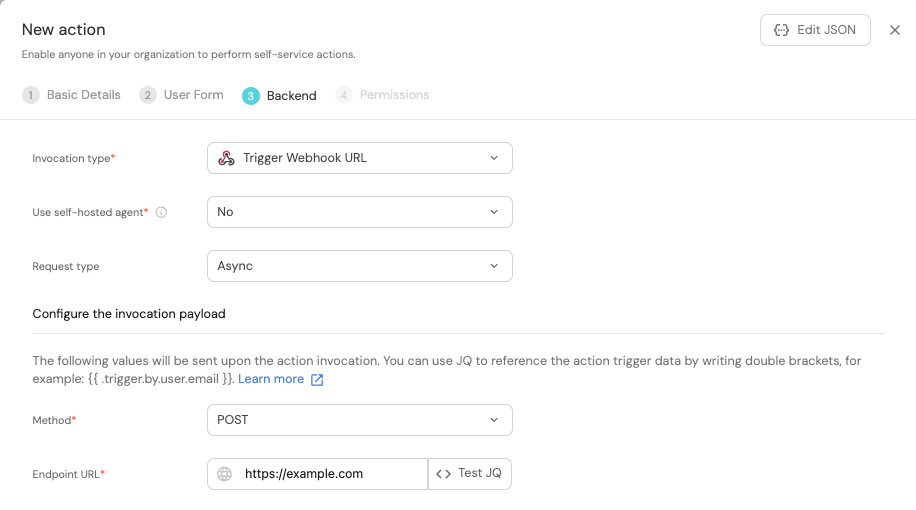
- Set Use self-hosted agent to No (
agent: false) for this direct webhook setup. You do not need Kafka or the Port execution agent. - Read about Request type in the webhook backend page.
- Set Method to POST.
- Fill Endpoint URL with the GitLab pipeline trigger URL (see below).
If you wish to create a self-service action or automation via Port's API, choose the webhook backend type under the invocationMethod object.
Create the webhook URL
A webhook URL used to trigger a pipeline in GitLab looks like this:
https://gitlab.com/api/v4/projects/{GITLAB_PROJECT_ID}/ref/main/trigger/pipeline?token={GITLAB_TRIGGER_TOKEN}
As you can see, there are two parameters that need to be filled in:
-
{GITLAB_PROJECT_ID}- The ID of the GitLab project containing your pipeline file.
To obtain the project ID, navigate to your project in GitLab, click on the⋮button in the top right corner, and selectCopy project ID. -
{GITLAB_TRIGGER_TOKEN}- The token used to authenticate the request.To create a new trigger token, follow these steps:
- Navigate to your GitLab project page.
- Go to
Settings->CI/CD. - Expand
Pipeline trigger tokens. - Select
Add new token. - Add a description and click
Create pipeline trigger token.
Note: You must have (at least) the
Maintainerrole in the project to create a new trigger token.
Webhook security
For increased security, you can validate the webhook signature.
Configure the payload
The payload is the data sent to the webhook URL every time the action/automation is executed. It is defined by the action/automation creator and can include any data that is needed by the GitLab pipeline.
When using the webhook backend, the payload is defined under the headers and body fields.
- Define a self-service action payload.
- Define an automation payload.
Examples
For guides and examples of self-service actions using a GitLab pipeline as the backend, check out the guides section.